 Sign In














 Email Marketing
 ABM
ABM  List Building
  Lead Generation
  Growth Hacker
  Digital Marketing
  Data Enrichment
  Software as a Service
  Data as a Service
  Waterfall Enrichment
  Startup
  Revenue Performance
  Job Change Tracking
  Customer Data Platform
  CRM
CRM 


 Knowledge Base
  Video Tutorials
  Help Center
  Tarpitting Scoring
  ROI Calculator
  About us
  Contact us
  Testimonials
  Automation
Inbox Placement vs Deliverability: What’s the Real Difference?

20 Aug 2026
Sreerag
12 Minutes
Read

 Blog
FAQ
Case Studies
Knowledge Base
Video Tutorials
Help Center
SEG Validation
Tarpitting Scoring
ROI Calculator
About us
Contact us
Testimonials
Blog
FAQ
Case Studies
Knowledge Base
Video Tutorials
Help Center
SEG Validation
Tarpitting Scoring
ROI Calculator
About us
Contact us
Testimonials
Email deliverability is your overall ability to reach inboxes over time, shaped by sender reputation, authentication, and list quality. Inbox placement is the specific outcome of one send: whether that message landed in the primary inbox, promotions, spam, or was blocked. Delivery, a third and separate term, only confirms the receiving server accepted the message; it says nothing about where the email went after that.
Here’s what that distinction looks like in practice. You send a campaign. Your ESP reports a 99% delivery rate. You’d assume that means the email reached your recipients. In most cases, it didn’t, at least not where it needed to. Delivery, deliverability, and inbox placement are three different things, and mixing them up is one of the most common reasons marketers misread their own deliverability metrics.
The rest of this guide breaks down exactly what separates them, how each is measured, and why the distinction changes how you should actually be tracking campaign health.
Email delivery simply means the receiving mail server accepted your message. Your ESP logs this as a successful send. It says nothing about where the email ended up after that; it only confirms the message wasn’t outright rejected at the server level.
A 99% delivery rate is common and, on its own, tells you almost nothing about campaign performance.
Email deliverability is the broader, ongoing measure of your ability to get mail into inboxes across all your sends, not just whether one message technically arrived. It’s shaped by sender reputation, authentication, list quality, and engagement history, and it’s evaluated continuously by every mailbox provider you send to.
Deliverability is a trend, not a single-message outcome. One clean send doesn’t fix poor deliverability, and one problem send doesn’t necessarily wreck it, but the pattern over time determines where your mail lands.
Inbox placement is the specific, measurable outcome for an individual send: did it land in the primary inbox, get filtered to promotions/spam, or get blocked entirely? This is the number that actually correlates with opens, clicks, and revenue, and it’s the one delivery rate can’t tell you.
The inverse of inbox placement is your spam folder rate, the percentage of accepted sends that mailbox providers route to spam instead of the primary inbox. A campaign can post a 99% delivery rate and a 40% spam folder rate at the same time; the two numbers measure completely different stages of the same send. Your inboxing rate (the percentage of sends that land specifically in the primary inbox, as opposed to promotions or spam) is the figure that should sit next to delivery rate on any real performance dashboard, since delivery rate alone can mask a spam folder problem entirely.
A simple way to hold the distinction: think of deliverability as a mail truck successfully dropping a letter at an apartment building. That’s the server accepting the message. Inbox placement is what happens next, whether the building manager puts that letter in the tenant’s actual mailbox or tosses it in the junk bin in the lobby. The truck completing its drop tells you nothing about which one happens.
Industry benchmark data puts average inbox placement rates somewhere in the 75 to 77% range across senders, while delivery rates for the same senders typically sit at 95% or higher. That gap, roughly 20 percentage points, is mail that was technically accepted but never reached a primary inbox.
A realistic breakdown for a single campaign might look like this:
| Metric | Reported Rate | What It Means |
|---|---|---|
| Delivery rate | 97% | Server accepted the message |
| Primary inbox placement | 72% | Actually landed in the inbox |
| Promotions / secondary tabs | 15% | Technically delivered, rarely seen |
| Spam folder | 10% | Filtered out entirely |
A team tracking only the top row believes their campaign reached 97% of its audience. It actually reached 72%, a difference large enough to change how a campaign’s ROI should be interpreted.
Put in real numbers, sending 10,000 emails with a 98% delivery rate still leaves room for a poor outcome: if 3,500 of those accepted messages route to spam, only 6,300 land in the primary inbox, a 63% inbox placement rate sitting well below the delivery number the dashboard reports. The delivery rate alone gives no warning that this is happening.
Left unaddressed, a low inbox placement rate tends to compound rather than stay flat. Fewer recipients see the email, so fewer engage with it; lower engagement reads as a negative trust signal to mailbox providers, which pushes future placement rates down further. Catching a placement decline early is generally easier than reversing an already-damaged sender reputation.
Placement rates aren’t uniform across mailbox providers, and treating them as one number hides where the actual problem is:
| Provider | Healthy Primary Inbox Placement | Warning Sign |
|---|---|---|
| Gmail | 93 to 97% | Below 85% |
| Outlook / Microsoft 365 | 88 to 94% | Below 85% |
| Overall blended average | 90%+ for well-managed programs | Below 77% (below the general survey average) |
Below 85% for any individual provider is worth investigating specifically, rather than treating it as part of a general deliverability problem. Gmail and Outlook weigh authentication, engagement, and reputation differently, so a placement issue isolated to one provider usually points to a provider-specific cause (a missing DMARC alignment for Outlook, a Promotions-tab classification issue for Gmail) rather than a global sending problem.
One distinction most guides skip: the Promotions tab is largely a consumer Gmail behavior. Google Workspace, the version of Gmail most B2B recipients actually use, doesn’t apply the same tabbed categorization. A cold email sent from one business domain to a Workspace account routes to either the primary inbox or spam, not into a Promotions tab in between.
This matters directly for measurement. If you’re testing inbox placement with a generic seed list weighted toward personal Gmail and Yahoo accounts, you’ll see Promotions-tab results that don’t reflect how your actual B2B recipients experience your email. An accurate placement test for B2B outreach needs a seed list weighted toward Google Workspace and Microsoft 365 accounts specifically, since those environments filter differently from consumer inboxes.
| Metric | What It Measures | What It Tells You | What It Misses |
|---|---|---|---|
| Delivery rate | Did the server accept the message? | The message wasn’t hard-rejected | Nothing about where it ended up |
| Deliverability | Your overall ability to reach inboxes over time | Sender health, reputation trend | Doesn’t tell you about one specific send |
| Inbox placement / inboxing rate | Where a specific email actually landed | Inbox vs. promotions vs. spam vs. blocked | Requires seed-list testing or provider tools to measure directly |
| Spam folder rate | The share of accepted sends filtered to spam | The direct inverse view of inbox placement | Doesn’t explain the underlying cause on its own |
These four numbers are the core deliverability metrics worth tracking together. Delivery rate alone answers almost none of the questions that actually determine campaign performance.
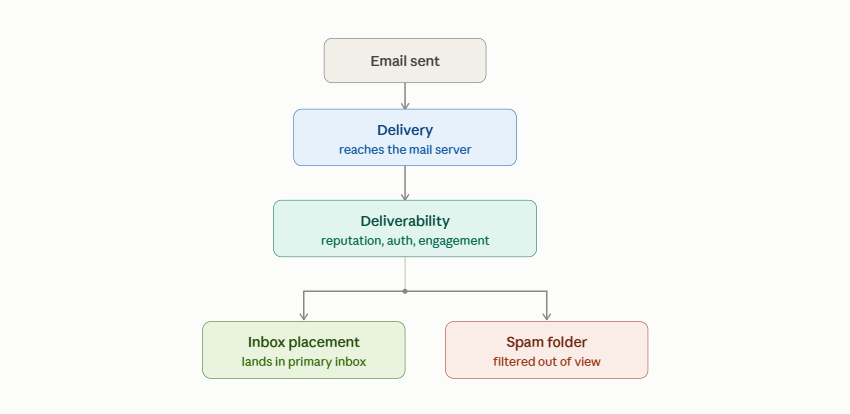
If you’re only tracking delivery rate, you can look completely healthy on a dashboard while a substantial share of your list never sees your emails in a checkable inbox. Industry estimates suggest close to half of B2B outreach email ends up filtered to spam, a scale of loss that a delivery-rate-only dashboard will never surface, because every one of those messages still counted as “delivered.”
Google’s own Postmaster Tools documentation makes this distinction explicit: a message can be successfully delivered to Gmail’s servers and still be routed away from the inbox based on spam rate, authentication, and reputation signals evaluated separately from delivery itself. That’s the technical basis for why delivery rate and inbox placement are reported as two different metrics inside Postmaster Tools rather than one.
The fix isn’t a single tactic; it’s the same set of fundamentals that shape deliverability broadly. Clean, validated lists reduce the bounce and complaint signals that damage deliverability in the first place, the full case for that connection, including authentication alignment and sending behavior, is what email deliverability best practices actually covers end to end.
Since delivery rate won’t tell you this, you need tools and methods built specifically to check placement:
Is a high delivery rate a good sign?
Not on its own. A 99% delivery rate only confirms messages weren’t rejected outright by the receiving server; it says nothing about your spam folder rate or where the email actually landed.
What’s a healthy inbox placement rate?
For Gmail, 93 to 97% primary inbox placement is considered healthy; for Outlook, 88 to 94%. Below 85% for either provider signals a problem specific to that provider rather than a general deliverability issue.
Does Google Workspace use the Promotions tab like consumer Gmail?
No. The Promotions tab is largely a consumer Gmail behavior. Google Workspace, which most B2B recipients use, routes mail to either the primary inbox or spam without the same tabbed categorization.
Can deliverability be good while inbox placement is bad for one send?
Yes. A generally healthy sender with strong deliverability can still see poor inbox placement on an individual campaign due to content, timing, or a spike in complaints on that specific send.
Can inbox placement vary between Gmail, Outlook, and Yahoo for the same email?
Yes. Each provider runs its own filtering algorithms and reputation evaluation, so an email that lands in the primary inbox on Gmail can land in spam on Outlook for the same send. This is why testing placement across multiple providers matters more than checking just one.
How often should inbox placement actually be checked?
For active outbound campaigns, weekly monitoring is a reasonable baseline; high-volume senders often check daily so a placement decline is caught before it affects a live campaign, rather than discovered afterward in reply-rate data.
Every factor that separates deliverability from inbox placement, reputation, authentication, engagement, traces back to one input you fully control: the quality of the addresses you’re sending to. A list full of invalid, disposable, or risky addresses drives up bounce and complaint rates before any of the rest of this even comes into play, which is why list quality is usually the fastest lever to pull when placement starts slipping.
Gamalogic email validation api verifies email addresses in real time and in bulk, catching invalid, disposable, and role-based contacts, along with spam trap and catch-all risk, before they ever reach a send. Cleaner lists mean fewer bounces and complaints working against your sender reputation, which gives every other placement factor covered above room to actually work.



How Gmail's spam filter actually evaluates a sender in 2026, the trust layers it checks, the thresholds it enforces, and why a validated list is what keeps every other layer intact.
Cold Email vs LinkedIn—which outreach channel delivers better results? We tested both and uncovered a surprising winner, along with a simple multi-channel strategy that significantly increased response rates.
Your cold email can have a great subject line and still fail to generate replies. From poor-quality prospect data and weak targeting to ineffective personalization and high-friction CTAs, several factors can affect campaign performance. This guide covers seven essential checks to help you improve your cold email quality before you hit send.


 No credit card required
Post your Comment.