 Sign In














 Email Marketing
 ABM
ABM  List Building
  Lead Generation
  Growth Hacker
  Digital Marketing
  Data Enrichment
  Software as a Service
  Data as a Service
  Waterfall Enrichment
  Startup
  Revenue Performance
  Job Change Tracking
  Customer Data Platform
  CRM
CRM 


 Knowledge Base
  Video Tutorials
  Help Center
  Tarpitting Scoring
  ROI Calculator
  About us
  Contact us
  Testimonials
  Automation
Gmail Spam Filters in 2026: What Email Marketers Need to Know

20 Aug 2026
Sreerag
12 Minutes
Read

 Blog
FAQ
Case Studies
Knowledge Base
Video Tutorials
Help Center
SEG Validation
Tarpitting Scoring
ROI Calculator
About us
Contact us
Testimonials
Blog
FAQ
Case Studies
Knowledge Base
Video Tutorials
Help Center
SEG Validation
Tarpitting Scoring
ROI Calculator
About us
Contact us
Testimonials
Gmail’s spam filter is not one check, it’s three, evaluated in order: authentication (is this sender who they claim to be), reputation (does this domain and IP have a trustworthy sending history), and engagement (does this specific audience actually want this mail). A message only gets judged on content and formatting after it clears the first two. That’s the part most “avoid the spam folder” advice skips, and it’s why fixing subject lines rarely fixes a Gmail deliverability problem, the filter decided most of the outcome before it ever read the copy.
Gmail also runs this evaluation independently of every other mailbox provider. A campaign can sit cleanly in an Outlook inbox and land in Gmail’s spam folder for the same list, because Gmail tracks its own reputation data and enforces its own thresholds, thresholds that have gotten meaningfully stricter since Google’s bulk sender rule changes reshaped what’s required to reach the inbox.
For any sender with a Gmail- or Google Workspace-heavy list, which covers most B2B email programs, that independence is the reason a generic, all-providers approach to deliverability under-performs a Gmail-specific one.
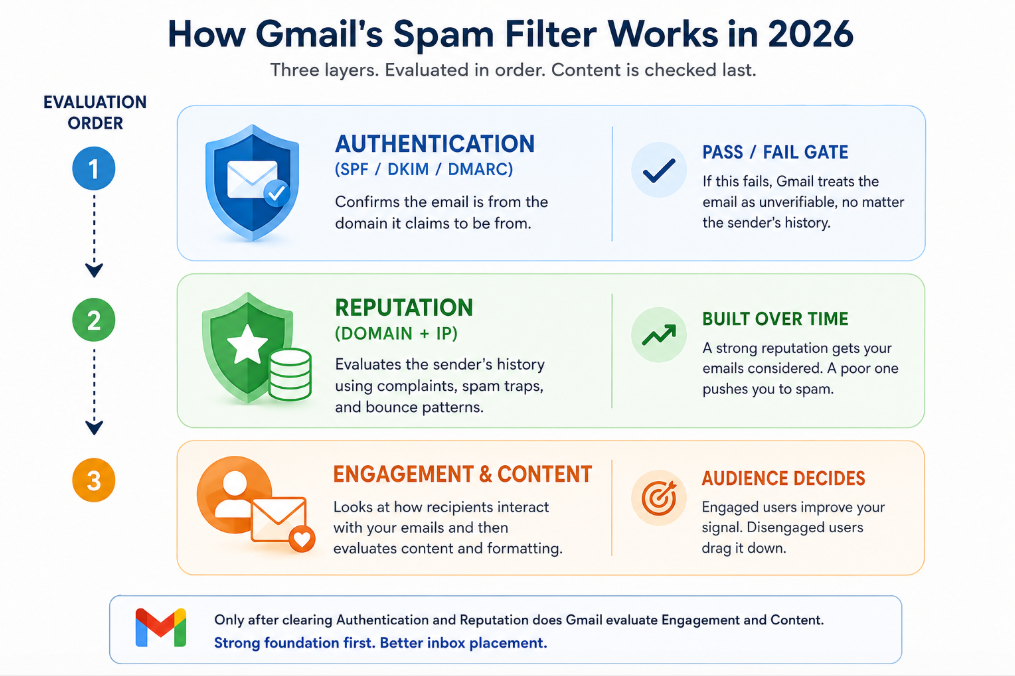
SPF, DKIM, and DMARC confirm a message actually came from the domain it claims to be from. Gmail treats this as binary, not a scoring input, mail that fails alignment gets treated as unverifiable regardless of how clean the sender’s broader history is. This layer is entirely within a marketer’s direct control and worth checking first, before touching anything else on this list.
This is the layer where email quality stops being a “nice to have” and starts directly deciding outcomes. Gmail tracks reputation at both the domain and IP level, built from complaint rate, spam-trap hits, and bounce patterns over a rolling window rather than a single send. A hard bounce isn’t just a failed delivery, it’s a data point Gmail logs against the sending domain, and it stays logged long after that one campaign is forgotten.
This is exactly the layer a validation step protects. Running a list through validation before it ever reaches a Gmail-heavy send catches the dead mailboxes, mistyped addresses, and disposable domains that would otherwise convert into hard bounces and quietly drag domain reputation down, often for campaigns that have nothing to do with the original bad data. A sender’s reputation with Gmail is, in large part, a running scorecard of how clean their list has been, send after send.
Opens, replies, deletions-without-reading, and how long a message sits unread all feed Gmail’s model of whether an audience actually wants a sender’s mail. A list padded with addresses that were never going to engage, because they’re role-based, abandoned, or belonged to someone who never really opted in, drags the entire engagement signal down, even for the genuinely interested subscribers sitting in the same send.
Content and formatting are evaluated last, underneath authentication and reputation, which is why even well-written email can’t rescue a campaign once the audience underneath it is compromised, a pattern that shows up across Gmail, Outlook, and Yahoo alike, not just here.
Both are checkable facts, not guesswork, and both interact with list quality: a validated list generates fewer unwanted sends in the first place, which is the simplest way to keep a complaint rate low before enforcement ever becomes a conversation.
For any sender pushing meaningful Gmail volume, Postmaster Tools is the closest thing to a direct line into how Gmail is actually scoring a domain:
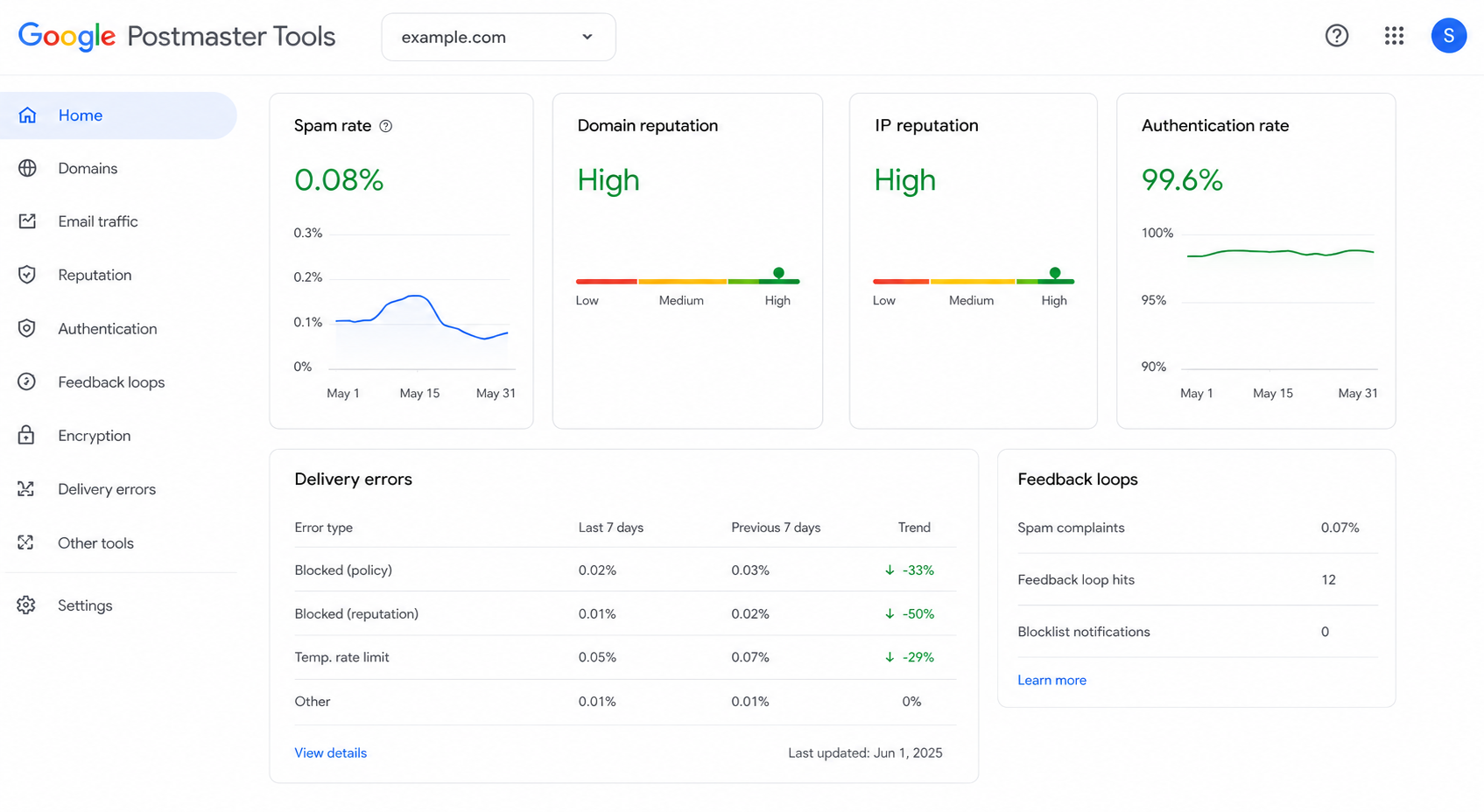
Open rate shows what happened after a message was delivered. Postmaster Tools shows whether delivery happened at all, which makes it the earlier and more diagnostic signal, and one that shifts noticeably the moment a list gets cleaned versus left to decay.
None of this happens in isolation from how Outlook, Yahoo, or Apple Mail treat the same message, Gmail is simply the provider with the clearest, most checkable rules, which is why it’s the best place to start building a real deliverability practice. The pattern of good content still landing in spam because of trust signals underneath it, not the writing itself, holds across every major provider, not just Gmail’s system.
And the single input that touches every layer above, authentication aside, is the same one: whether the addresses being sent to are real, current, and actually wanted. Getting Gmail specifically right is less about mastering one provider’s quirks and more about treating list health as infrastructure, not a one-time cleanup, the wider deliverability discipline worth building regardless of which inbox a message is ultimately trying to reach.
Does Gmail use a different spam filter than Outlook or Yahoo?
Yes. Each major provider runs independent filtering and reputation tracking. A message can land cleanly in one inbox and hit spam in another for the same recipient list.
What is Google Postmaster Tools and who needs it?
A free dashboard showing how Gmail evaluates a sending domain, spam rate, domain and IP reputation, and authentication rate. Anyone sending meaningful volume to Gmail addresses should check it regularly rather than relying on open rate alone.
Is the 0.3% complaint threshold a hard rule?
Google enforces it for bulk senders rather than treating it as a soft guideline. Crossing it consistently can trigger filtering that persists beyond the campaign that caused it.
Can strong content overcome a damaged Gmail reputation?
Not on its own, authentication and reputation are evaluated before content and engagement, so a well-written email from a domain with reputation problems still has to clear the trust layer first.
Does email validation directly affect Gmail deliverability?
Yes, meaningfully. Invalid and dead addresses are what generate the bounce and non-engagement patterns that damage domain reputation, one of the two layers Gmail checks before content is ever weighed.
Gamalogic validates email addresses in real time, without caching the data it checks, so lists stay clean going into every send, including the Gmail-heavy ones where reputation is hardest to rebuild once it slips.
For a closer look at where validation fits into an email marketing program specifically, see Gamalogic for email marketing teams; for domains that accept every address without confirming a real mailbox behind it, a common source of the silent bounces this article covers, see catch-all email validation.


Even the most compelling email won't drive results if it never reaches the inbox—learn eight proven strategies to improve email deliverability, protect your sender reputation, and maximize campaign performance with Gamalogic.

CRM email validation improves sales pipeline accuracy by removing invalid contacts, reducing deal leakage, and strengthening forecasting reliability. Learn how How CRM Email Validation Improves Sales Pipeline Accuracy.
Invalid emails silently drain your marketing budget, with up to 62% wasted on messages that never reach the inbox. Learn how to stop the leak, improve deliverability, and drive higher ROI by fixing your email list and optimizing campaign performance.


 No credit card required
Post your Comment.