Poor CRM email data including invalid addresses, disposable emails, duplicates, and abandoned inboxes costs B2B organizations an average of $12.9 million annually (Gartner). It damages email deliverability, distorts sales forecasting, wastes marketing spend, and creates revenue leakage from missed follow-ups.
The fix requires CRM email validation at the point of entry combined with scheduled bulk audits not one-time cleanup projects.
Key costs covered in this guide:
Wasted marketing spend on unreachable contacts
Higher customer acquisition cost (CAC)
Damaged sender reputation and inbox placement
Broken sales pipeline and forecasting
Lost revenue from missed follow-ups and renewals
AI model miscalibration from dirty training data
Your CRM Has a Data Problem You Haven’t Fully Priced
Most businesses treat their CRM as a source of truth.
It isn’t unless you actively make it one.
B2B contact databases decay at 20-30% per year. People change jobs. Companies shut down. Email addresses get abandoned. Sales reps enter wrong information. Marketing forms collect fake signups. Every month you don’t address this, the decay compounds silently across your pipeline, your campaigns, and your revenue forecasts.
The damage isn’t just cosmetic. Poor CRM email data creates a chain reaction:
Bad contacts → Wasted campaigns → Broken pipeline data → Missed revenue → Higher cost to acquire the same result
Industry research estimates that poor data quality costs organizations an average of $12.9 million per year (Gartner). Sales teams alone lose roughly 500 hours annually validating and correcting bad records time that should go toward closing deals.
This guide breaks down exactly what that cost looks like across your organization, and what it takes to fix it starting with your email data.
What Is Poor CRM Email Data?
Poor CRM email data refers to contact records containing inaccurate, outdated, incomplete, or risky email information.
Abandoned business emails — old addresses from employees who’ve since left
Disposable email addresses — temporary inboxes created to bypass forms (Temp Mail, Guerrilla Mail, 10 Minute Mail, Mailinator)
Role-based emails — info@, support@, admin@ addresses that rarely belong to a decision-maker
Catch-all domain emails — domains that accept all mail but may never deliver it
Spam trap addresses — inactive addresses repurposed by blacklist providers to identify poor senders
Duplicate contacts — the same person entered multiple times under slight variations
Typographical errors — johndoe@compny.com instead of johndoe@company.com
Each category creates different downstream damage. Understanding which types you have and in what volume is the starting point for any fix.
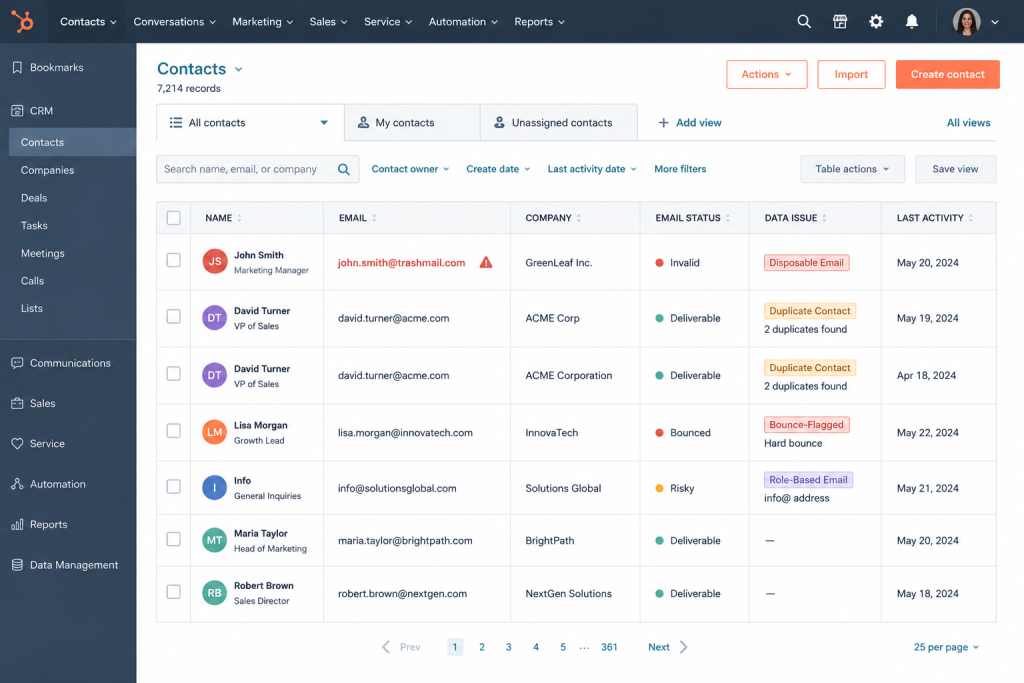
A typical CRM database showing the most common types of poor email data invalid addresses, duplicates, disposable emails, and role-based contacts that reduce pipeline quality.
Why CRM Data Decays Naturally
Data decay isn’t a failure of your team. It’s inevitable. Every active database degrades because the real world keeps changing:
Roughly 30% of the B2B workforce changes jobs every year
Companies merge, rebrand, or shut down taking their email domains with them
Domains expire and get repurposed
Manual data entry introduces typos at volume
Lead generation forms attract fake and low-intent submissions
Data governance policies often aren’t enforced consistently across teams
Most organizations don’t see the full cost until revenue metrics start slipping. By then, the problem is already widespread.
Wasted Marketing Spend
Every email sent to an invalid address wastes budget directly:
Email platform costs (you’re paying per contact or per send)
CRM storage for contacts that will never convert
Automation sequences running on dead records
Lead nurturing campaigns touching zero real people
When 10–25% of your list is invalid a realistic figure after 12–18 months without validation campaign ROI drops proportionally. You don’t get 10–25% less return; you get less on every metric: opens, clicks, conversions, pipeline contribution.
Higher Customer Acquisition Cost (CAC)
CAC rises when your database is full of unreachable contacts:
Marketing generates leads that never become opportunities
Sales works harder to hit pipeline targets from a smaller pool of valid contacts
Re-engagement campaigns add cost with diminishing returns
The result: more spend, same output, higher cost per acquired customer.
Revenue Leakage
Revenue leakage from email data problems is subtle but compounding.
Sales reps may never reach:
Qualified prospects who submitted a form with a typo
Existing customers whose email changed after a company merger
Renewal opportunities where the primary contact moved roles
These aren’t hypothetical scenarios. They happen in every CRM with more than a year of unvalidated data.
Real-World Impact: How DQ Global Fixed Their CRM Email Data Problem
Before looking at the broader cost framework, it’s worth seeing what poor CRM email data actually costs a real organization and what fixing it looks like in practice.
DQ Global, a data quality and CRM services company, was experiencing exactly the problems described above: their CRM database had accumulated invalid, inaccurate, and unreliable email records over time, leading to deliverability issues and complaints from clients about the quality of their data outputs.
After implementing Gamalogic’s real-time email validation api directly into their CRM workflow, DQ Global achieved a 25% improvement in CRM email data accuracy — and a measurable reduction in customer complaints related to data quality.
The key shift wasn’t a one-time cleanup. It was moving validation to the point of entry, so bad data stopped accumulating in the first place.
“The improvement in data accuracy was immediate and significant. Real-time validation gave us confidence in the quality of every record entering our system.” – DQ Global team, full case study →
This is the practical outcome of what the cost figures below represent in reverse: when you fix CRM email data quality, accuracy improves, complaints drop, and the downstream pipeline problems described throughout this article stop compounding.
The Prevention vs. Cleanup Cost Reality
This is the framing most teams miss:
Approach
Estimated Effort
Effectiveness
Quarterly manual cleanup
500+ team hours/year
Temporary fix — 60% of issues caught
Reactive scrubbing after bounces
Ongoing drain
Damage already done
Point-of-entry validation
One-time setup
Prevents 90%+ of bad data entering
Cleaning bad data is expensive. Preventing it is cheap. The strongest CRM email validation strategy combines both — but shifts emphasis toward prevention.
How Poor CRM Email Data Destroys Sales Pipeline Quality
Lower Lead Quality Starts at the Form
Poor email data and poor lead quality are often the same problem.
Invalid contacts frequently originate from:
Disposable email services used to grab gated content without real purchase intent
Bot registrations on landing pages
Fake form submissions from competitors or casual browsers
Low-intent users who will never engage a sales sequence
CRM reports are only as accurate as the data inside them.
When a meaningful percentage of pipeline contacts are invalid, unreachable, or duplicated:
Forecasted revenue is artificially inflated
Conversion rates look worse than reality (invalid contacts never convert)
Win rate calculations are skewed
Stage progression data is distorted
Leadership makes headcount, territory, and budget decisions based on pipeline data. If that data is polluted, those decisions will be wrong.
Missed Follow-Ups at Critical Moments
Sales deals often turn on timing.
When email addresses are invalid:
Follow-up emails after demos never arrive
Proposal notifications bounce silently
Renewal reminders reach no one
Drip sequences run their full course on a dead inbox
Every missed communication is a compounding risk of lost revenue.
The Email Deliverability Cascade
Poor CRM email data doesn’t stay contained to sales. It radiates outward into your entire email program.
Hard Bounces Damage Sender Reputation
Invalid email addresses create hard bounces. Mailbox providers Google, Microsoft, Yahoo track bounce rates continuously. When your bounce rate climbs above 2%, sender reputation begins to suffer. Above 5%, you’re likely hitting spam folders including for your valid contacts.
The cascade looks like this:
Bad data → High bounce rate → Damaged sender reputation → Lower inbox placement → Lower open rates → Reduced campaign ROI
Each stage makes the next worse.
Spam Trap Exposure
Catch-all domains and long-dormant CRM addresses can harbor spam traps addresses seeded by blacklist providers to catch senders with poor list hygiene. One spam trap hit can land your domain on a major blacklist, affecting deliverability for your entire contact list not just the bad records.
The Deliverability-Revenue Link
Poor deliverability eventually hits revenue directly. Even excellent copy and a strong offer don’t matter if emails don’t reach inboxes.
This is why email hygiene is foundational, not optional. To understand how email verification maintains long-term deliverability, read our complete guide to email verification and email hygiene.
How CRM Email Validation Works
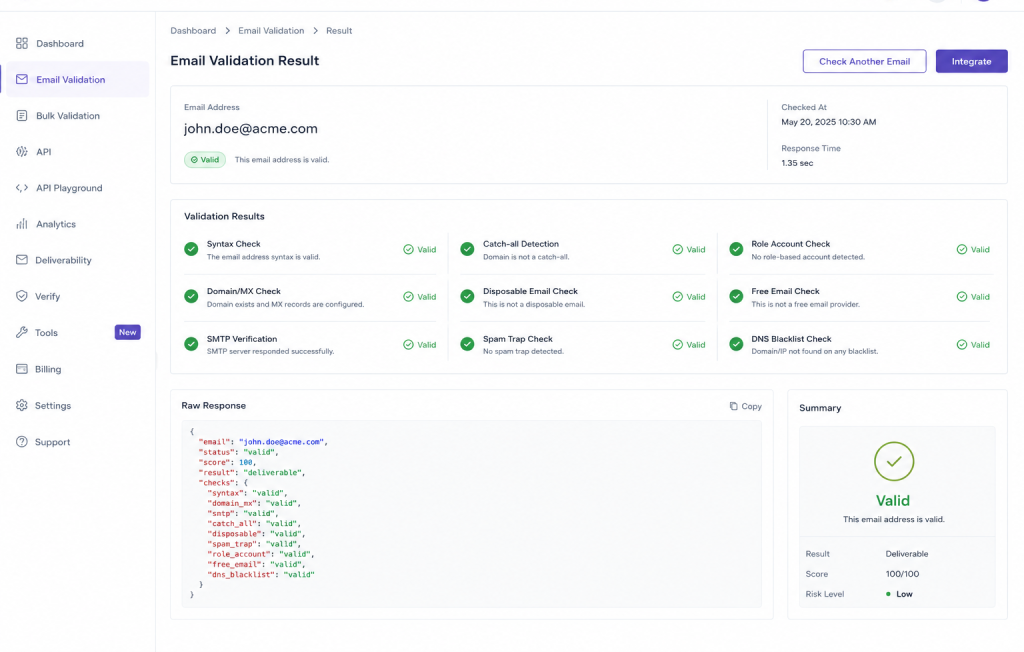
CRM email validation identifies invalid, risky, or low-quality email addresses before they affect business operations.
Modern validation runs multiple checks in sequence:
Syntax validation — Does the address follow valid email format? Domain verification — Does the domain exist and is it active? DNS lookup — Are the DNS records properly configured? MX record validation — Does the domain have active mail exchange servers? SMTP verification — Does the specific mailbox actually exist? Catch-all detection — Does the domain accept all addresses regardless of validity? Disposable email detection — Is this a known temporary email provider? Role-based email detection — Is this a shared inbox (info@, admin@, support@)? Spam trap identification — Is this address flagged as a known spam trap?
Together, these checks give a complete picture of every contact’s email quality before a single campaign runs or a sales rep makes a single call.
Gamalogic’s CRM email validation checks each address against 9 validation layers from syntax and MX records to spam trap detection and disposable email identification.
Operational Damage Beyond Sales and Marketing
Duplicate Contacts Create Downstream Confusion
Duplicates don’t just waste storage. They:
Send the same person multiple emails from different sequences
Split contact history across records activity ends up on the wrong one
Corrupt reporting (the same customer counted twice inflates metrics)
Create awkward customer experiences when someone receives the same outreach multiple times
Manual Cleanup Drains Team Productivity
Without systematic validation, someone has to clean up manually. That someone is usually RevOps, sales ops, or marketing ops people whose time is expensive and scarce.
500+ hours per year of manual data correction is a conservative industry estimate. At average RevOps salaries, that’s a significant hidden labor cost that never appears on a data quality report.
AI Readiness: Your CRM Data Is Your Model’s Training Material
This is a gap most content in this space misses entirely and it’s becoming more urgent.
If your organization is implementing AI tools for lead scoring, forecasting, account prioritization, or personalization, the quality of your CRM data directly determines the quality of those AI outputs.
Garbage in, garbage out has never been more consequential. AI models built on CRM data with 15–25% invalid emails will learn patterns from bad signals:
Lead scores will be miscalibrated against contacts that were never real
Forecasts will model churn and conversion patterns from distorted data
Personalization will misfire against role-based or abandoned inboxes
Maintaining clean CRM email data isn’t just an operational concern it is now an AI readiness requirement for any team building on top of CRM data.
Compliance Risk
In regions covered by GDPR, CASL, or CAN-SPAM, maintaining inaccurate or consent-lapsed contact records creates regulatory exposure. Regular validation and database audits support compliance by ensuring records reflect current, accurate information — and that your outreach is reaching the people it’s supposed to reach.
Real-Time vs. Bulk Validation: When to Use Each
Most organizations benefit from running both approaches.
Real-Time Validation (Prevention)
Deploy at:
Lead capture forms
CRM manual data entry points
Account registration flows
Customer onboarding
API integrations pushing contacts into your CRM
This stops bad data before it enters the system. It’s the highest-leverage, lowest-cost defense available.
Bulk Validation (Cleanup)
Deploy for:
Existing contact databases with unvalidated historical records
Lists inherited from acquisitions or data purchases
Pre-campaign database audits
Quarterly or semi-annual scheduled hygiene reviews
Bulk validation restores quality at scale especially important for any CRM that hasn’t been validated in 12+ months.
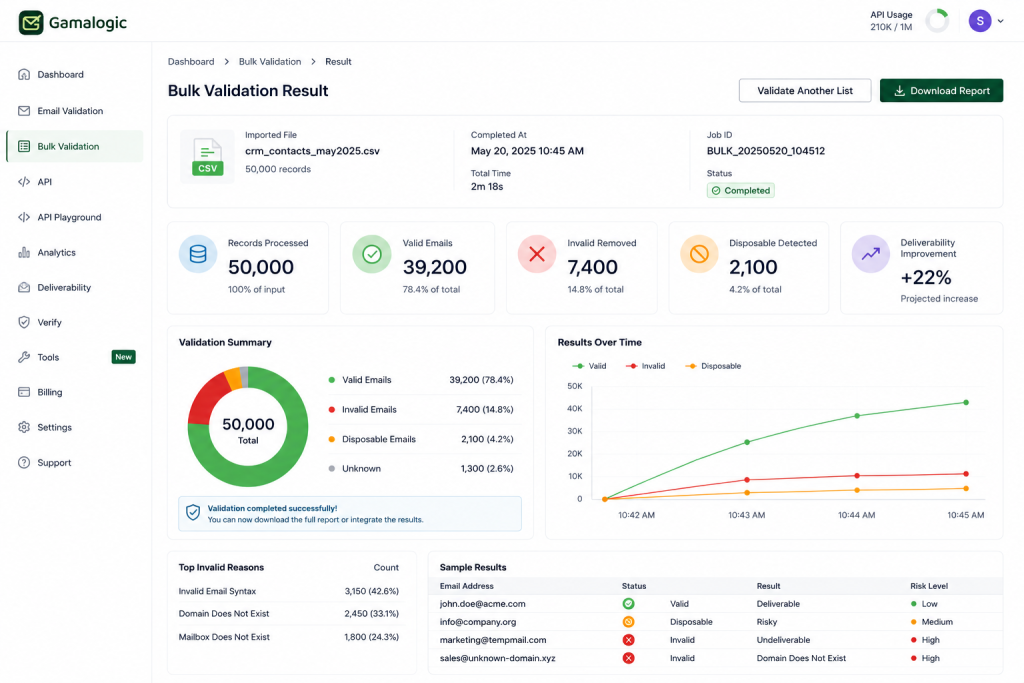
A bulk CRM email validation run on 50,000 records showing invalid emails removed, disposable addresses flagged, and projected deliverability improvement before a campaign launch
Platform-Specific Considerations
Salesforce
Use Salesforce validation rules and Flows to enforce email format requirements at the field level. For deliverability-level validation SMTP checks, catch-all detection, spam trap identification integrate Gamalogic’s email validation API directly into your Salesforce workflow it supports 100+ integrations. Native Salesforce validation cannot perform these checks.
HubSpot
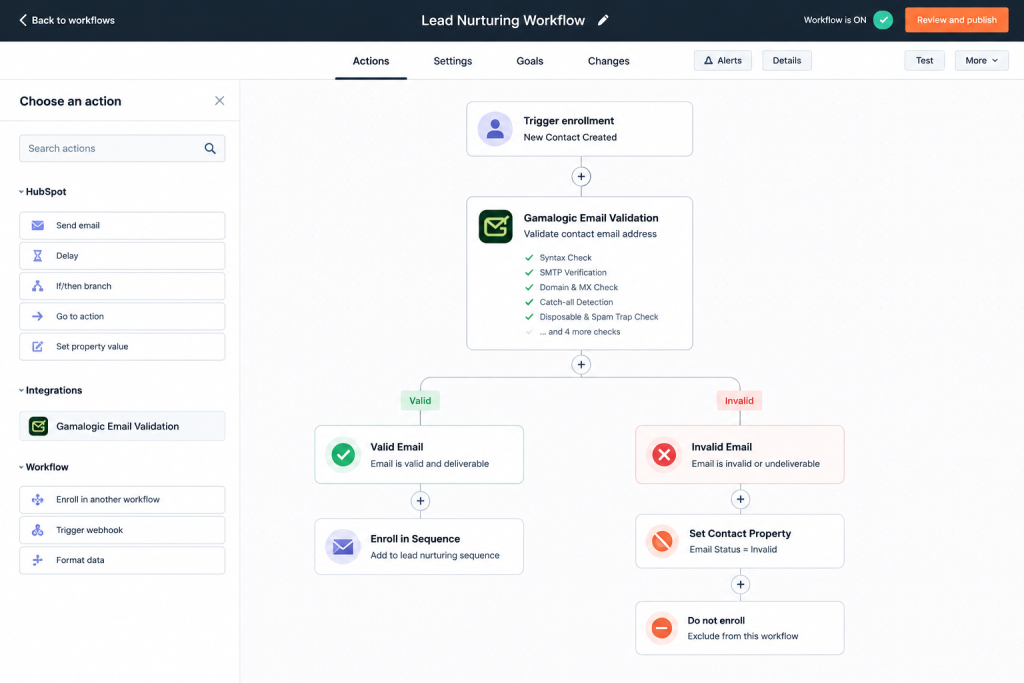
HubSpot property validation handles basic format checks. For deeper validation (SMTP, disposable email, spam trap), integrate Gamalogic via workflow actions or native API connection. This catches problems HubSpot’s built-in tools miss entirely.
Microsoft Dynamics 365, Zoho CRM, Pipedrive
These platforms support API-based integrations for validation at entry points. Periodic bulk exports for external validation are the standard approach for historical data cleanup across these platforms.
Gamalogic’s email validation API integrated into a HubSpot enrollment workflow automatically filtering invalid contacts before they enter any sales or nurturing sequence.”
CRM Data Hygiene Best Practices
1. Validate at the point of entry. Stop invalid data before it reaches your CRM. Real-time validation at forms and entry points is the single highest-leverage action you can take it prevents the problem rather than treating it after the fact.
2. Run quarterly database audits. Schedule bulk validation at least every 90 days for active databases, or every 6 months for lower-volume CRMs. Don’t wait for campaign performance to tell you something is wrong.
3. Eliminate duplicates systematically. Use deduplication rules or tools to merge duplicate records. Duplicates compound every other data quality problem they inflate metrics, split histories, and cause over-communication with real customers.
4. Monitor bounce rates as a leading indicator. Bounce rates above 2% signal a data problem that needs immediate attention. Don’t wait for a post-campaign report. Build bounce rate monitoring into your weekly ops review.
5. Standardize data entry formats. Use dropdowns instead of free text wherever possible. Standardized formats for company name, industry, and job title reduce downstream inconsistency that’s expensive to clean up later.
6. Make data quality a shared team responsibility. Sales, marketing, RevOps, and customer success all contribute to CRM data quality. Shared standards and clear ownership reduce the rate of decay.
7. Automate validation don’t treat it as a project. Automated CRM email validation should run continuously: at entry points in real time and on a scheduled cadence for existing records. Organizations that treat validation as a one-time project will be back in the same position within 12 months.
Frequently Asked Questions
What is poor CRM data?
Poor CRM data refers to inaccurate, outdated, incomplete, duplicate, or invalid customer information stored in a CRM system. For email data specifically, it includes invalid addresses, abandoned inboxes, disposable emails, role-based addresses, catch-all domains, and spam traps. Each type creates different risks to deliverability, pipeline quality, and revenue performance.
How does bad CRM email data affect sales?
Bad CRM email data reduces lead quality, creates missed follow-ups when emails bounce, distorts sales forecasting with inflated pipeline numbers, and forces sales reps to waste time on contacts that can never be reached. The compound effect is lower conversion rates, inaccurate revenue projections, and higher cost to hit the same pipeline targets.
What are the hidden costs of poor CRM email data?
Beyond obvious bounce costs, the hidden costs include: wasted marketing platform fees on invalid contacts, higher customer acquisition costs from unreachable leads, revenue leakage from missed follow-ups and renewals, hundreds of team hours spent on manual data cleanup, and distorted business decisions made on inaccurate reporting. Gartner estimates poor data quality costs organizations $12.9 million annually on average.
Why is CRM email validation important?
CRM email validation ensures that the contacts in your database are reachable, real, and safe to send to. It prevents bounces that damage sender reputation, removes low-intent and fake contacts that waste sales effort, and maintains the data accuracy that sales forecasting and marketing ROI measurement depend on. Without it, CRM data quality degrades continuously as new invalid records enter and old records go stale.
How often should CRM email data be cleaned?
Active databases should be validated quarterly at minimum. High-volume lead generation environments benefit from real-time validation at the point of entry, combined with monthly or quarterly bulk audits for the existing database. Any CRM that hasn’t been validated in 12+ months should run an immediate bulk validation before the next major campaign.
Can email verification improve CRM performance?
Yes. Email verification removes invalid contacts, reduces bounce rates, protects sender reputation, improves inbox placement, and increases campaign open and click rates. It also sharpens the accuracy of pipeline forecasting by removing contacts that were never going to convert. The result is better ROI on both sales and marketing spend from the same database.
What is the difference between real-time and bulk email validation?
Real-time validation checks an email address at the moment it’s entered on a form or in the CRM and prevents bad data from entering the system in the first place. Bulk validation processes an existing list to identify and remove invalid contacts retroactively. Both are necessary: real-time prevents future decay, bulk validation repairs historical damage.
What types of email addresses are most damaging in a CRM?
Spam trap addresses cause the most severe deliverability damage a single spam trap hit can blacklist your sending domain. Catch-all domains create unpredictable bounce exposure at scale. Disposable emails indicate low-intent leads that will never convert. Role-based addresses (info@, admin@, support@) rarely belong to decision-makers and consistently suppress engagement rates.
How does poor CRM data affect AI tools?
AI tools for lead scoring, forecasting, and personalization are only as accurate as the data they’re trained on or query against. CRM records with high volumes of invalid emails, duplicates, and fake contacts produce miscalibrated AI models. Lead scores won’t reflect real buying signals. Forecasts will model conversion patterns from distorted data. As AI adoption in RevOps grows, clean CRM data is increasingly an AI readiness requirement, not just an operational nicety.
What tools help improve CRM data quality?
The most effective tools combine real-time email validation APIs (for preventing bad data at entry), bulk email verification services (for cleaning existing databases), and CRM-native deduplication tools (for managing duplicate records). Gamalogic’s email validation solution covers all three layers from API integration for real-time checks to bulk processing for existing contact databases.
How does invalid email data impact revenue?
Invalid email data impacts revenue through multiple channels simultaneously: it reduces the deliverable size of your marketing list, lowers campaign ROI, creates missed sales follow-ups, inflates pipeline numbers that lead to poor forecasting, and increases the cost of acquiring each new customer. The revenue impact compounds over time as data quality continues to degrade without systematic validation in place.
Final Thoughts
Poor CRM email data doesn’t announce itself. It works quietly inflating bounce rates, distorting pipeline numbers, draining marketing budgets, and blocking sales follow-ups that should have closed deals. By the time most organizations notice, the damage is already spread across reports, forecasts, and sender reputation.
The fix isn’t complicated, but it does require treating data quality as an ongoing operational discipline rather than a one-time cleanup project. Validate at entry. Audit on a schedule. Monitor bounce rates as your earliest warning signal. Connect your validation workflow directly to your CRM so quality is enforced automatically, not manually.
And with AI tools now depending on CRM data to score leads, forecast revenue, and personalize outreach, the stakes are higher than they’ve ever been. Dirty data doesn’t just hurt campaigns it trains your AI systems to make the wrong decisions.
If you’re not sure where your database stands today, that’s the first thing to find out. A single bulk validation run will show you exactly how much of your CRM is working against you and what cleaning it up is worth in deliverability, pipeline quality, and revenue.
→ See how Gamalogic handles CRM email validation from real-time API integration to bulk database cleanup for B2B teams. Gamalogic supports 100+ CRMs integratons .
Sreerag
Sreerag P is a seasoned Email Marketing Specialist with over 10 years of experience in digital communication, deliverability optimization, and campaign performance analytics. At Gamalogic, he shares expert insights on improving inbox reach, data hygiene, and API-driven email validation strategies that empower businesses to build trusted customer connections.
Learn how to validate large email lists instantly using the Gamalogic Bulk Email Validator. Step-by-step guide for CSV, Excel, or TXT uploads, plus tips, results, and API integration.
Self-hosted vs API email verification, compared on real cost, compliance, and engineering time, not vendor bias. See which fits your infrastructure and when to switch.
Learn how SPF, DKIM, DMARC, and email validation reduce bounce rate, protect sender reputation, and boost inbox placement in 2026. Essential guide for marketers.
 Sign In













 Email Marketing
 ABM
ABM  List Building
  Lead Generation
  Growth Hacker
  Digital Marketing
  Data Enrichment
  Software as a Service
  Data as a Service
  Waterfall Enrichment
  Startup
  Revenue Performance
  Job Change Tracking
  Customer Data Platform
  CRM
CRM 


 Knowledge Base
  Video Tutorials
  Help Center
  Tarpitting Scoring
  ROI Calculator
  About us
  Contact us
  Testimonials
  Automation

 Blog
Blog




 No credit card required
Post your Comment.