 Sign In














 Email Marketing
 ABM
ABM  List Building
  Lead Generation
  Growth Hacker
  Digital Marketing
  Data Enrichment
  Software as a Service
  Data as a Service
  Waterfall Enrichment
  Startup
  Revenue Performance
  Job Change Tracking
  Customer Data Platform
  CRM
CRM 


 Knowledge Base
  Video Tutorials
  Help Center
  Tarpitting Scoring
  ROI Calculator
  About us
  Contact us
  Testimonials
  Automation
Why Your Emails Go to Spam Even When the Content Is Good

10 Jul 2026
Sreerag
12 Minutes
Read

 Blog
FAQ
Case Studies
Knowledge Base
Video Tutorials
Help Center
SEG Validation
Tarpitting Scoring
ROI Calculator
About us
Contact us
Testimonials
Blog
FAQ
Case Studies
Knowledge Base
Video Tutorials
Help Center
SEG Validation
Tarpitting Scoring
ROI Calculator
About us
Contact us
Testimonials
Great subject lines and well-written copy can’t fix a spam folder problem. Mailbox providers decide inbox placement using authentication, sender reputation, list quality, and engagement content is just one signal among many.
If you’re dealing with recurring inboxing problems despite good writing, the real cause is almost always upstream: a damaged sender reputation, incomplete authentication, or a contact list that’s gone stale. And of those three, list quality is the one you can fix completely,with proper validation of emals immediately, with an accurate email validation tool like Gamalogic’s email validation API no waiting weeks for a reputation score to recover.
It’s a natural assumption: if the subject line is compelling and the copy is well written, the email should perform.
But inbox placement is decided before a human ever reads the message. Gmail, Outlook, Yahoo, and Apple Mail all run mail through layered filters first sender history, authentication, complaint trends, engagement, list hygiene. Content only gets weighed after those checks.
That’s why two nearly identical emails can perform completely differently. One sender has a warmed-up domain and a freshly validated list. The other is working from a stale audience with a rising complaint rate. The second one keeps hitting the spam folder more often and no subject-line rewrite changes that.
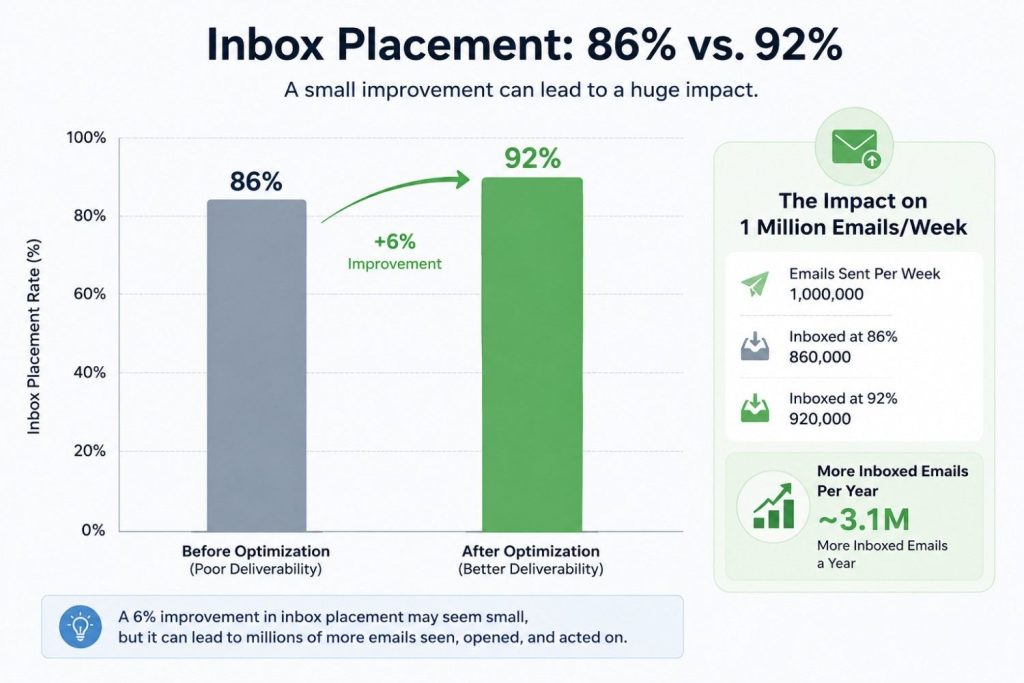
The gap is bigger than most teams think. Median inbox placement in 2026 ranges from about 86% (weakest sender categories) to 92% (strongest), and that six-point spread comes from list quality and authentication hygiene, not copywriting.
Before an email reaches the inbox, providers run it through a trust check. Here’s what’s actually on that checklist:
If enough of these signal risk, the email lands in spam even though it was technically “delivered.” That distinction trips up a lot of senders: a healthy delivery rate can be hiding a real spam-placement problem underneath it.
Most senders assume bounce rate is the number providers care about most. It isn’t, quite.
Spam complaint rate usually carries more weight. Gmail’s Postmaster Tools dashboard surfaces it as a headline metric, and it factors directly into inbox placement. The general healthy ceiling in 2026: around 0.3% complaints, or roughly 3 per 1,000 messages.
Here’s the part that trips people up it’s rarely one bad send that causes damage. It’s a trend.
✅ Fix: Track your complaint-rate trend, not just the current number. Bounces are one of the biggest drivers behind rising complaints, so catching bad addresses before you send keeps this number from climbing in the first place.
Reputation isn’t a score you check once, it’s a moving composite of sender behavior, complaints, and engagement sender Reputation Actually Works in Email Marketing and will make huge changes in the results
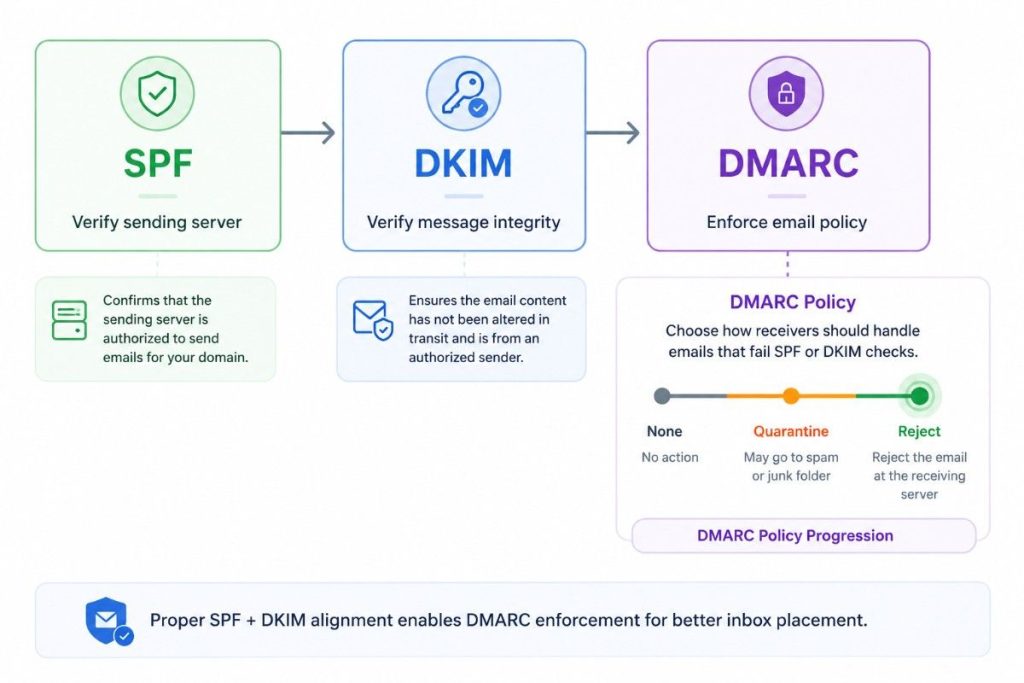
Authentication proves an email genuinely came from your domain. Without it, providers default to caution which usually means spam or rejection.
SPF — a DNS record listing which servers can send on your domain’s behalf. It commonly breaks after switching ESPs, when the new sending server isn’t added to the record.
DKIM — a cryptographic signature confirming the message wasn’t altered in transit and really came from your domain.
DMARC — the policy layer tying SPF and DKIM together. It tells receiving servers what to do when a message fails either check.
⚠️ The catch most senders miss: having a DMARC record isn’t the same as having one that enforces anything. A policy set to “none” only monitors failures it doesn’t stop anything.
✅ Fix: Once every legitimate sending source is authenticated, move DMARC toward stricter enforcement. This is one of the highest-leverage changes and one of the most skipped.
This is the one most “why do emails go to spam” articles reduce to a single bullet point. It deserves more, because it’s usually the fastest thing to both cause and fix and unlike reputation or authentication, it doesn’t take weeks to repair.
Every hard bounce tells a provider your list isn’t maintained. And unlike a content problem, a bad list doesn’t cost you one send — it follows you into every send after it.
A concrete example:
Say you have a 50,000-contact list, uncleaned for over a year. Untouched lists typically decay 4–5% annually dead mailboxes, disposable signups, role-based addresses. That’s 2,000–2,500 hard bounces on one send.
Providers register that as a reputation event tied to your domain, not just that campaign. Your next send even to genuinely engaged subscribers can land worse, through no fault of theirs.
A tool that only checks formatting misses almost everything that actually causes bounces which is exactly why bounce rates often stay stubborn even after a “quick clean.”
This is where email validation comes in. Email validation is the process of checking every address on a list beyond just spelling for whether it can actually receive mail, before you ever hit send. Done properly, it catches dead mailboxes, disposable signups, catch-all domains, and role-based addresses that a basic formatting check would let straight through.
This matters because list quality is the one deliverability lever you can fix immediately. Authentication issues and reputation damage take weeks to fully resolve. A dirty list can be validated and cleaned in minutes which is exactly why it’s worth treating as step one, not an afterthought.
There are several email validation tools on the market built to do this most work on the same core principle of checking syntax, domain, and mailbox-level deliverability before a send. Gamalogic is one of them, and it’s worth walking through what that actually looks like in practice.
List quality is the one lever on this list you can pull immediately, without waiting on a reputation score to recover. That’s also the foundation the rest of your sending setup depends on, authentication, warm-up, and sending behavior all work better on top of a validated list, which is the full case made in email deliverability best practices.
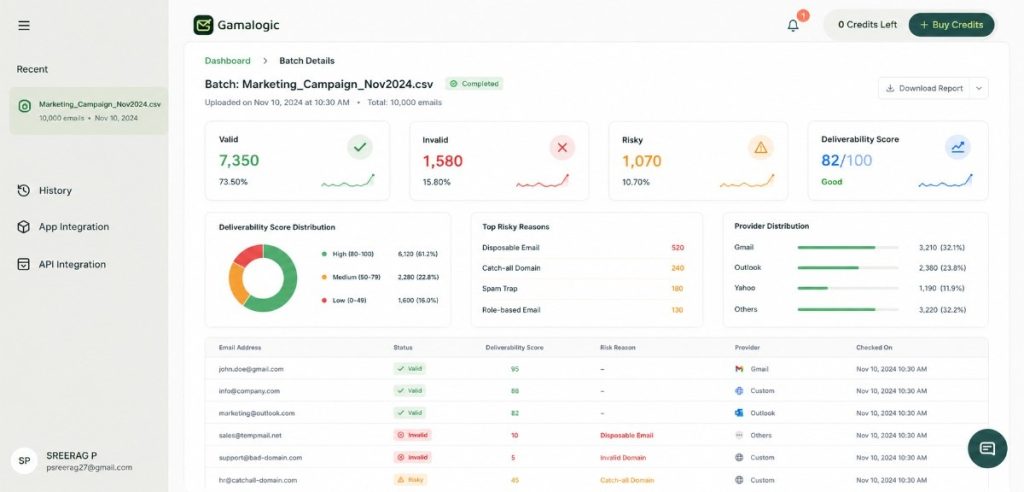
Most deliverability articles tell you to “validate your list” and stop there, without explaining what that actually involves. Here’s the detail, using Gamalogic to illustrate what a validation tool in this category typically checks and how it fits into a sending workflow.
A real validation pass needs to go deeper than “does this look like an email address”:
info@, support@, admin@ — technically valid, almost never engagedThe short version is that the validator opens a connection to the mail server and asks the equivalent of “does this mailbox exist,” then disconnects before a message would actually be delivered, no send, no bounce, no notification to the recipient. This is exactly how you verify an email address without sending an email.
Each address comes back tagged Valid, Invalid, or Risky, with a deliverability score attached so you’re not just deleting addresses blindly, you’re making an informed call on the risky/catch-all ones instead.
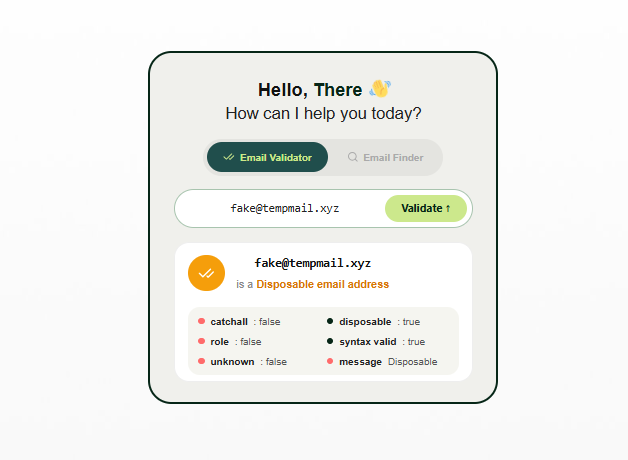
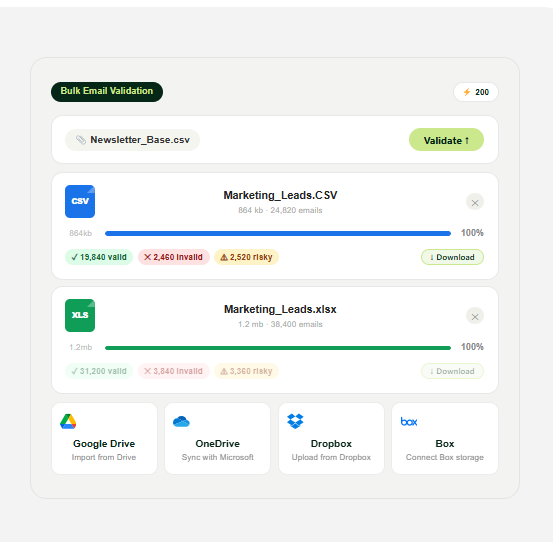
Most senders who take deliverability seriously run both real-time on every signup form, and a scheduled bulk check before higher-stakes sends (launches, reactivation campaigns, or any list segment that’s gone quiet for 60+ days).
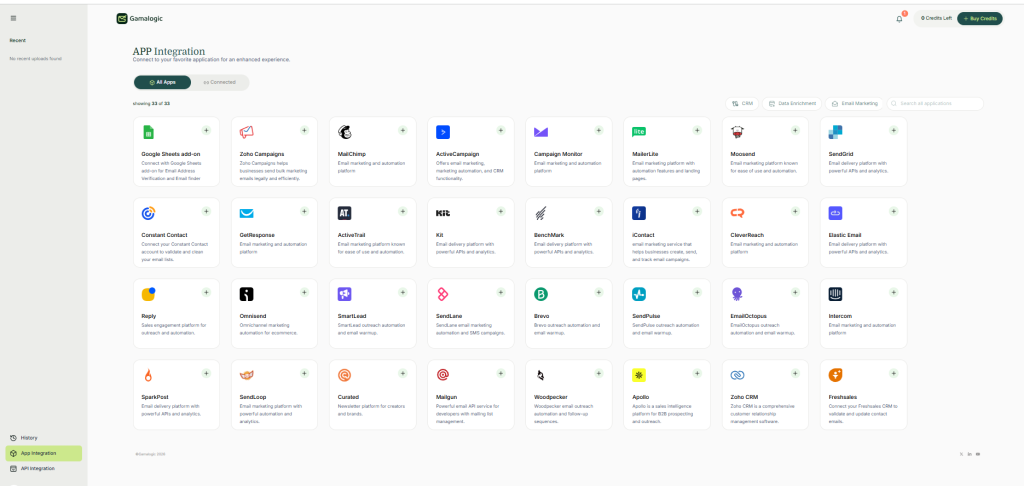
Gamalogic connects directly into the tools you’re already sending from, rather than requiring a manual export-clean-reimport cycle every time. That includes native integrations with major ESPs and CRMs, a Google Sheets add-on for validating a list without leaving your spreadsheet, and a full REST API for teams who want validation built directly into their signup flow or internal tools.
In practice, that means Gamalogic can slot into your stack alongside the other 20+ platformsn integrations it already connects to whichever ESP, CRM, or signup form you’re currently using without you needing to change how your team already works.
Whichever Email validation tool you end up using, the underlying checklist above syntax, MX, SMTP-level, disposable, catch-all, role-based, spam trap is the standard worth checking any provider against before you commit to one.
✅ Fix: Start with a bulk validation pass on your existing list this week, then turn on real-time validation at signup so you’re not repeating this cleanup every quarter.
Filters read recipient behavior as closely as they read anything about you as a sender.
Positive signals: opens, clicks, replies, adding you to contacts Negative signals: immediate deletion, spam complaints, long stretches of no engagement
Enough disengagement anywhere on your list drags down placement even for the subscribers who are engaged elsewhere in your program.
✅ Fix: Segment by engagement and recency instead of sending one blast to everyone. Let your most responsive subscribers keep building positive signal, and handle re-engagement or removal for dormant contacts separately.
Each provider runs its own filtering logic:
| Provider | What it weights most |
|---|---|
| Gmail | Engagement, domain reputation, authentication |
| Outlook | Sender trust, complaint history, SmartScreen |
| Yahoo | Reputation, historical interaction patterns |
| Apple Mail | Privacy-first filtering + sender reputation (Mail Privacy Protection also limits real open-rate visibility) |
An email that lands cleanly in Gmail can still hit Outlook’s junk folder for the same audience, if trust signals differ even slightly between the two.
✅ Fix: Monitor inbox placement per provider, not as one blended average. A strong overall number can hide a serious problem concentrated in a single provider.
None of this makes content irrelevant it’s just evaluated after the structural signals, not instead of them.
Filters do look at:
But even excellent copy is fighting an uphill battle if it’s sitting on top of a dirty list, weak authentication, or a damaged sender reputation.
Prevention is cheaper than recovery but if you’re already dealing with spam folder issues and inboxing problems that started recently, work through this in order:
Recovery is gradual reputation rebuilds over multiple clean sends, not overnight. That’s exactly why fixing list quality first, before you resume sending, matters more here than anywhere else in this checklist.
Ready to see your own list’s bounce risk? Validate your first 500 contacts with Gamalogic, free – no credit card, results in minutes.
Can email verification improve inbox placement?
Yes. Removing invalid, disposable, and high-risk addresses lowers bounce rate and protects sender reputation — both weighed directly in placement decisions. This is the one lever on this list you can pull immediately, without waiting on a reputation score to recover.
Does SPF stop emails from going to spam on its own?
No. It needs to work alongside DKIM, DMARC, a healthy reputation, and a clean list. Any one alone leaves gaps.
Why do Gmail emails specifically go to spam?
Most commonly: missing/misaligned authentication, a rising complaint trend, high bounce rate from an unclean list, weak engagement, or a stale audience.
What’s the difference between delivery rate and inbox placement?
Delivery rate = reached the mail server. Inbox placement = actually landed in the primary inbox, not spam. An email can succeed at the first and fail the second.
Delivery rate confirms the server accepted your message; inbox placement is where it actually landed. See the full breakdown for how deliverability fits between inbox placement the two.
Does Gamalogic validate in real time, or just in bulk?
Both. Real-time validation checks addresses the moment someone signs up, before they ever reach your ESP. Bulk validation runs a full-list pass before a send, catching addresses that decayed after collection.
What does Gamalogic integrate with?
Gamalogic connects natively to major ESPs and CRMs, plus a Google Sheets add-on and a REST API, 20+ platforms in total, so validation fits into the workflow you already use instead of requiring a manual export/reimport cycle.
How often should sender reputation be reviewed?
At minimum quarterly, and always around big changes new ESP, new domain, or a significant volume increase.


Catch-all emails and high bounce rates hurting your campaigns? Learn how email validation APIs detect risky addresses, prevent fake signups, and improve email deliverability.

This blog explores how email validation is transforming B2B sales intelligence and prospecting in 2025—helping teams reach real prospects, reduce bounce rates, and protect sender reputation. Discover why clean data isn’t just a backend task—it’s your competitive edge.

A concise guide to improving cold email deliverability, covering key factors like authentication, domain setup, list quality, and sending practices. Learn proven strategies to avoid spam filters, boost inbox placement, and maximize outreach results.


 No credit card required
Post your Comment.