 Sign In














 Email Marketing
 ABM
ABM  List Building
  Lead Generation
  Growth Hacker
  Digital Marketing
  Data Enrichment
  Software as a Service
  Data as a Service
  Waterfall Enrichment
  Startup
  Revenue Performance
  Job Change Tracking
  Customer Data Platform
  CRM
CRM 


 Knowledge Base
  Video Tutorials
  Help Center
  Tarpitting Scoring
  ROI Calculator
  About us
  Contact us
  Testimonials
  Automation
How to Use Gamalogic Bulk Email Validator Step-by-Step Guide

06 Nov 2025
Sreerag
12 Minutes
Read

 Blog
FAQ
Case Studies
Knowledge Base
Video Tutorials
Help Center
SEG Validation
Tarpitting Scoring
ROI Calculator
About us
Contact us
Testimonials
Blog
FAQ
Case Studies
Knowledge Base
Video Tutorials
Help Center
SEG Validation
Tarpitting Scoring
ROI Calculator
About us
Contact us
Testimonials
Managing thousands of email addresses manually is nearly impossible and sending campaigns to invalid emails can damage your sender reputation fast. With Gamalogic’s Bulk Email Validator, you can upload and verify large lists of emails quickly and securely.
Whether you’re a marketer cleaning your CRM or a developer handling automated verifications, Gamalogic makes bulk validation effortless and accurate. In this guide, you’ll learn how to use Gamalogic’s Bulk Email Validator, interpret results, and scale up to our API for automated verification.
Tip: New users get 500 free credits enough to test both single and bulk validation features.
After logging in, you’ll land on the dashboard where the Email Validation tab is selected by default.
Once your file is selected, you’ll see a progress bar showing upload status.
When the upload completes, click “Validate.”
A pop-up will appear asking you to confirm validation for the number of rows in your file.
Your uploaded file will open in the Gamalogic Online Sheet.
Click “Upload” to start the validation process.
You’ll see a progress bar updating in real time on your dashboard.
Wait until it reaches 100% that’s when all email addresses have been validated.
Once validation is complete, click “Go to File.”
You’ll now see your validated list along with added result columns that classify each email as valid, invalid, disposable, catch all, role based, or risky.
From the top-right corner, click Download to get your cleaned file.
Once your file is processed, each row will include a validation status and related metadata. Here’s what the results mean:
Ready to validate large lists automatically?
You can use the Bulk Email Validation API to process thousands of addresses per request.
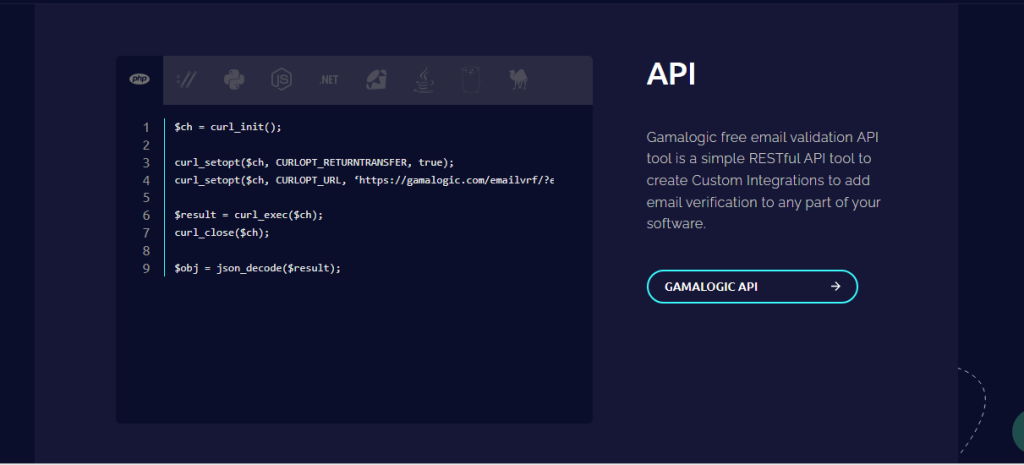
$ch = curl_init();

curl_setopt($ch, CURLOPT_RETURNTRANSFER, true);
curl_setopt($ch, CURLOPT_URL, ‘https://gamalogic.com/emailvrf/?emailid=your_emailid_here&apikey=your_api_key_here’);

$result = curl_exec($ch);
curl_close($ch);

$obj = json_decode($result);
API Documentation for full parameters, response details, and SDKs for Python, Node.js, PHP, and more.
Gamalogic starts with 500 free credits perfect for testing both single and bulk email validation Api.
When you’re ready to scale, choose a plan that fits your business:
All paid plans include:
📧 Contact: info@gamalogic.com
📄 Visit: Pricing Page →

Keeping your email lists healthy is key to successful email marketing. With Gamalogic’s Bulk Email Validator, you can clean thousands of addresses in minutes improving deliverability, protecting your sender score, and increasing campaign ROI.
Start free today upload your file and validate up to 500 emails at no cost.
👉 Get 500 Free Credits and Start Bulk Validation → | View API Documentation →



Are hidden email validation mistakes draining your subscribers and revenue? Discover the 10 most common errors businesses make—and how to fix them before they sabotage your marketing success.

Looking for better options than Abstract API? Top 5 Email Validation API Alternatives to Abstract API in 2026 with pricing, features, and accuracy comparison.

A practical guide to email validation for B2B, covering CRM email validation, sales email verification, bounce rate reduction, and better lead quality for revenue teams.


 No credit card required
Post your Comment.