 Sign In












 Email Marketing

 ABM
 List Building
 Lead Generation
 Growth Hacker
 Digital Marketing
 Data Enrichment
 Software as a Service
 Data as a Service
 Waterfall Enrichment
 Startup
 Revenue Performance
 Job Change Tracking
 Customer Data Platform
 CRM



 Knowledge Base
 Video Tutorials
 Help Center
 Tarpitting Scoring
 ROI Calculator
 About us
 Contact us
 Testimonials
 Automation
Best Ethical Email Finding Ways to Find Professional Contact Information

25 Apr 2025
Athika Jishida
16 Minutes
Read

 Blog
FAQ
Case Studies
Knowledge Base
Video Tutorials
Help Center
SEG Validation
Tarpitting Scoring
ROI Calculator
About us
Contact us
Testimonials
Ethical Email finding is the practice of locating a professional’s business email address Ethically using publicly available, consensual, or legitimately licensed sources as opposed to scraping, guessing at scale, or acquiring unconsented data.
Finding someone’s professional contact details ethically comes down to three questions that most guides blur together. Is the source legitimate? Is the person or address real? And are you entitled to use it for this purpose? Answer only the first and you may email a dead inbox. Answer only the second and you may do something technically accurate that is still intrusive.
This guide covers all three. You will see which sources are acceptable, how to verify an address and a professional profile without touching private data, whether it is appropriate to look someone up from their email address, how CAN-SPAM, GDPR and CASL change the answer by region, and how to write a first message that explains how you found them.
To find professional contact information ethically, use sources the person or their employer made public for business purposes, collect only what you need for a specific business reason, verify before you send, tell the person how you found them, and make opting out easy. Do not infer, buy or compile personal data (home addresses, personal numbers, private social accounts) and stop if someone asks you to.
The 5-point checklist
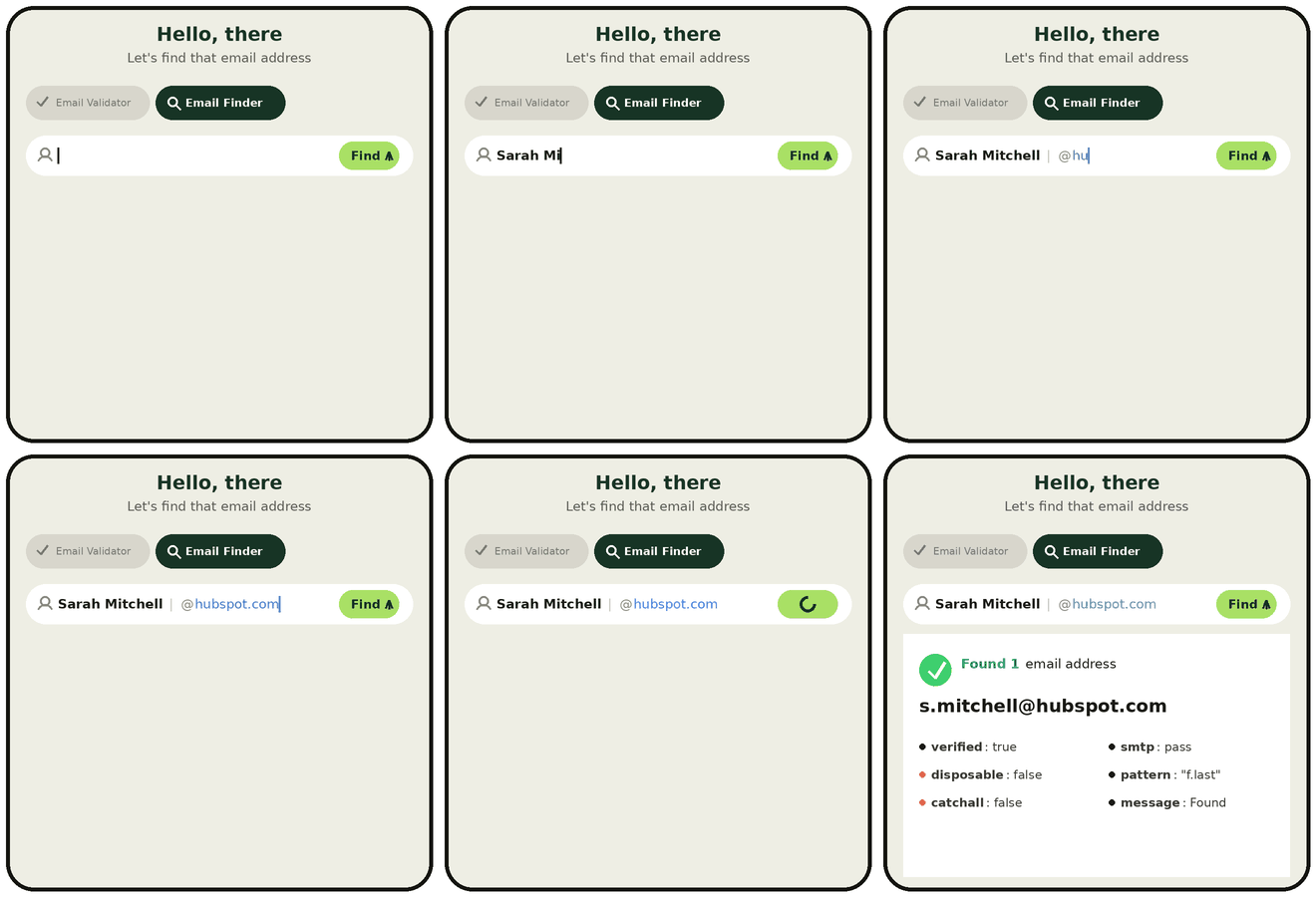
The fastest ethical way to do this at scale is an email finder that shows where its data comes from and verifies every address before you send. Gamalogic Email Finder takes a person’s name and company domain, returns the most likely business email and checks whether that mailbox is deliverable, so you can follow the checklist above without guessing addresses by hand. Find a verified work email now or jump to the step-by-step walkthrough further down.
Ethical Email email finding is the process of discovering a person’s professional email address through methods that respect privacy law, platform terms of service, and the individual’s reasonable expectation of how their information will be used.
It sits at the intersection of two separate questions that most guides collapse into one: is this address real? (a technical/verification question) and am I allowed to use it, and how? (an ethics and compliance question). Answering only the first question is what leads to legally-sourced-but-tone-deaf outreach; answering only the second leads to well-intentioned messages sent to dead inboxes. For a broader walkthrough of the tools and techniques involved, see Email Finding Explained: How to Connect with Key Contacts Online.
Not all email-finding methods carry the same risk. It helps to think of them on a spectrum rather than a single ethical/unethical binary.
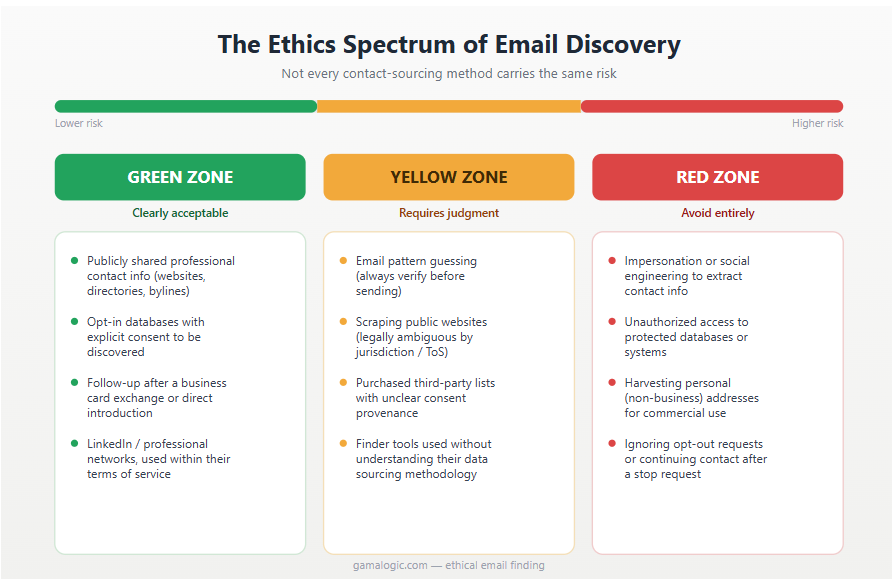
“Where common contact-sourcing methods fall on the ethics spectrum.“
Our 4P framework turns the spectrum into questions you can answer before every campaign or lookup.
| P | Question | Good practice | Warning sign |
|---|---|---|---|
| Purpose | Why this person, and why now? | A specific, role-relevant reason you can state in one sentence | “They might buy something” |
| Provenance | Where did this address come from? | Company website, public business listing, opt-in provider with disclosed sources | Unknown or undisclosed source |
| Precision | Are you collecting only what you need? | Name, role, company, one business address | Personal details, family, location history |
| Permission | Can you contact them lawfully, and stop when asked? | Regional rules checked, clear opt-out, suppression list honored | No unsubscribe, no record of the source |
Design note: make this table into the featured diagram and give it the alt text above. A visual that readers can screenshot and share is one of the few things competitors do not have.
Short answer: it depends on whose email it is, what you will do with the result, and whether the person would reasonably expect it. Looking up a professional profile from a work email for a relevant business reason is widely practiced and sits in the yellow zone. Using a personal email to identify, locate or profile someone is much harder to justify and often crosses into red.
If you only have a personal address and no other connection to the person, the lower-risk route is to ask for the right business contact rather than identify them yourself.
Platforms set their own rules about how their data may be accessed and used, and members can often limit whether others can find them by email address. Read the platform’s current terms before building any process around lookups. LinkedIn publishes its rules in its User Agreement, which includes restrictions on automated data collection (confirm the current wording before you cite specifics).
Two practical consequences:
Stop and reconsider if any of the following is true:
If any answer is no, change the approach.
Instead of starting from an email, start from public professional facts: the person’s name, company and role from a company page or published byline. Confirm with an independent public source (their employer’s site, a conference page). Then contact them through a business channel and say how you found them. If you need to confirm identity from an email, ask them in your message.
Work through these in order. Stop at the first step that gives you a verified business contact.
Manual research works for a handful of contacts. When you need to reach dozens or hundreds of people, an email finder saves the guesswork and the bounces. Here is how to use Gamalogic Email Finder in line with the 4P framework.
Why this is the ethical route: you are using public business facts, a verified business address and a documented process, not buying a list of unknown origin or guessing at personal accounts.
Ready to try it? Start finding verified work emails with Gamalogic. Want to check addresses you already have? Use the email verifier before your next campaign.
You do not need a personal address to reach a professional. Choose the route that fits your goal.
Use the contact form or listed business email. Mention the specific page or work that prompted your message. This route signals that you respect the company’s chosen channel.
Send a short message that states who you are, why you are writing and what you are asking. Avoid copying contact details you find elsewhere into the message.
Which route to use
| Your goal | Best route |
|---|---|
| Press or media request | Press mailbox or press contact page |
| Partnership or sales inquiry | Company contact form or role mailbox |
| Recruiting or networking | Professional network message or warm intro |
| Research or interview | Contact form with a clear description of the study |
Verification means three different things, and ethical teams do all three.
This is technical. A verification process typically checks:
Catch-all domains and addresses behind secure email gateways need special handling. See our guides to catch-all email validation and validation on secure email gateways. For team-level processes, our B2B email validation checklist goes deeper.
Confirm that the person is real and holds the role you think they do:
If two independent public sources agree, you have enough. Do not go further to verify, such as searching for their home address or personal social accounts.
Record, in your CRM or spreadsheet: the source, the date, the purpose and the lawful basis or consent you are relying on. If someone asks how you got their email, you can answer in a sentence. This is also what regulators and partners look for first.
The first message sets the tone. A good one makes it easy to understand who you are, why you wrote and how to say no.
Use these elements, adapting for your market. For US commercial email, the FTC’s CAN-SPAM compliance guide requires, among other things, accurate header and subject information, a valid physical postal address and a clear, working opt-out.
Subject: [Specific topic relevant to their role]
Hi [First name],
I’m [Name] at [Company]. I found your work email on [source, for example your company’s team page], and I’m writing because [one specific, role-relevant reason].
[One sentence stating what you are offering or asking.]
If this isn’t relevant, tell me and I won’t follow up. You can also unsubscribe here: [link].
[Name, company, physical postal address]
Bad vs good
Keep follow-ups proportionate. One polite reminder is normal; a long drip sequence to someone who never replied is not.
Doxxing means publishing or compiling private information about someone to expose or target them. Ethical contact research stays on the other side of that line.
If you would not be comfortable showing the person everything you have stored about them, you have collected too much.
Not legal advice. Laws change and depend on facts. Confirm current text and consult counsel for high-stakes use.
| Law / region | Governs | B2B email rule (summary) | What you should do | Source |
|---|---|---|---|---|
| CAN-SPAM (US) | Commercial email | Applies to B2B email as well as consumer email; does not require prior consent but sets conduct rules | Accurate headers and subject, identify the message as an ad where applicable, include a physical postal address, provide a working opt-out and honor it promptly | FTC guide |
| GDPR (EU) | Personal data of people in the EU, including work emails that identify a person | Needs a lawful basis (legitimate interests is commonly considered for B2B, with a documented balancing test) and transparency | Document your basis, limit data, tell people how you got their data (Art. 14), honor objection and deletion rights | Art. 6, Art. 14 |
| UK GDPR and PECR (UK) | Personal data and electronic marketing | Rules differ for corporate subscribers and for sole traders or partnerships, which are often treated like individuals | Check which type of recipient you are emailing; keep records of basis | ICO |
| CASL (Canada) | Commercial electronic messages | Generally requires express or implied consent, with limited exceptions (for example, certain conspicuously published business addresses) | Confirm consent type, identify yourself, include an unsubscribe | Official Canadian government guidance (confirm current text) |
| CCPA/CPRA (California) | Personal information of California residents | Gives rights to know, delete and opt out of sale or sharing | Be ready to answer access and deletion requests; check whether your use counts as a sale or sharing | State attorney general guidance (confirm current text) |
Before you rely on any provider, including us, ask:
A vendor that cannot describe sources specifically is a warning sign. Ask for the answer in writing.
An ethical tool maintains suppression lists and acts on removal requests, not just on unsubscribes from your own campaigns.
We compare approaches on criteria that matter for ethics, not just speed. Disclosure: Gamalogic offers one of the approaches below.
| Approach | Provenance clarity | Privacy risk | Verification built in | Typical effort | Best for |
|---|---|---|---|---|---|
| Manual research (company sites, bylines, registers) | High | Low | No (you verify separately) | High | Small, high-value outreach |
| Professional network messaging | High | Low | Not applicable | Medium | Networking, recruiting |
| Licensed business-data providers | Depends on vendor | Medium | Often | Low | Scaled B2B prospecting |
| Pattern guessing plus verification | Low | Medium | Required | Medium | Cases with no published contact |
| Scraped or breach-sourced lists | Low | High | Rare | Low | Avoid |
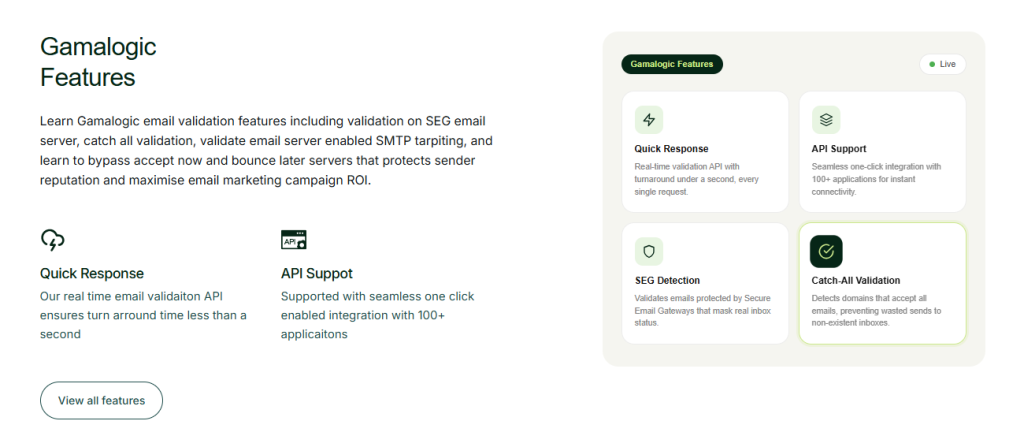
Gamalogic’s email finder for ethically-sourced professional contacts is built around the same purpose provenance precision permission logic outlined above:
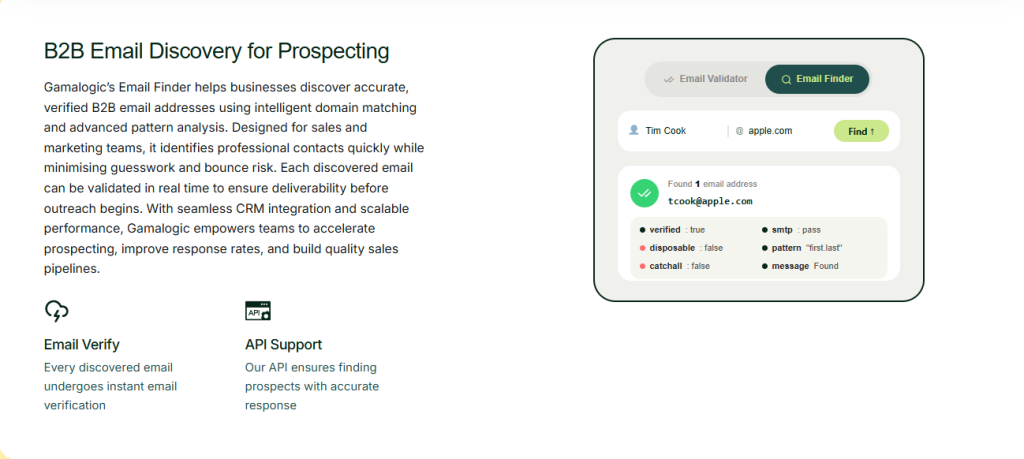
“A sample result from Gamalogic’s Email Finder, sourced and verified in one step.”
What are ethical ways to find professional contact information?
Publicly available business sources (company websites, directories, conference profiles), opt-in professional databases, warm introductions, and verified email-finder tools that source from public or consensual data combined with a technical verification step before outreach.
Is scraping LinkedIn illegal?
Not automatically, but it can breach the platform’s terms and create legal and account risks, and personal data rules may apply to what you collect. Use platform features and licensed data rather than scraping, and read the current terms.
Is it legal to email a business address I found online?
Often yes, but rules depend on the sender’s and recipient’s regions and on the type of recipient. In the US, CAN-SPAM sets conduct rules; in the EU, UK and Canada, additional consent or lawful-basis rules apply. See the regional table.
Can I use a personal email for professional outreach?
It is risky. A personal address was usually shared for a different purpose, and some laws treat individuals differently from companies. Prefer a business channel, or ask for the right contact.
Are email finder tools ethical?
They can be, use email finder toools like gamalogic, if the provider discloses its sources, honors opt-outs and does not use breach data, and if you use the results for a specific, relevant purpose. Use the vendor questions above.
What should I say if someone asks how I got their email?
Tell them the specific source (for example, your company’s team page), apologise if the message was unwelcome, and offer to delete their details. Log the request.
How do I verify someone’s identity from their email address ethically?
Confirm the person through public professional sources such as an employer team page, an official register or published work, rather than linking their address to personal accounts.
Looking to build a prospect list the ethical way? Try Gamalogic’s ethically-sourced email finder sourced from public and opt-in data, verified in real time.
Make the move now to adopt Gamalogic’s ethical email finding technology!


This blog explores how email validation is transforming B2B sales intelligence and prospecting in 2025—helping teams reach real prospects, reduce bounce rates, and protect sender reputation. Discover why clean data isn’t just a backend task—it’s your competitive edge.
Discover how the Gamalogic Email Finder for Google Sheets helps you find and verify email addresses instantly—so your outreach hits the mark every time.

Wondering why your emails keep landing in spam folders? Uncover the key reasons behind poor deliverability and learn practical steps to ensure your messages reach the inbox every time.


 No credit card required
Post your Comment.