 Sign In














 Email Marketing
 ABM
ABM  List Building
  Lead Generation
  Growth Hacker
  Digital Marketing
  Data Enrichment
  Software as a Service
  Data as a Service
  Waterfall Enrichment
  Startup
  Revenue Performance
  Job Change Tracking
  Customer Data Platform
  CRM
CRM 


 Knowledge Base
  Video Tutorials
  Help Center
  Tarpitting Scoring
  ROI Calculator
  About us
  Contact us
  Testimonials
  Automation
Why Your Emails End Up in Spam (and How to Ensure Inbox Delivery in 2026)

30 Sep 2023
Mohamed Ahmed
12 Minutes
Read

 Blog
FAQ
Case Studies
Knowledge Base
Video Tutorials
Help Center
SEG Validation
Tarpitting Scoring
ROI Calculator
About us
Contact us
Testimonials
Blog
FAQ
Case Studies
Knowledge Base
Video Tutorials
Help Center
SEG Validation
Tarpitting Scoring
ROI Calculator
About us
Contact us
Testimonials
Have you ever sent an important email a proposal, a newsletter, a cold outreach message, only to find out weeks later it was sitting unread in someone’s spam folder? It’s one of the most frustrating problems in email marketing and sales outreach, and it’s more common than most senders realize: even emails that are technically “delivered” can be invisible to the recipient.
Understanding why this happens and fixing it comes down to two related but different concepts: email deliverability and inbox placement. Get both right, and your emails land where they belong. Get either wrong, and even brilliant subject lines and perfect copy won’t save you.
Most guides use these terms interchangeably. They shouldn’t be.
You can have a 99% delivery rate and still have a 60% inbox placement rate if most of those “delivered” emails are quietly filtered into spam. Mailbox providers like Gmail, Outlook, and Yahoo report both stages differently, and most sending platforms only show you the first one which is why bounce rate alone is a misleading health check.
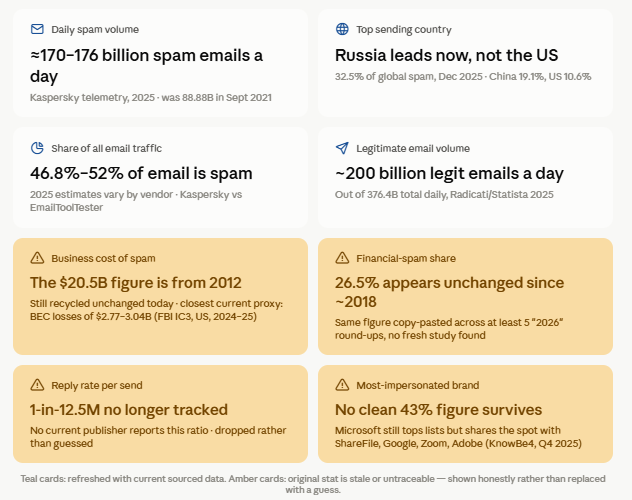
Two older stats deserve a specific flag rather than a fresh number, because we couldn’t verify either one has actually been re-measured recently:
Being upfront about which of these numbers are actually current and which ones the internet has just been copy-pasting is exactly the kind of detail that’s easy for a reader (and Google) to trust more than a recycled infographic.
In 15 years of running outreach and deliverability audits, this is still the number one thing I see teams get wrong: they treat their email list as a static asset instead of something that decays every single month. Sending to invalid, mistyped, or long-dead addresses signals a server that either doesn’t verify its list or doesn’t care who’s on it. Mailbox providers track your hard bounce rate (permanent failures — bad address, non-existent domain) separately from soft bounces (temporary issues like a full inbox). A hard bounce rate above roughly 2% is enough to start damaging sender reputation with most major ISPs. This is the single most preventable cause of poor deliverability, because it’s fixed before you hit send with email verification.
One of the clearest examples of this at scale: RampedUp needed to validate over 800 million B2B contact records, including hard-to-verify catch-all and SEG-protected addresses that most validation tools either skip or misjudge. After putting proper validation in front of that data, they saw 20% higher deliverability and 50% fewer data complaints and that’s without touching a single subject line, send time, or piece of copy. The list itself was the deliverability problem.
This is the technical foundation competitors rank for and most beginner guides skip:
Without these four in place, you’re not just risking the spam folder — you’re vulnerable to domain spoofing, which tanks reputation for everyone using that domain.
Note for 2026 senders: Since Gmail and Yahoo’s bulk sender requirements took effect, any sender pushing more than ~5,000 emails/day to Gmail addresses must have SPF, DKIM, and DMARC configured, keep spam complaint rates under 0.3%, and provide one-click unsubscribe (RFC 8058) or risk blanket filtering, regardless of content quality.
Your sending domain and IP carry a reputation score, much like a credit score, tracked by mailbox providers and blocklist operators. It’s shaped by:
A damaged reputation doesn’t reset overnight rebuilding it can take weeks to months of consistently clean sending.
Spam trap addresses are planted by ISPs and anti-spam organizations specifically to catch senders with poor list hygiene — either recycled dead addresses or addresses that never opted in anywhere. Hitting even a small number of spam traps can get an entire IP range added to a blocklist. The only reliable defense is never purchasing lists and routinely verifying your list with an email validation tool before every send.
When recipients don’t open, click, or reply, mailbox providers interpret that as a signal that your content isn’t wanted — and start diverting future messages to spam automatically, even from previously “safe” senders. Engagement is now arguably a stronger placement signal than authentication alone.
Certain words and patterns (“FREE!!!”, “risk-free,” excessive capitalization, too many exclamation points, a heavy image-to-text ratio) still contribute to spam-filter scoring, even though modern filters weigh engagement more heavily than keyword-matching. Content that reads as templated bulk marketing rather than a genuine one-to-one message is also more likely to get bulk-classified.
If people can’t easily opt out, they’ll hit “Report Spam” instead which hurts you far more than a clean unsubscribe would. Both a visible unsubscribe link and, for bulk senders, a functioning one-click unsubscribe header are now expected, not optional.
| Problem | Fix | Owner/Tool |
|---|---|---|
| High bounce rate | Verify list before every send | Email Validation — see RampedUp’s results |
| Spoofing risk / unauthenticated domain | Set up SPF, DKIM, DMARC, BIMI | DNS / ESP settings |
| Spam traps | Never buy lists; verify continuously | Catch-all Email Validation |
| Poor sender reputation | Warm up new domains/IPs gradually | Sending platform |
| Low engagement | Sunset inactive subscribers, segment actives | ESP automation |
| Content flagged as spam | Avoid trigger phrases, balance text/image ratio | Copy review |
| Rising complaints | One-click unsubscribe + preference center | ESP settings |
Never send high volume from a brand-new domain or IP. Start small (tens to low hundreds of emails per day) to your most engaged contacts and increase gradually over 2–4 weeks. This builds the trust signal ISPs need before they’ll deliver at scale.
Remove hard bounces immediately after every send. Run re-engagement campaigns for contacts inactive for 3–6 months, then apply a sunset policy: suppress anyone who doesn’t respond rather than continuing to email them indefinitely. A smaller, engaged list consistently outperforms a larger, stale one both for deliverability and for actual replies.
The cheapest fix for high bounce rates and spam-trap hits is catching bad addresses before they ever leave your list whether that’s disposable domains, role-based addresses, or catch-all mailboxes that accept anything. This is precisely the gap email verification tools close, and it’s the fastest lever most senders haven’t pulled yet.
A good benchmark: a deliverability rate of 95%+ is considered healthy. Consistently below 90% signals a reputation or list-quality problem that needs immediate attention.
What’s the difference between delivery rate and deliverability?
Delivery rate is the percentage of emails accepted by the recipient’s mail server. Deliverability (or inbox placement) is the percentage that actually reach the inbox rather than spam. A high delivery rate can still hide a low inbox placement rate.
How long does it take to fix a damaged sender reputation?
Minor authentication fixes can show results within days to a couple of weeks. A seriously damaged reputation from spam complaints or blocklisting, can take several months of consistently clean sending to rebuild.
Can email verification alone stop emails from going to spam?
No, it removes one major cause (bad addresses driving bounce rate and spam-trap hits) but authentication, engagement, and content quality all matter too. Verification is necessary, not sufficient.
Do I need a dedicated IP address?
Only really necessary once you’re consistently sending high volume (often cited around 25,000+ emails/day). Below that, a well-reputed shared IP pool from your ESP is usually fine and easier to keep warm.
How often should I clean my email list?
Remove hard bounces after every single send. Run re-engagement or suppression reviews on inactive contacts every 3–6 months.
Gamalogic: Your Trusted Email Verification and Validation Provider. Schedule Your Free 30-Minute Consultation Today – No Obligation, Just Results.


Learn what a cold email really is, why it remains one of the most powerful tools for outreach, and how to use it effectively to connect, engage, and grow your business.
Reaching high-value prospects today takes more than polished templates. AI-powered personalization helps you cut through inbox noise by tailoring each message to a prospect’s role, intent, and priorities at scale. This blog explores how to use AI thoughtfully to craft cold emails that feel relevant, human, and worth replying to.
This blog unpacks the ethical considerations behind email discovery, helping professionals understand the boundaries between smart networking and intrusive practices. Learn how to grow your network with integrity, transparency, and respect.


 No credit card required
Post your Comment.