 Sign In














 Email Marketing
 ABM
ABM  List Building
  Lead Generation
  Growth Hacker
  Digital Marketing
  Data Enrichment
  Software as a Service
  Data as a Service
  Waterfall Enrichment
  Startup
  Revenue Performance
  Job Change Tracking
  Customer Data Platform
  CRM
CRM 


 Knowledge Base
  Video Tutorials
  Help Center
  Tarpitting Scoring
  ROI Calculator
  About us
  Contact us
  Testimonials
  Automation
How to Find Someone’s Email Address: A Detailed Guide: 12 Verified Methods + Decision Framework

29 Sep 2026
Sreerag
12 Minutes
Read

 Blog
FAQ
Case Studies
Knowledge Base
Video Tutorials
Help Center
SEG Validation
Tarpitting Scoring
ROI Calculator
About us
Contact us
Testimonials
Blog
FAQ
Case Studies
Knowledge Base
Video Tutorials
Help Center
SEG Validation
Tarpitting Scoring
ROI Calculator
About us
Contact us
Testimonials
Need to find someone’s email address and not sure where to start? You’re not alone. It’s one of the most common roadblocks in sales outreach, recruiting, and partnership building.
Most people default to the slowest option: guess an address, send it, and see what bounces back. That instinct is worth stopping before you act on it.
Finding an email address is easy. Finding the right one, and knowing it will actually reach an inbox, is a different problem. Most guides on this topic only answer the first half. This one covers both:
It’s tempting to treat this like dialing a wrong number: you try, you see if it connects, you move on. Email doesn’t work that way, and treating it as trial-and-error carries real cost.
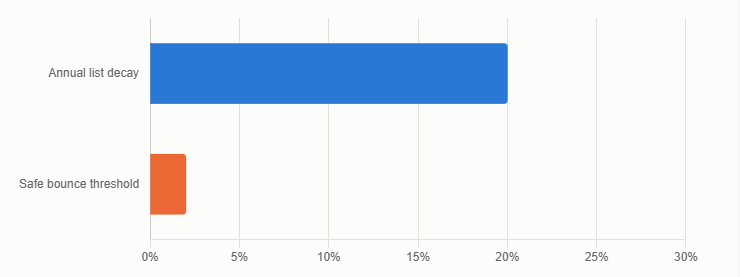
The scale of the problem is bigger than most people assume:
The deliverability threshold that actually matters is narrower than you’d think:
So the real question isn’t just how do you find someone’s email — it’s how do you find one you can trust enough to send to. Both halves matter.
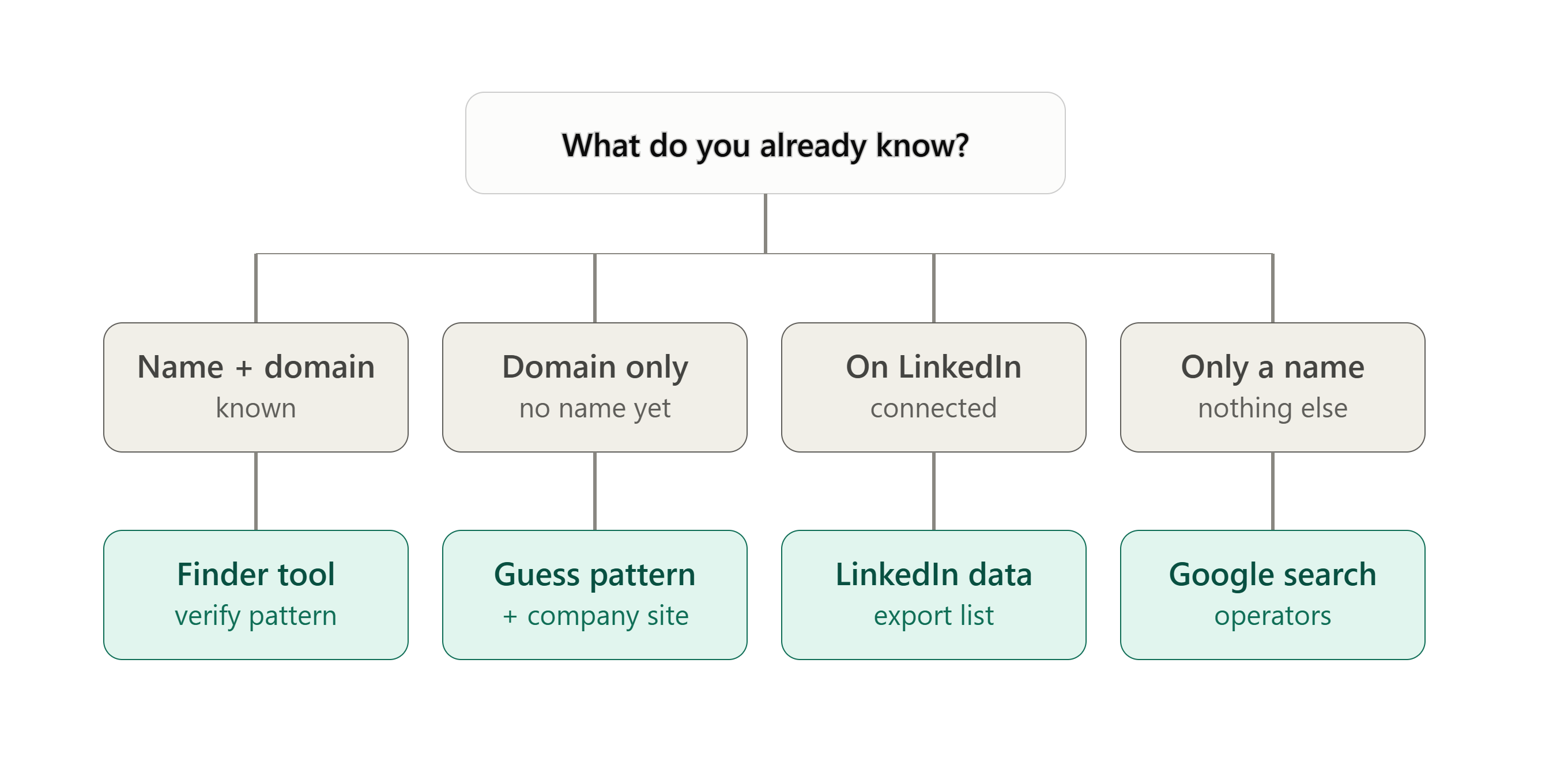
Don’t work through 12 methods in order. Use what you already know to skip straight to the one most likely to work.
| What you already know | Best method to try first | Why |
|---|---|---|
| Full name + company domain | Email finder tool | Pattern detection + verification in one step |
| Just a company domain, no name | Pattern guess + company site | Most companies use one address structure company-wide |
| LinkedIn profile URL, no domain | Name-based finder or Sales Navigator | Domain lookup usually needs the name first |
| Already connected on LinkedIn | LinkedIn data export | Only works for accepted connections, not cold prospects |
| A blog or newsletter they run | Newsletter subscription | Personal senders often use their real address |
| Nothing but a name | Google + advanced search operators | Cheapest option when you have the least information |
An email finder takes a name and a company domain, checks that domain’s known address pattern, and returns a match — ideally already verified.
Gamalogic’s Email Finder works this way:
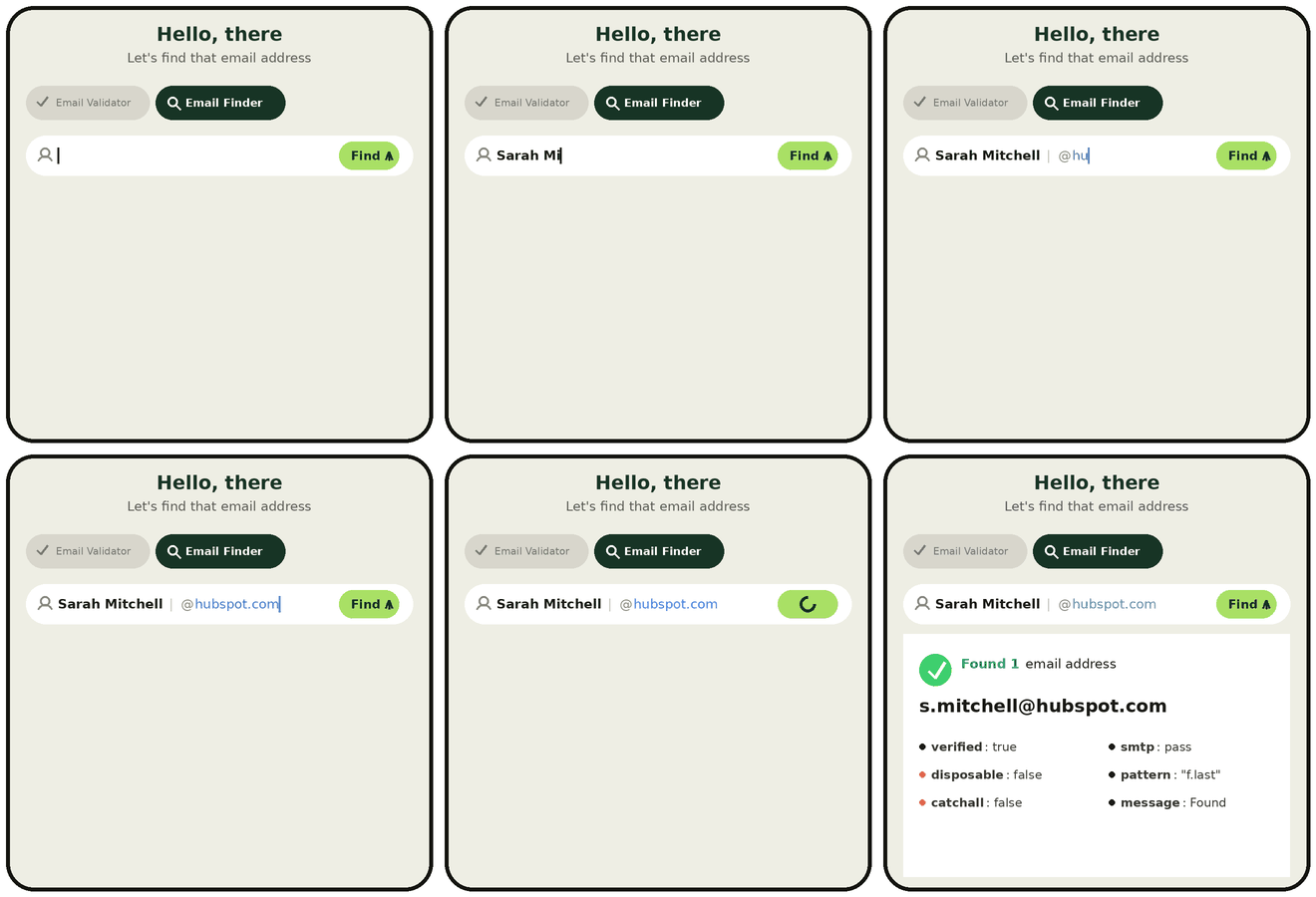
For bulk lists, the Google Sheets add-on runs the same lookup against an entire spreadsheet at once.
One limitation worth knowing upfront: finder tools work off domain-level patterns, so they’re weaker for personal Gmail or Outlook addresses that don’t follow a company convention. Method 9 below covers that case.
“Guessing email addresses” is a legitimate method, not a shortcut around real research. Most companies standardize on one pattern company-wide. Confirm it from a single known address, and you know the format for everyone else at that domain.
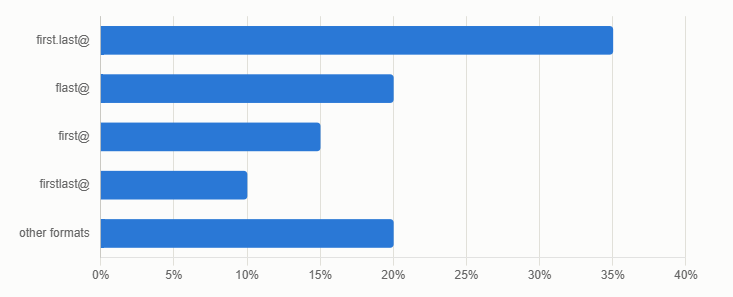
How common each pattern actually is, based on aggregate corporate email data:
| Pattern | Approx. share | Example (Jane Smith at acme.com) |
|---|---|---|
| first.last@ | ~35% | jane.smith@acme.com |
| flast@ | ~20% | jsmith@acme.com |
| first@ | ~15% | jane@acme.com |
| firstlast@ | ~10% | janesmith@acme.com |
| Other formats | ~20% | varies |
Once a company sets a pattern, it tends to stick almost universally. Public data on large enterprises backs this up: one major professional services firm was found to use a single naming convention for over 97% of its addresses, and a major bank was found to use one pattern for more than 92% of verified addresses.
The takeaway: once you’ve confirmed the pattern with one real address, a guess for anyone else at that same company is a strong bet, if you verify it before sending.
How to confirm the pattern before you guess at scale:
Why the verification step matters so much here: guessing without verifying is the most common way outreach lists quietly degrade. A guessed address that doesn’t exist doesn’t fail silently. It counts against the same bounce-rate threshold — under 2% — that determines whether mailbox providers start treating your sends as a spam signal, exactly the same as a scraped or stale address would.
Start with /contact, /about, /team, or /meet-the-team.
Try these combinations:
"[Full Name]" AND emailsite:company.com "[Full Name]"site:company.com "@company.com"This works best for people with a public professional footprint — conference speakers, bylined writers, anyone quoted in press coverage. It gets weaker for common names with no distinguishing context.
Google treats the @ symbol as a social-tag operator, so this specific trick doesn’t work there. DuckDuckGo will return publicly indexed pages containing @domainname.com, surfacing addresses that show up in:
Add a name to narrow the results, or leave it generic to see the domain’s pattern in the wild.
If you’re already connected with someone on LinkedIn, you can request a data export that includes emails for connections who’ve allowed it to be visible:
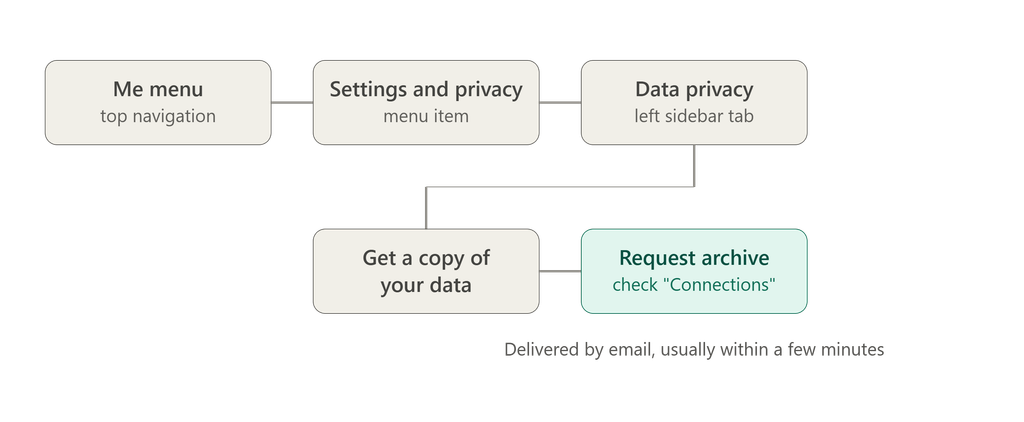
This only surfaces addresses for people you’re already connected to who’ve opted to share it. It’s not a cold-prospecting method. For prospects you’re not connected with, LinkedIn Sales Navigator’s filtering can at least confirm current company and role, which feeds back into Methods 1 and 2.
Individuals and small businesses frequently send newsletters from a personal inbox rather than a no-reply address.
Every other guide on this topic lists WHOIS as a standard method without flagging how much it’s changed.
This is one of the clearest gaps across other guides on this topic, most still present WHOIS as a mainstream tactic with no mention of the policy shift that made it mostly ineffective.
People sometimes post their email publicly but obscure it from bots — writing “jane at acme dot com” instead of jane@acme.com.
If direct methods fail, a short, non-generic message to info@ or support@ asking to be pointed to the right person is a legitimate fallback, especially for smaller organizations where that inbox is actually monitored by a real person.
Sometimes the fastest, most reliable path isn’t technical at all:
This is worth trying before a cold guess whenever you have any existing relationship path — it converts far better than an unsolicited email, regardless of how accurate the address is.
For teams doing this at volume, enriching a CRM, running it inside a signup flow, or batch-processing a list, a manual method per contact doesn’t scale.
Gamalogic’s Email Finder API takes a first name, last name, and domain via a single request and returns a verified result programmatically:
GET https://gamalogic.com/email-discovery/?firstname=Jane&lastname=Smith&domain=acme.com&apikey=yourAPIkeyThe same pattern-plus-verification logic from Method 1 runs automatically across thousands of contacts.
The core trade-off is search volume and verification depth, not just price.
| Tool | Free tier | Paid entry point | Best for |
|---|---|---|---|
| Gamalogic | Free credits on signup, no card required | Low-cost credit packs | Finder + verification in one workflow, Google Sheets bulk use |
| Hunter.io | Limited free searches/month | Paid plans scale by volume | Established database, browser extension |
| Snov.io | Limited free searches/month | Paid plans scale by volume | Combined finder + drip campaigns |
| GetProspect | Chrome-extension based lookups | Paid plans for bulk export | Quick LinkedIn-adjacent lookups |
| Voila Norbert / FindThatLead | Small free trial | Paid, per-search pricing | One-off lookups at moderate volume |
Note: free-tier limits and pricing on each vendor’s will change often.
Where Gamalogic differs from most names on this list: finder and verification aren’t separate purchases. A discovered address is checked for syntax, domain and MX records, and mailbox status as part of the same workflow, rather than requiring a second tool.
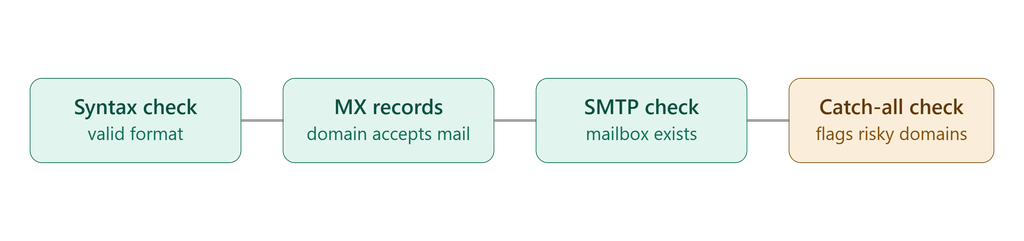
Whichever method finds the address, the same step comes after every one of them. An address can look completely correct and still not exist, forward nowhere, or land in a catch-all inbox nobody reads.
A real verification pass checks:
Skipping this step is what turns a found address into a bounced email. Once bounce rate crosses roughly 2–3%, mailbox providers start reading it as a spam signal rather than a data hiccup, and that affects deliverability for every email you send afterward, not just that one message.
“The mistake I see most often isn’t a bad guess, it’s a correct-looking guess nobody verified. A pattern match tells you the address is plausible. Only an SMTP check tells you it’s real.” – Athika Jishida, Lead Generation Strategist at Gamalogic
Finding an address and being allowed to use it for outreach are two different questions. Before sending anything, check:
For the fuller framework on sourcing and consent, see Gamalogic’s Ethical Email Finding guide.
How do you find someone’s email address for free?
Google search operators, DuckDuckGo’s @domain.com search, company contact or about pages, WHOIS (with reduced success since 2018), and most finder tools’ free-tier searches including Gamalogic’s free signup credits, are all no-cost starting points.
How do you figure out someone’s email if you only know their name?
Start with Google search operators combining the name with “email” or “contact.” Once you also know where they work, move to a domain-based method, a finder tool or a confirmed company pattern.
Is guessing email addresses accurate?
It can be highly accurate once you’ve confirmed the company’s pattern from one real address. Some large companies use a single format for over 90% of employees. But it’s only reliable when paired with verification before sending.
How can I find out someone’s email address without LinkedIn?
Company contact pages, Google or DuckDuckGo search, WHOIS, newsletter subscriptions, and a name-plus-domain finder tool all work without LinkedIn.
Does WHOIS still show someone’s real email address?
Rarely, for domains registered or renewed since 2018. ICANN’s GDPR-driven privacy rules mean most registrars redact registrant contact details by default, returning a privacy-proxy address instead.
What’s the difference between an email finder and email verification?
A finder locates a candidate address. Verification confirms that address actually exists and can receive mail. Finding without verifying is how outreach lists accumulate bounces.
Is it legal to look up someone’s email address?
Generally yes, when using publicly available information. What requires more care is how you use the address afterward under GDPR, CAN-SPAM, and CCPA.


Reduce fake signups and improve onboarding with email validation for SaaS. Explore tools, APIs, and strategies to scale your growth efficiently.

Wondering why your emails keep landing in spam folders? Uncover the key reasons behind poor deliverability and learn practical steps to ensure your messages reach the inbox every time.
Discover how the Gamalogic Email Finder for Google Sheets helps you find and verify email addresses instantly—so your outreach hits the mark every time.


 No credit card required
Post your Comment.