 Sign In














 Email Marketing
 ABM
ABM  List Building
  Lead Generation
  Growth Hacker
  Digital Marketing
  Data Enrichment
  Software as a Service
  Data as a Service
  Waterfall Enrichment
  Startup
  Revenue Performance
  Job Change Tracking
  Customer Data Platform
  CRM
CRM 


 Knowledge Base
  Video Tutorials
  Help Center
  Tarpitting Scoring
  ROI Calculator
  About us
  Contact us
  Testimonials
  Automation
Email Address Format: Valid Syntax Rules, Examples & Provider Limits

29 Sep 2026
Sreerag
12 Minutes
Read

 Blog
FAQ
Case Studies
Knowledge Base
Video Tutorials
Help Center
SEG Validation
Tarpitting Scoring
ROI Calculator
About us
Contact us
Testimonials
Blog
FAQ
Case Studies
Knowledge Base
Video Tutorials
Help Center
SEG Validation
Tarpitting Scoring
ROI Calculator
About us
Contact us
Testimonials
A valid email address follows the structure local-part@domain.tld, for example,
jane.doe@company.com. The local part (before the @) can be up to 64 characters, the domain up to 255 characters, and the full address up to 320 characters combined, per RFC 5322. But the spec and real inbox providers don’t fully agree: Gmail, Outlook, and Yahoo each enforce their own, stricter rules on top of it, which is where most confusion about “what’s actually valid” comes from Getting this wrong is one of the most preventable causes of bounces in any email marketing campaign.
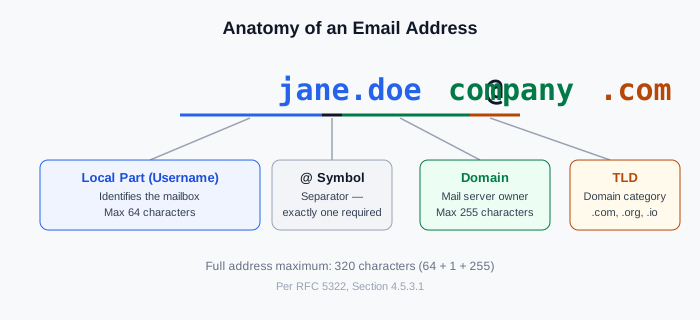
Every standard email address has four parts:
jane.doecompany.com, .org, .ioSome addresses also include a subdomain, sitting between the @ symbol and the domain: jane.doe@mail.company.com.
When you send an email, the sending server looks up the domain’s MX record, connects to that mail server, and asks whether the local part is a recognized mailbox. This is the exact failure point that quietly damages email marketing campaigns — not spam filters or content, just a malformed address that never had a chance to arrive
If the format is wrong at any stage, the message bounces before it ever reaches an inbox, terminology like MX record and local part is covered in more depth across Gamalogic’s email validation glossary.
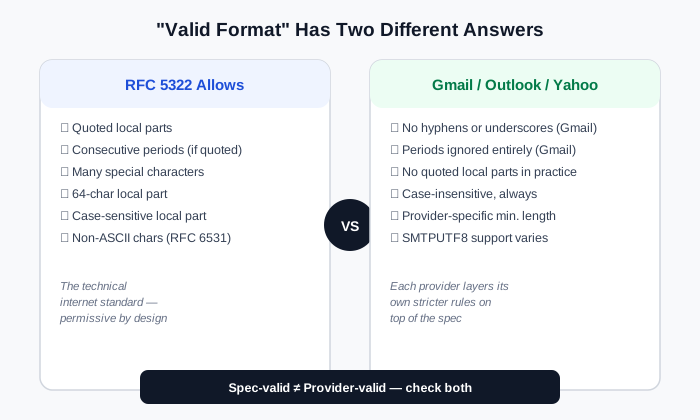
This is the part most guides on this topic skip, and it’s the source of almost all the confusion. RFC 5322 — the technical standard defining email syntax — is genuinely permissive. It allows quoted local parts like "john..smith"@example.com, where consecutive periods (normally forbidden) become legal once wrapped in quotes, along with a wider range of special characters than most people have ever seen in a real address.
Real inbox providers don’t implement the full RFC. Gmail, Outlook, and Yahoo each layer their own, stricter rules on top of the spec, mainly to reduce parsing errors, spoofing, and abuse. So an address can be fully RFC-valid and still get rejected by Gmail’s signup form.
The practical takeaway: “is this address in valid format” has two different correct answers depending on whether you mean valid per the internet standard, or valid on the specific provider it’s registered with. Most validation tools only check the first one which is part of why claimed accuracy numbers vary so much between vendors; see how we define and measure ours in our accuracy methodology.
The local part can contain:
. _ - + in most standard, non-quoted implementationsLength limit: 64 characters, per RFC 5322 section 4.5.3.1.1.
Casing and periods barely matter in practice. Most major providers treat the local part as case-insensitive, and Gmail specifically ignores periods entirely — john.doe@gmail.com and johndoe@gmail.com reach the same inbox. That’s a Gmail-specific routing quirk, not a universal rule.
One local-part pattern worth flagging separately: generic addresses like info@, support@, or sales@ are structurally valid but behave differently for outreach and marketing purposes than a named individual’s address, see our breakdown of role-based email addresses for why that distinction matters.
The domain can contain:
Length limit: 255 characters, giving a combined maximum of 320 characters for the full address.
A domain also needs a valid MX record, the DNS entry telling other mail servers where to deliver mail for it. A syntactically perfect domain with no MX record can’t receive anything at all. It’s also worth noting that a domain can be perfectly valid in format and still be a problem address in practice disposable and temporary email domains pass every syntax and MX check while still being throwaway addresses nobody checks twice.
[Insert real Gmail + Outlook signup-error screenshots here, see note in the meta block above]
| Rule | Gmail | Outlook / Microsoft 365 | Yahoo | Zoho |
|---|---|---|---|---|
| Periods in local part | Ignored (routing quirk) | Treated as significant | Treated as significant | Treated as significant |
| Underscore ( _ ) | Not allowed at signup | Allowed | Allowed | Allowed |
| Plus (+) for aliasing | Allowed (user+tag@gmail.com) | Allowed | Allowed | Allowed |
| Hyphen (-) | Not allowed at signup | Allowed | Allowed | Allowed |
| Consecutive periods | Never allowed | Never allowed (unquoted) | Never allowed (unquoted) | Never allowed (unquoted) |
| Minimum username length | 6 characters | Varies | 4 characters | Varies |
| Case sensitivity | Case-insensitive | Case-insensitive | Case-insensitive | Case-insensitive |
(These reflect each provider’s signup-form restrictions specifically, a mail server may still accept and deliver to addresses with characters it wouldn’t let you register at signup.)
If you’re validating a list of unknown addresses, you can’t assume one provider’s rules apply to all of them. An address that looks “wrong” by Gmail’s standards might be completely normal on Zoho or a custom company domain.
Almost every other guide on this topic treats email addresses as ASCII-only. That stopped being fully accurate over a decade ago.
RFC 6531 (SMTPUTF8) is an SMTP extension, published in 2012, allowing non-ASCII characters accented letters, Cyrillic, Chinese, Arabic script, directly in the local part of an email address. Support for it varies by mail server and client, which is why it hasn’t fully replaced ASCII addresses, but it’s a real, standards-track part of modern email, not a theoretical edge case.
Internationalized domain names work differently: since most of the DNS system still runs on ASCII, a domain containing non-Latin characters gets converted to a special ASCII form called Punycode, always prefixed with xn--. A domain like münchen.de transmits as xn--mnchen-3ya.de behind the scenes mail clients typically handle this conversion automatically.
For most B2B and marketing use cases, ASCII addresses still dominate, but if you operate internationally, it’s worth knowing whether your validation tool actually supports SMTPUTF8 rather than silently rejecting every non-ASCII address as invalid.
A meaningful share of “invalid format” addresses aren’t random garbage they’re one-keystroke typos of a handful of major domains.
| Common typo | Intended domain |
|---|---|
| gmial.com, gmal.com, gmaill.com | gmail.com |
| yaho.com, yahooo.com | yahoo.com |
| hotmial.com, hotmal.com | hotmail.com |
| outlok.com, outloo.com | outlook.com |
| gmai.com | gmail.com |
A syntax-only validator will pass jane@gmial.com — it’s a structurally fine-looking domain, it just doesn’t exist as the one the person meant. Catching this class of error takes either a live MX/domain check or a typo-suggestion feature, not syntax rules alone. It’s also worth knowing that a domain reactivated specifically to catch senders with bad list hygiene a spam trap can look exactly like a normal, syntactically valid address, which is a separate risk from a simple typo.
| Valid | Why |
|---|---|
| jane.doe@company.com | Standard format, single period, valid domain |
| support+billing@company.com | Plus-addressing, widely supported for routing/tagging |
| j_smith@company.co.uk | Underscore and country-code TLD both fine |
| Invalid | Why |
|---|---|
| jane..doe@company.com | Consecutive periods, not allowed unquoted |
| .jane@company.com | Cannot start with a period |
| jane@company | Missing a TLD — domain alone isn’t deliverable |
| jane@@company.com | Two @ symbols |
| Term | Definition |
|---|---|
| RFC 5322 | The IETF standard defining valid email message and address syntax |
| RFC 6531 (SMTPUTF8) | SMTP extension allowing non-ASCII characters in the local part of an address |
| MX record | The DNS entry specifying which mail server handles delivery for a domain |
| Punycode | ASCII encoding (prefixed xn--) used to represent internationalized domain names |
| Local part | The portion of an address before the @ symbol |
| Catch-all domain | A domain configured to accept mail to any address, valid or not |
| Disposable domain | A temporary, throwaway email domain not meant for long-term use |
| Role-based address | A generic address (info@, support@) not tied to one named individual |
Manually checking a list against these rules works for a handful of addresses. It doesn’t work for a a real email marketing list of 10,000 contacts, and it won’t catch typo-domains, missing MX records, or provider-specific quirks all of which look structurally valid while still failing to deliver.
Gamalogic’s email validation API checks syntax, MX records, and disposable-domain status in the same real-time or bulk request, so a malformed address, a typo-domain, and a dead domain are all caught in one pass instead of needing separate manual checks.
If you’re building a list by guessing likely addresses from a name and company domain rather than validating an existing one, the API runs the same checks programmatically against bulk lookups too useful context on that specific workflow is in our FAQ below.
What is the correct format for an email address?
local-part@domain.tld — for example, jane.doe@company.com. The local part identifies the mailbox, the domain identifies the mail server, and the TLD categorizes the domain.
Can an email address contain special characters?
Yes, but which ones depends on the provider. Periods, hyphens, underscores, and plus signs are common, but Gmail specifically disallows hyphens and underscores at signup, while other providers allow them.
Why does my email address work on one site but get rejected on another?
Different websites implement different validation rules, some check only against the RFC spec, others add their own stricter rules. This is a site-side validation choice, not a property of your address being wrong.
Can an email address have Unicode or non-English characters?
Yes, since RFC 6531 (2012) added SMTPUTF8 support for non-ASCII characters in the local part. Support varies by mail server, so an internationalized address may not work everywhere, but it’s a legitimate, standards-track format.
What’s the maximum length of an email address?
320 characters total (64 for the local part, 1 for the @ symbol, 255 for the domain), though 256 characters is the safer practical limit due to separate constraints on the mail-forwarding path.
Does capitalization matter in an email address?
Generally no for the domain, and usually no for the local part on major providers, though the RFC technically allows the local part to be treated as case-sensitive, almost no provider enforces this in practice.
If I’m guessing someone’s email address rather than validating one I already have, does format still matter?
Yes, a guessed address still has to be format-valid before it’s worth verifying at all. Our guide on how people actually find email addresses covers the common local-part patterns (first.last@, flast@, etc.) companies actually use, which is the practical starting point before you check format or run verification.
A valid email address follows one simple structure: local-part@domain.tld. But “valid” isn’t a single fixed rule. RFC 5322 sets the technical baseline, and Gmail, Outlook, Yahoo, and Zoho each add their own stricter rules on top of it, same address, different verdicts depending on where it’s checked.
Format is also only half the picture. A typo’d domain, a dead mailbox, or a missing MX record can all look perfectly valid and still fail to deliver and still fail to deliver, quietly dragging down every email marketing campaign sent to that list.
For one address, checking by eye works fine. For a real list, it doesn’t scale which is why validation exists as its own step, not a formatting afterthought.
Run a list through Gamalogic’s email validation API to catch format errors, typo-domains, and dead mailboxes in one pass, 500 free credits, no card required, to test it on your own list first.



How to Integrate an Email Validation API is one of the most impactful steps you can take to ensure clean data, improved deliverability, and reduced bounces.Whether you’re a developer building a signup form, a SaaS product capturing leads. email marketer this guide will help you.
Learn how to detect fake and disposable emails at signup using real-time email validation APIs. Improve deliverability, protect sender reputation, and boost engagement.
Discover What is Email Validation , why it matters, and how third-party tools help improve deliverability, sender reputation, and ROI.


 No credit card required
Post your Comment.