 Sign In














 Email Marketing
 ABM
ABM  List Building
  Lead Generation
  Growth Hacker
  Digital Marketing
  Data Enrichment
  Software as a Service
  Data as a Service
  Waterfall Enrichment
  Startup
  Revenue Performance
  Job Change Tracking
  Customer Data Platform
  CRM
CRM 


 Knowledge Base
  Video Tutorials
  Help Center
  Tarpitting Scoring
  ROI Calculator
  About us
  Contact us
  Testimonials
  Automation
How to Drop a Live Email Checker on a Signup Form Without Writing Code

24 Sep 2026
Sreerag
12 Minutes
Read

 Blog
FAQ
Case Studies
Knowledge Base
Video Tutorials
Help Center
SEG Validation
Tarpitting Scoring
ROI Calculator
About us
Contact us
Testimonials
Blog
FAQ
Case Studies
Knowledge Base
Video Tutorials
Help Center
SEG Validation
Tarpitting Scoring
ROI Calculator
About us
Contact us
Testimonials
If you’ve ever opened a signups spreadsheet and found rows of asdf@asdf.com and test@test.com, you already know the problem this post solves. Fake and mistyped signups don’t just clutter a list, they quietly distort onboarding metrics and waste sales follow-up, which is part of why SaaS teams that have looked closely at their onboarding numbers tend to treat clean signup data as a growth lever rather than a technical afterthought, not just a hygiene task.
Most teams respond one of two ways: they accept the noise as the cost of running a public form, or they get quoted a week of developer time for a backend validation task that keeps getting bumped for higher-priority work. There’s a third option that doesn’t show up in most comparisons, a JS widget: one script tag that checks an email address the moment someone types it into a form, before it ever reaches a database. No backend code, no request logic to write, no developer sprint.
This post walks through what the widget actually does, how to set it up on Webflow, WordPress, Framer, or any plain HTML form, and where it stops making sense so you know when to graduate to a full API integration instead.
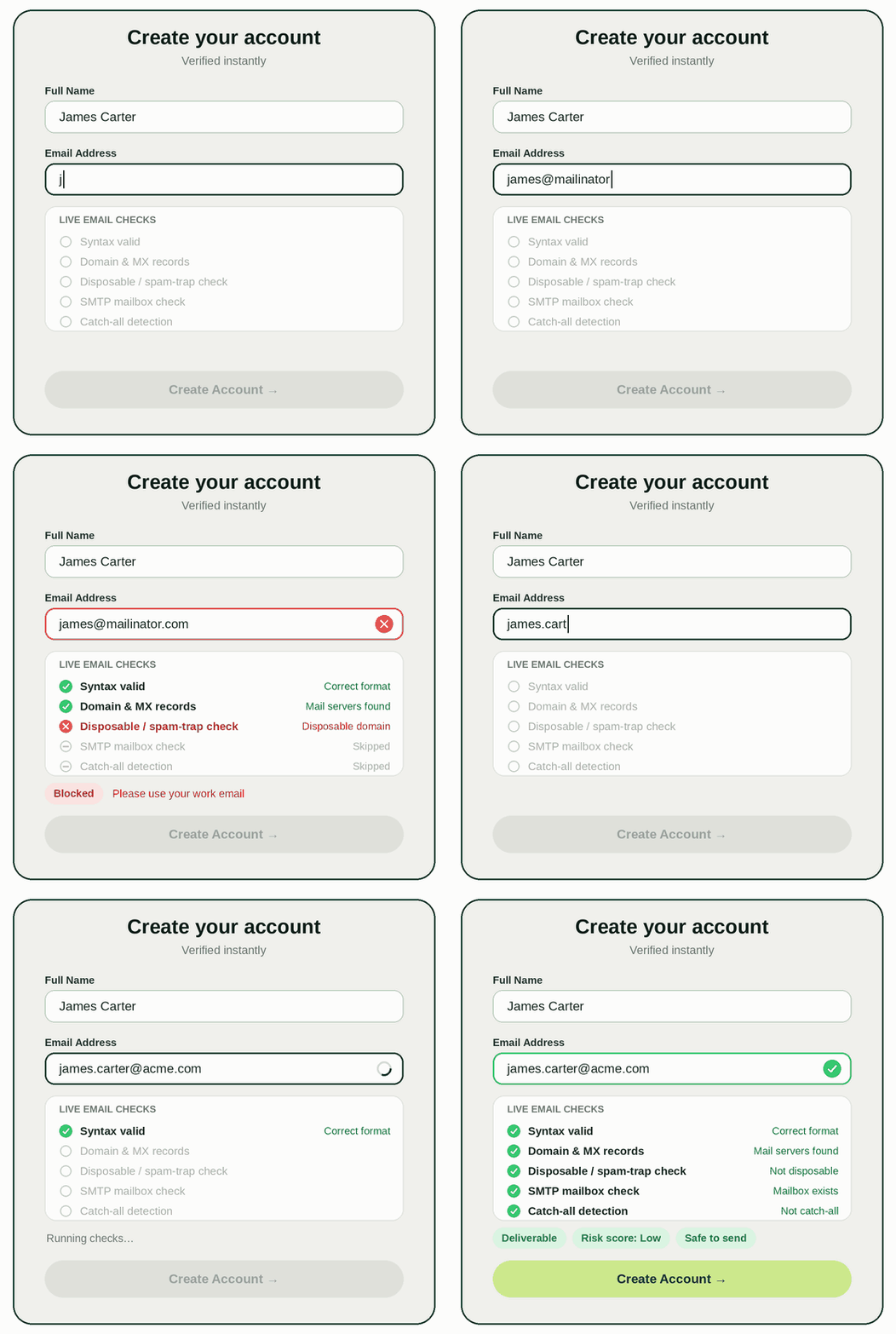
“No-code” here means no custom code, you’re not writing request handlers or parsing JSON responses. What you’re doing is pasting one <script> tag onto your page, the same way you’d add a chat widget or an analytics tag. From that point on:
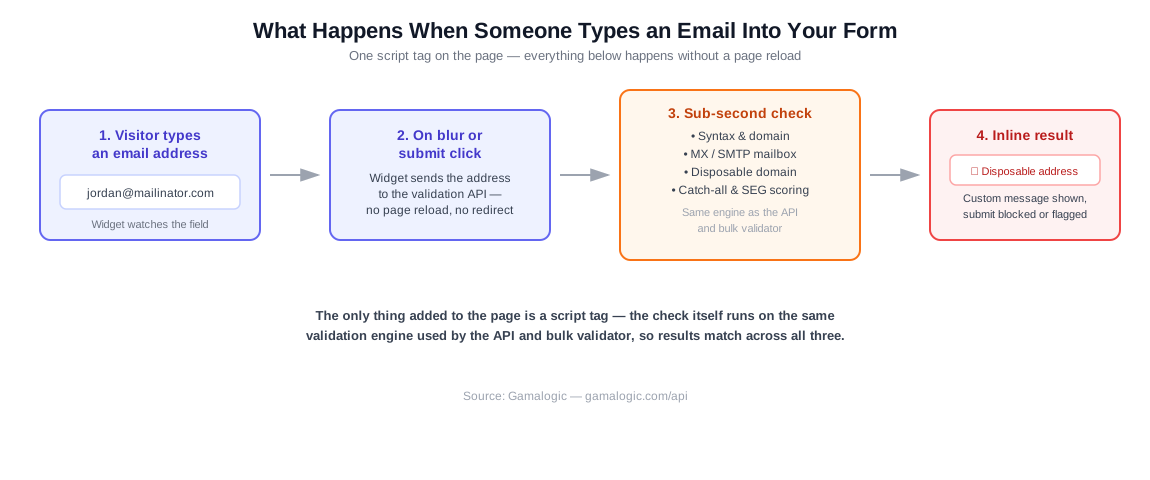
The important detail is the last line in that diagram: it’s the same validation engine behind Gamalogic’s API and bulk validator, not a lighter, less accurate version built specifically for the widget. A disposable Mailinator address gets caught the same way whether it’s checked through the widget, the API, or a spreadsheet upload, which matters if you’re testing accuracy before rolling it out everywhere, since there’s no gap to account for later.
1. Get free credits, no card needed. Gamalogic’s free tier gives new accounts 500 verification credits with no credit card required, and the credits don’t expire while you test. That’s enough to run the widget on a live form for a while before you need to think about a paid plan.
2. Grab the embed snippet from your dashboard. Inside Gamalogic’s App Integration dashboard, the widget lives alongside the other no-code integrations, the same dashboard that connects to 20+ email platforms without custom code, covered in our guide to validating lists across every major ESP. Generate the widget snippet for your site.
3. Paste the snippet into your page. Where it goes depends on what you’re building on:
</body> tag” field.<body> tag section.</body> tag in your page’s source.4. Point it at your email field. Most widget setups need one thing from you: which field on the form is the email input. This is usually a matter of matching the field’s id or name attribute in the widget’s config, which your dashboard setup screen walks through.
5. Decide what happens on a bad address. This is the one genuinely important decision in the whole setup, covered in the next section, don’t skip it.
6. Test with a few known-bad addresses before going live: a Mailinator address, an obvious typo, and a real one you control. Confirm each behaves the way you expect.
Every real-time widget in this category gives you some version of three choices when an address comes back invalid or risky:
There’s no universally correct choice here, it’s a trade-off between friction and list quality, and it depends entirely on what the form is for. A B2B trial signup and a blog newsletter form justify different answers.
Show Image
The widget and the API aren’t competing products, they’re two entry points into the same validation logic, and most teams end up using both for different things. The widget is the right call when you want something live today, on a marketing site or landing page, without pulling in a developer, and if what you actually need first is a smaller starting point, cleaning a list you already have rather than catching problems at the point of entry, testing a few free email checker tools is the better fit.
A full API integration makes more sense once you’re building custom signup logic inside a product, need server-side validation before writing to a database, or are validating at a volume and level of customization the widget’s configuration options don’t cover.
If you’re not sure which side of that line you’re on, our breakdown of real-time vs. batch validation covers the broader version of this trade-off, and Gamalogic’s developer integration guide is the next step if the API route fits better.
Most signup forms already have some email validation, usually a regex check confirming the input looks like something@something.com. That catches typos in the format, but nothing else. It won’t catch:
info@ or support@, valid-looking but rarely tied to a real signup you want in your CRMCatch-all handling in particular is the layer most basic form plugins skip entirely, because it requires an actual SMTP-level check rather than a pattern match, catch-all detection is structurally harder to get right than the other layers, for reasons worth understanding if you’re deciding how strict to make your form’s rules. It’s also why “my form already validates emails” and “my form validates emails at the point where it actually matters” are two different claims.
Do I need a developer to add a real-time email validation widget?
No, that’s the specific difference between a widget and an API integration. The widget is a single script tag you paste into your site builder’s custom code section (Webflow, WordPress, Framer, etc.), with no backend request logic to write.
Will a validation widget slow down my signup form?
The check itself runs in under a second and happens asynchronously in the background, so it doesn’t block the page from loading. The visitor only notices it at the moment they finish typing their email, not before.
What happens to an email address that’s flagged as risky does the widget block it automatically?
That’s configurable, not automatic. You choose whether a flagged address blocks the submit button, shows a warning but still allows submission, or is logged silently without changing the visitor’s experience at all.
Does the widget catch catch-all and disposable email addresses?
Yes, it runs the same syntax, domain, MX, SMTP, disposable-detection, and catch-all scoring used by the full API, not a stripped-down version built just for the widget.
Can I use a validation widget alongside my email service provider’s own signup form?
It depends on whether your ESP’s form allows custom code injection. Where it doesn’t, the more common pattern is validating through your ESP’s own integration or a webhook sync after signup, see validating lists across 20+ ESPs for which approach fits which platform.
Is a free plan enough to run a validation widget on a live form?
For testing and lower-volume sites, yes, Gamalogic’s free email address validator tier includes 500 credits with no credit card required and no expiry while you’re testing. Once a form is bringing in enough traffic to exhaust that regularly, that’s the natural point to move to a paid plan
A signup form without real-time validation isn’t broken. It’s missing a layer that most teams don’t think to add until fake signups start showing up in their metrics.
The widget is the fastest way to close that gap: one script tag, the same detection engine as the full API, and a setup that takes minutes rather than a developer sprint.
Here’s how to put it to work:
Ready to try it? Gamalogic gives you 500 free credits with no credit card required, which is enough to test the widget on a live form.



Learn everything about The Complete Guide to Email Validation APIs ,their features, benefits, integration steps, and top tools to ensure accurate, secure, and deliverable email addresses for your business.

How to Integrate an Email Validation API is one of the most impactful steps you can take to ensure clean data, improved deliverability, and reduced bounces.Whether you’re a developer building a signup form, a SaaS product capturing leads. email marketer this guide will help you.

Developing new email marketing ideas consistently can be a daunting task, leaving even the most seasoned email marketers feeling stuck in a creative rut. Fear not! This comprehensive guide will equip you with a wealth of strategies and techniques to ensure you never run out of email marketing ideas.


 No credit card required
Post your Comment.