How to Use Gamalogic Bulk Email Validator – Step-by-Step Guide

06 Nov 2025
Sreerag
12 Minutes Read

Managing thousands of email addresses manually is nearly impossible — and sending campaigns to invalid emails can damage your sender reputation fast. With Gamalogic’s Bulk Email Validator, you can upload and verify large lists of emails quickly and securely.

Whether you’re a marketer cleaning your CRM or a developer handling automated verifications, Gamalogic makes bulk validation effortless and accurate. In this guide, you’ll learn how to use Gamalogic’s Bulk Email Validator, interpret results, and scale up to our API for automated verification.

Why Validate Emails in Bulk?

  • Protect your sender reputation by removing invalid and spam-trap addresses.
  • Save time with automated bulk validation for large datasets.
  • Reduce bounce rates and improve deliverability for all campaigns.
  • Focus on genuine leads that drive engagement and conversions.

Quick Overview (What You’ll Need)

  • A Gamalogic account (sign up is free and includes 500 free credits).
  • A CSV, TXT, or Excel file containing the list of email addresses.
  • (Optional) Cloud storage access like Google Drive, OneDrive, or Dropbox.
  • (Optional) API key for automated or recurring validation.

Step-by-Step: Validate a Bulk Email List with Gamalogic

Step 1 — Sign Up or Log In

  1. Go to the Gamalogic website.
  2. Sign up using your email and password, or log in with Google or Microsoft.

Tip: New users get 500 free credits — enough to test both single and bulk validation features.


Step 2 — Upload Your File

After logging in, you’ll land on the dashboard where the Email Validation tab is selected by default.

  1. Click “Attach CSV, TXT, or Excel File” to upload your list.
  2. Gamalogic supports .txt, .csv, .xls, and .xlsx formats.
  3. You can upload files directly from your computer or import them from:
    • Google Drive
    • OneDrive
    • Box.com
    • Dropbox

Step 3 — Start the Upload

Once your file is selected, you’ll see a progress bar showing upload status.
When the upload completes, click “Validate.”


Step 4 — Confirm the Validation

A pop-up will appear asking you to confirm validation for the number of rows in your file.

  • Gamalogic supports up to 100,000 rows per batch.
  • Ensure your file size and available credits match your list size.
  • Then click “Accept.”

Step 5 — Review Your Data

Your uploaded file will open in the Gamalogic Online Sheet.

  • The column containing email addresses will be automatically detected and marked as the email field.
  • If not, click the “+” button and manually select the correct column.
  • A ✅ tick mark will confirm your selection.

Step 6 — Begin Validation

Click “Upload” to start the validation process.
You’ll see a progress bar updating in real time on your dashboard.
Wait until it reaches 100% — that’s when all email addresses have been validated.


Step 7 — Access Your Results

Once validation is complete, click “Go to File.”

You’ll now see your validated list along with added result columns that classify each email as valid, invalid, disposable, catch-all, role-based, or risky.


Step 8 — Download the Results

From the top-right corner, click Download to get your cleaned file.

  • Your original sheet remains intact — Gamalogic simply adds validation results as new columns.
  • You’ll also receive an email notification when validation completes.
  • To access it later, go to the History section in the dashboard menu.
  • Find your previous validations anytime and re-download the file as needed.

Understanding Your Results

Once your file is processed, each row will include a validation status and related metadata. Here’s what the results mean:

  • Valid – Email passed syntax, MX, and SMTP checks successfully.
  • Invalid – Bad syntax or unreachable domain detected.
  • Disposable / Temporary – Identified as a temporary mailbox (e.g., Mailinator).
  • Catch-All – Domain accepts all emails; Gamalogic predicts real deliverability.
  • Role-Based – Addresses like info@ or support@ marked as generic or low-conversion.
  • Risky / Spam Trap – Potentially harmful addresses flagged by AI scoring.

Best Practices for Bulk Validation

  • Clean your lists before every major campaign to improve inbox placement.
  • Remove invalid and disposable emails immediately.
  • Use real-time validation API on your forms to prevent future data pollution.
  • Schedule periodic list revalidation (every 30–90 days).
  • Integrate the Bulk Validation API for automated, ongoing hygiene in CRMs or marketing tools.

Automate with Gamalogic Bulk Validation API

Ready to validate large lists automatically?
You can use the Bulk Email Validation API to process thousands of addresses per request.
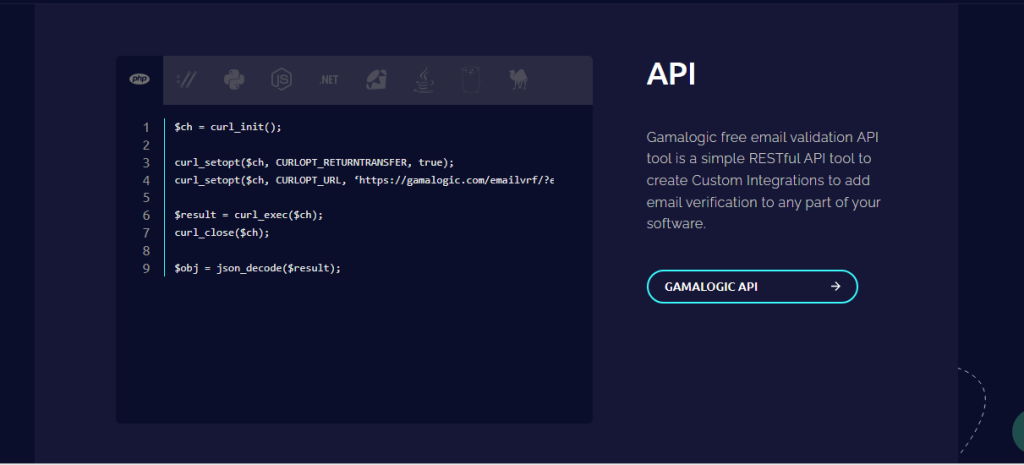
$ch = curl_init();

curl_setopt($ch, CURLOPT_RETURNTRANSFER, true);
curl_setopt($ch, CURLOPT_URL, ‘https://gamalogic.com/emailvrf/?emailid=your_emailid_here&apikey=your_api_key_here’);

$result = curl_exec($ch);
curl_close($ch);

$obj = json_decode($result);

e API Documentation for full parameters, response details, and SDKs for Python, Node.js, PHP, and more.


Connect to Other Gamalogic Resources


Upgrade & Pricing Options

Gamalogic starts with 500 free credits — perfect for testing both single and bulk email validation.

When you’re ready to scale, choose a plan that fits your business:

  • Pay-as-You-Go – Buy credits anytime, no monthly commitments.
  • Monthly Credit Plans – Predictable credits and volume discounts.
  • Enterprise Plan – For high-volume users needing custom limits, SLAs, and priority support.

All paid plans include:

  • Full API access
  • Higher throughput
  • Catch-all prediction
  • White-label reporting
  • 24/7 uptime & dedicated support

📧 Contact: info@gamalogic.com
📄 Visit: Pricing Page →


Conclusion & Call to Action

Keeping your email lists healthy is key to successful email marketing. With Gamalogic’s Bulk Email Validator, you can clean thousands of addresses in minutes — improving deliverability, protecting your sender score, and increasing campaign ROI.

Start free today — upload your file and validate up to 500 emails at no cost.

👉 Get 500 Free Credits and Start Bulk Validation → | View API Documentation →

No credit card required

Post your Comment.

You might also like

Email Validation
12 Min Read

Why B2B Email Verification is important?

B2B email lists decay fast—up to 36% every year. Professionals change jobs, and with them go their email addresses. That’s why B2B email verification is critical for digital marketers. Catch-all domains make validation tricky, but ignoring them leads to poor deliverability, high bounce rates, and wasted outreach. In this blog, discover how B2B email validation works, why catch-all detection matters, and how Gamalogic’s real-time verification helps keep your campaigns accurate, efficient, and effective.

Email Validation
12 Min Read

Boost Your Email List Accuracy with Gamalogic’s Google Sheets Add-On

Say goodbye to messy email lists and complex integrations. Gamalogic’s powerful (and free!) Google Sheets email validation add-on is every digital marketer’s dream tool. With thousands of users and a seamless setup, this tool makes real-time email verification fast, accurate, and easy—right from your spreadsheet. Whether you're in lead gen or email outreach, boost your campaign performance with just a few clicks.
Email Validation
15 Min Read

Real-Time Email Verification: How to Validate Email Addresses Instantly in 2025

In 2025, precision in email communication is no longer optional—it's essential. This blog explores the power of real-time email verification and how it enables instant validation of email addresses before they reach your list. Discover the latest tools, techniques, and benefits that help ensure your messages land in real inboxes—protecting deliverability, improving engagement, and maintaining sender reputation.