 Sign In














 Email Marketing
 ABM
ABM  List Building
  Lead Generation
  Growth Hacker
  Digital Marketing
  Data Enrichment
  Software as a Service
  Data as a Service
  Waterfall Enrichment
  Startup
  Revenue Performance
  Job Change Tracking
  Customer Data Platform
  CRM
CRM 


 Knowledge Base
  Video Tutorials
  Help Center
  Tarpitting Scoring
  ROI Calculator
  About us
  Contact us
  Testimonials
  Automation
SMTP in Email Marketing: Understanding Its Critical Role (And Why Tarpitting and Validation Matter)

04 May 2025
Mohamed Ahmed
12 Minutes
Read

 Blog
FAQ
Case Studies
Knowledge Base
Video Tutorials
Help Center
SEG Validation
Tarpitting Scoring
ROI Calculator
About us
Contact us
Testimonials
Blog
FAQ
Case Studies
Knowledge Base
Video Tutorials
Help Center
SEG Validation
Tarpitting Scoring
ROI Calculator
About us
Contact us
Testimonials
TL;DR
SMTP (Simple Mail Transfer Protocol) is the internet standard that governs how every email including your marketing campaigns travels from your sending server to a recipient’s inbox. Understanding how it works isn’t just technical trivia: SMTP responses are exactly where deliverability problems first show up, from soft bounces and tarpitting delays to hard bounces that damage sender reputation. This guide breaks down the full SMTP journey, the authentication checkpoints your emails pass through, what happens when a message gets tarpitted or bounced, and how email validation prevents most of these failures before they happen.
SMTP functions as the internet’s postal service, facilitating the reliable transfer of your emails across various networks, servers, and security checkpoints. Developed in 1982 by the Internet Engineering Task Force, this protocol has withstood the test of time, evolving alongside the internet while maintaining its core functionality.
At its essence, SMTP is a set of commands that email servers use to communicate with each other. When you hit “send” on an email, SMTP takes over, initiating a sequence of handshakes and data transfers that ensure your message reaches its intended destination.
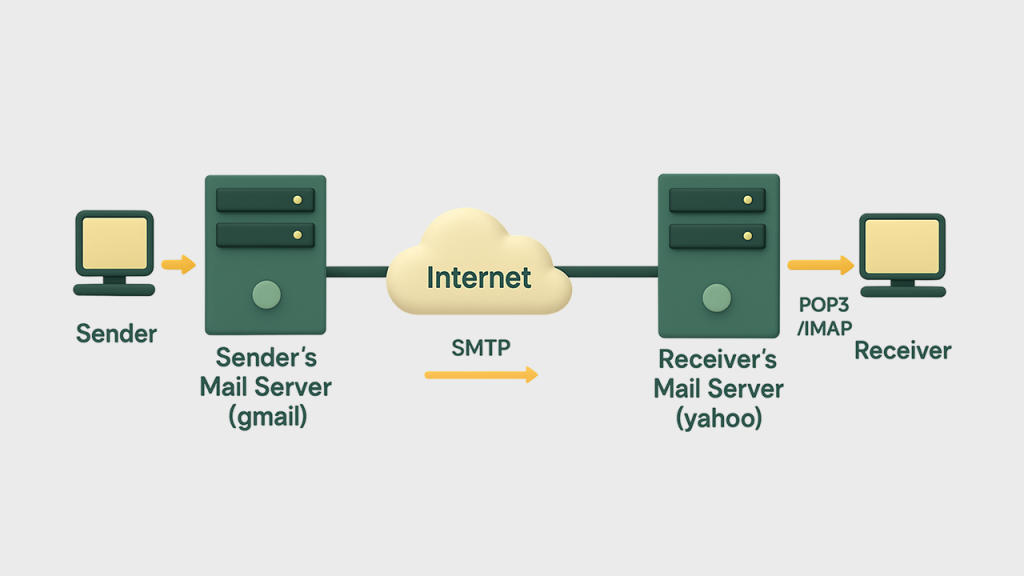
The journey of an email starts the moment you finish composing your message and click “send.” At this point, your email client (whether Gmail, Outlook, or another service) connects to an SMTP server. This connection typically uses port 25 for unencrypted communications, or more commonly today, port 587 for encrypted connections using TLS/SSL.
Your email client introduces itself to the SMTP server through a process called the “SMTP handshake,” which involves a series of commands:
This handshake provides the server with essential routing information — essentially addressing the digital envelope that will carry your message.
In today’s security-conscious digital environment, emails rarely proceed without proper verification. Modern SMTP implementations include various authentication mechanisms to prevent spam and email forgery:
Before accepting your outgoing message, the SMTP server typically verifies your identity through one of several methods:
The server performs several checks on your message:
These checkpoints help maintain the integrity of email systems by preventing malicious actors from abusing the network.
Once your email passes initial validation, the real journey begins. Like a baton in a relay race, your message may pass through multiple SMTP servers before reaching its destination.
Your outgoing SMTP server needs to locate the recipient’s mail server. It does this by performing a DNS lookup for the MX (Mail Exchange) records of the recipient’s domain. MX records specify which mail servers are responsible for accepting email for that domain, along with their priority levels.
For example, if you’re sending an email to someone@example.com, your SMTP server queries DNS for the MX records of example.com. The response might indicate that mail.example.com is responsible for receiving emails for that domain.
Your outgoing server establishes a connection with the recipient’s mail server and initiates another SMTP handshake similar to the one your email client performed earlier. The two servers exchange information about the sender, recipient, and message size.
At this point, several more security checks may occur:
If any of these checks fail, your message might be rejected, quarantined, or flagged as suspicious.
Assuming all checks pass successfully, the recipient’s mail server accepts your message and stores it until the recipient connects to retrieve their mail. This final stage typically involves a different protocol either POP3 (Post Office Protocol) or IMAP (Internet Message Access Protocol) which governs how email clients retrieve messages from servers.
When the recipient opens their email client, it connects to their mail server using POP3 or IMAP, downloads new messages, and displays them in the inbox. The journey is complete.
Not all email journeys end successfully. Various factors can interrupt the process.
Temporary issues that may resolve with time:
In these cases, the sending server typically attempts redelivery several times over a period of hours or days before giving up.
Not every delivery delay is a clean soft bounce. Some receiving servers use a technique called tarpitting — deliberately slowing down or delaying the SMTP response to a sending server, often as an anti-spam measure, without issuing a clear accept or reject. To a standard sending system, a tarpitted response can look ambiguous: not a hard failure, but not a confirmed delivery either.
This matters for marketers because tarpitting responses are easy to misread. Treating a tarpit delay as a simple retry-later soft bounce can mean repeatedly hitting the same slow server, which some receiving systems interpret as suspicious sending behavior compounding the original delay rather than resolving it. Gamalogic’s SMTP tarpitting handling is built specifically to recognize this response pattern and validate addresses accordingly, rather than treating every ambiguous SMTP response the same way as a standard soft bounce.
Permanent failures that won’t be resolved with retries:
When a hard bounce occurs, the sending server generates a bounce message — an email notification explaining why delivery failed and returns it to the sender.
While SMTP’s core functionality remains largely unchanged, the protocol has evolved significantly to address modern email challenges.
For marketers, SMTP isn’t just a technical protocol — it’s the foundation of successful email marketing campaigns. Understanding how SMTP works enables marketers to optimize deliverability and maximize ROI from email initiatives.
Email deliverability the ability to reach subscribers’ inboxes rather than spam folders or being blocked entirely — depends largely on proper SMTP implementation.
Proper authentication is non-negotiable for marketing emails:
Marketing platforms that implement these authentication methods experience significantly higher deliverability rates — often 10-20% higher than those without proper authentication.
Many email marketing platforms leverage specialized SMTP relay services that offer:
These relay services build relationships with major inbox providers (Gmail, Yahoo, Outlook) to maintain preferential delivery paths for legitimate marketing emails.
Successful email marketers closely monitor several SMTP-related metrics:
Industry benchmarks suggest maintaining bounce rates below 2% and complaint rates below 0.1% to preserve good sender reputation.
When launching new email marketing initiatives, proper “IP warming” is essential:
Email marketers who follow proper warming protocols typically see 30-40% higher deliverability rates during the crucial initial months of a campaign compared to those who immediately send at full volume.
A critical component of successful email marketing is ensuring your contact list contains valid, deliverable addresses before initiating the SMTP sending process. This is where specialized email validation services like Gamalogic come into play.
Gamalogic provides comprehensive email validation services that work alongside SMTP processes to dramatically improve deliverability metrics. By validating email addresses before they enter the SMTP pipeline, Gamalogic helps marketers avoid the bounces, tarpitting confusion, and reputation damage described above.
Gamalogic’s email validation service implements a sophisticated multi-step verification process that mimics SMTP transactions to predict deliverability:
Gamalogic’s API seamlessly integrates with leading email marketing platforms and SMTP services, allowing for:
Organizations implementing Gamalogic’s validation service in conjunction with optimized SMTP practices typically experience:
Gamalogic’s verification services enhance the email journey at critical points:
By implementing these validation processes before emails enter the SMTP journey, marketers can ensure their messages are routed more efficiently, avoid tarpitting-related delivery confusion, and reach more inboxes.
What is SMTP in email marketing?
SMTP (Simple Mail Transfer Protocol) is the internet standard governing how emails travel from a sending server to a recipient’s inbox. In email marketing specifically, SMTP performance authentication, bounce handling, and server responses — directly determines whether campaigns reach the inbox or get filtered.
What is SMTP tarpitting?
Tarpitting is when a receiving mail server deliberately delays its SMTP response as an anti-spam measure, rather than issuing a clear accept or reject. It can be mistaken for a standard soft bounce if a sending system isn’t built to recognize the pattern specifically.
What’s the difference between a soft bounce and a hard bounce?
A soft bounce is a temporary delivery failure (full mailbox, temporary server issue) that may resolve on retry. A hard bounce is permanent the address or domain doesn’t exist, or the sending domain is blacklisted and won’t resolve with repeated attempts.
What SMTP-related metrics should marketers track?
Delivery rate, inbox placement rate, bounce rate, deferral rate, and complaint rate. Keeping bounce rate below roughly 2% and complaint rate below 0.1% is the generally accepted threshold for preserving sender reputation.
How does email validation help with SMTP deliverability?
Validation checks an address’s syntax, domain, MX records, and mailbox existence including recognizing tarpitting and catch-all responses before the address ever enters the SMTP sending pipeline, preventing most bounce and reputation issues before they happen.



Find out how often to clean your email list by size and type, plus the trigger events that mean it's time to clean now, not later.

Boost your email marketing performance by saying more with fewer words. Write Less, Get More teaches you how minimalist messaging increases open rates, click-throughs, and conversions by delivering value with clarity and precision.

Master the art of combining smart automation with genuine human connection in your AI-powered email campaigns. Learn how to balance efficiency and empathy to boost engagement, build trust, and drive better results.


 No credit card required
I enjoyed reading this article. Thanks for sharing your insights.