 Sign In














 Email Marketing
 ABM
ABM  List Building
  Lead Generation
  Growth Hacker
  Digital Marketing
  Data Enrichment
  Software as a Service
  Data as a Service
  Waterfall Enrichment
  Startup
  Revenue Performance
  Job Change Tracking
  Customer Data Platform
  CRM
CRM 


 Knowledge Base
  Video Tutorials
  Help Center
  Tarpitting Scoring
  ROI Calculator
  About us
  Contact us
  Testimonials
  Automation
Email Validation API Latency and Rate Limits: What to Test Before You Integrate

28 Sep 2026
Sreerag
12 Minutes
Read

 Blog
FAQ
Case Studies
Knowledge Base
Video Tutorials
Help Center
SEG Validation
Tarpitting Scoring
ROI Calculator
About us
Contact us
Testimonials
Blog
FAQ
Case Studies
Knowledge Base
Video Tutorials
Help Center
SEG Validation
Tarpitting Scoring
ROI Calculator
About us
Contact us
Testimonials
Every email validation vendor’s homepage says roughly the same thing: “real-time,” “sub-second,” “high throughput.” None of that tells you what happens when your signup form fires 40 requests in the same second after a product launch. It also doesn’t tell you how your p95 latency (explained below) looks at 2 PM on a Tuesday compared with 3 AM.
Quick answer: Before you integrate any email validation API, test four things yourself:
A vendor’s latency figure is a claim. The only number worth building on is one you measured against your own traffic.
An email validation API is a service your software calls over the internet to check whether an email address is valid. You send an address, and it replies with a verdict such as valid, invalid, risky or catch-all. Two performance properties decide whether it will work in your product.
Latency is how long you wait for the answer. It’s measured from the moment your code sends the request to the moment the full response arrives, usually in milliseconds (ms). It matters most when a person is waiting, for example a user typing their email into a signup form.
A rate limit is a cap on how many requests you may send in a period, such as 10 requests per second. Providers set limits to protect their servers. If you go over, the email validator API rejects the extra requests with an HTTP 429 Too Many Requests status instead of a validation result.
Email validation is usually slower than an ordinary API call. A thorough check can involve a DNS lookup and a live conversation with the recipient’s mail server (an SMTP check). Some checks, such as catch-all email validation, need extra probing to tell a real mailbox from a domain that accepts everything. Some servers also deliberately slow their responses to deter automated checks, a technique called SMTP tarpitting. This is why you should test latency yourself instead of assuming it matches a generic API.
Latency varies from request to request, so a single number can’t describe it. Engineers use percentiles instead.
Send 100 requests and sort them from fastest to slowest:
An average blends fast and slow requests into one flattering number and hides the slow tail. That’s why the percentile figures matter more than the average.
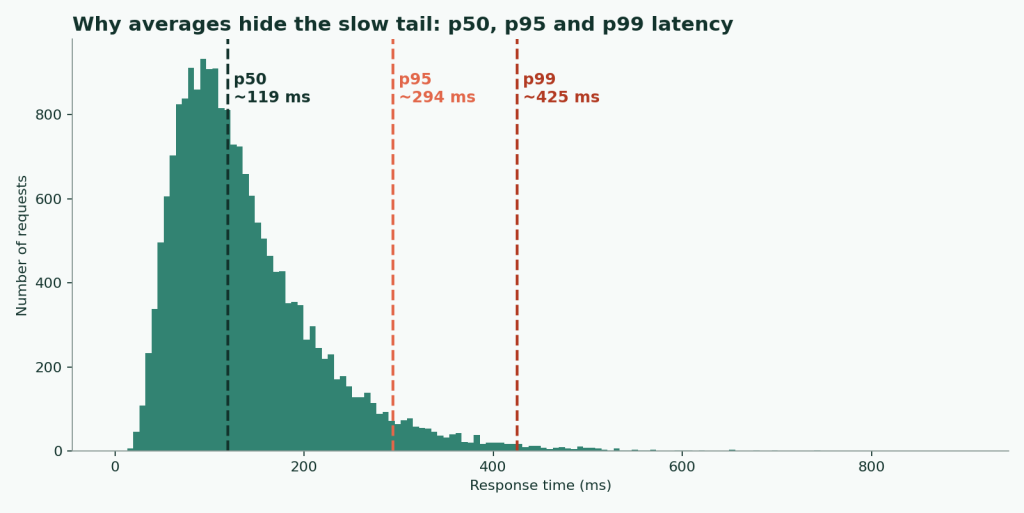
Suppose a vendor says “50ms average response time.” If 95% of requests return in 50ms and the other 5% take two seconds, your signup form’s worst case is two seconds. Those slow requests also tend to cluster around your busiest moments. At 100,000 requests a day, the slowest 1% is still 1,000 delayed users.
If a vendor publishes only an average, test it yourself before you put it in the path of a signup form.
Send the same validation call repeatedly over several hours, spanning your real peak window, and log each response time. Use a Session object so the test reflects real client behavior with connection reuse:
import time
import statistics
import requests

API_URL = "https://api.example.com/v1/validate"
API_KEY = "your_api_key"
TEST_EMAIL = "test@example.com"
NUM_REQUESTS = 200

session = requests.Session()  # reuses connections (keep-alive)
session.headers.update({"Authorization": f"Bearer {API_KEY}"})

latencies = []
for _ in range(NUM_REQUESTS):
    start = time.perf_counter()
    session.get(API_URL, params={"email": TEST_EMAIL}, timeout=10)
    latencies.append((time.perf_counter() - start) * 1000)
    time.sleep(0.5)  # stay well under rate limits while testing

latencies.sort()
p50 = statistics.median(latencies)
p95 = latencies[int(len(latencies) * 0.95)]
p99 = latencies[int(len(latencies) * 0.99)]
print(f"p50: {p50:.0f} ms | p95: {p95:.0f} ms | p99: {p99:.0f} ms")
Run it at different times of day. A vendor’s infrastructure can behave differently during its own peak hours than it does at 3 AM your time.
Two separate numbers matter, and vendors often publish only one:
Limits usually depend on your plan, so read the tier details as well. Our breakdown of email validation API pricing models explains how volume and limits tend to be packaged.
Test the limit by sending a burst above the documented ceiling. You want a clean 429 response (RFC 6585). A silent timeout or dropped connection is much harder to build retry logic against.
When you hit a 429, check the following:
Retry-After header? It can be a number of seconds or an HTTP date (RFC 9110).Trigger a 429 on purpose, wait out the Retry-After window, and confirm the next request succeeds.
A single-request test says nothing about real concurrent traffic. Run 20 to 50 concurrent requests for a couple of minutes and watch two things. Does p95 stay flat or climb? Do errors and timeouts appear?
hey -z 2m -c 20 -H "Authorization: Bearer your_api_key" \
  "https://api.example.com/v1/validate?email=test@example.com"
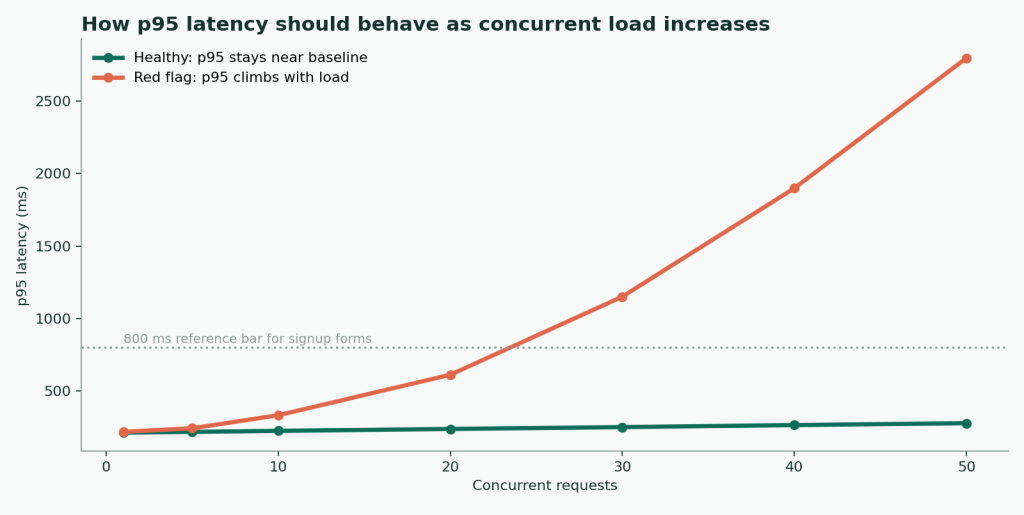
If your workload is large or doesn’t need an instant answer, don’t force it through synchronous calls. Delivering results asynchronously, for example through webhook and sync validation, avoids most rate-limit pressure.
These figures are general engineering guidelines for a signup-form use case. They are a reference bar for your own results, not a benchmark of any vendor.
| Metric | Reasonable for real-time (signup form) | Acceptable for batch/background | Red flag |
|---|---|---|---|
| p50 latency | Under 200ms | Under 2s | Over 1s on a “real-time” claim |
| p95 latency | Under 800ms | Under 5s | Not published at all |
| Rate-limit response | Clean 429 + Retry-After | Clean 429 + Retry-After | Silent drop or generic timeout |
| At 20+ concurrent requests | p95 within ~2x baseline | Some degradation acceptable | Errors or timeouts |
| Burst allowance | Documented | Documented | Undocumented |
Latency is only one axis when comparing vendors. Accuracy is the other. Our test of free email checker tools ran the same list through five tools, so you can weigh speed against correctness.
Two factors inflate real-world latency, and neither shows up in a tight back-to-back test loop.
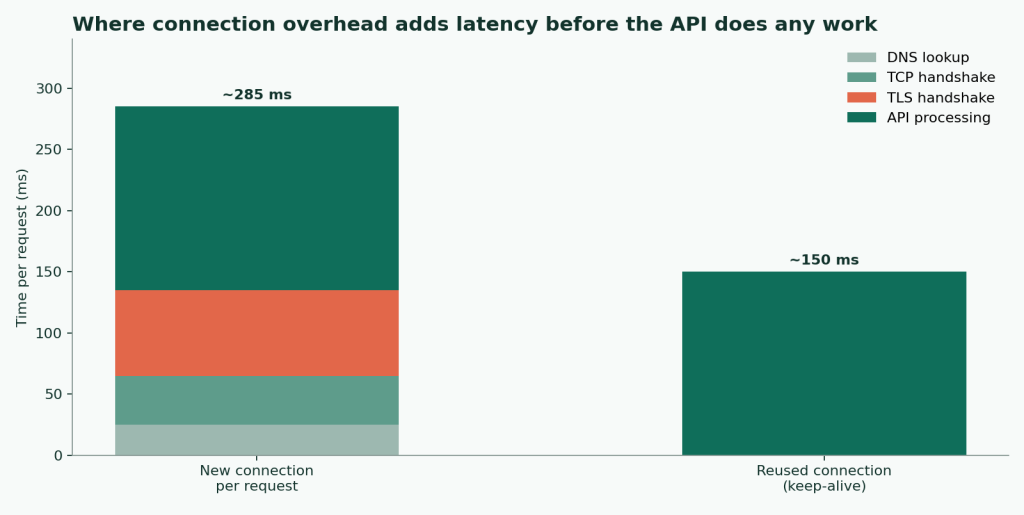
Connection overhead. A new connection needs a DNS lookup, a TCP handshake and a TLS handshake before the API does any work. Depending on distance, that can add roughly 100 to 300ms. Reusing connections (HTTP keep-alive) removes most of it. Test with and without reuse. The difference is often bigger than the gap between two competing vendors.
Cold starts. Some APIs run on infrastructure that scales down when idle. The first request after a quiet period can be noticeably slower than a warm one. Test a request after a deliberate 10 to 15 minute idle gap, not only back-to-back calls. Bursty signup traffic looks much more like that pattern.
If you validate at signup, p95 and p99 matter most, because a slow outlier is a user staring at a spinner. If you clean a 50,000-record list overnight, sustained throughput matters more than any single request’s speed.
Decide on architecture first. If you’re still weighing self-hosted vs API email verification, settle that before you start latency testing.
Gamalogic’s real-time email validation API is documented at under one second per single-request call. That is still a claim until you test it against your own traffic, region and concurrency. The method above works on any vendor, including us. Check the API documentation for current limits, and compare credit-based pricing against your expected volume.
What is API latency in simple terms?
It’s the time between sending a request and receiving the full answer. For email validation, it’s how long a user waits for an address to be checked.
What does p95 latency mean?
95% of requests finished at or below that time, and 5% were slower. It shows what your slower users experience, which the average hides.
What is a normal latency for a real-time email validation API?
A p50 under 200ms and a p95 under 800ms is a reasonable bar for signup forms. That is a general guideline, not a benchmark. Treat “instant” with no published p95 as something to verify.
How many test requests do I need for a reliable p95 or p99?
At least 100 to 200, spread over hours or days. A rapid burst of identical requests can trigger rate limiting and skew the results.
What does a 429 response mean, and how should my code handle it?
You’ve exceeded the rate limit. Read the Retry-After header if present and wait that long before retrying. Retrying immediately usually extends the throttling.
Do free email validation APIs have stricter limits?
Usually, yes. A free email validation API tends to cap volume and request rate tightly, so test the ceiling before you rely on it in production.
Which validation APIs should I compare?
Start with your own accuracy and latency tests. If you’re weighing options against a specific vendor, these Abstract API alternatives are a reasonable shortlist.
Why is the API faster in my test than in production?
Test loops reuse connections and keep infrastructure warm. Production traffic is burstier and includes fresh connections and cold starts.
A latency claim is a starting point, not a result. Measure p50, p95 and p99 against your own traffic, trigger a rate limit on purpose to see how the API responds, and load-test under realistic concurrency, including a cold-start gap, before you build a dependency that’s hard to swap out later. If you’re wiring validation into a product, Gamalogic’s API for developers page covers the integration options.


Learn how cart recovery email validation improves abandoned cart recovery, ecommerce email deliverability, bounce reduction, and customer retention. Discover how clean email lists help ecommerce brands recover more lost sales and optimize recovery campaigns.


 No credit card required
Post your Comment.