 Sign In














 Email Marketing
 ABM
ABM  List Building
  Lead Generation
  Growth Hacker
  Digital Marketing
  Data Enrichment
  Software as a Service
  Data as a Service
  Waterfall Enrichment
  Startup
  Revenue Performance
  Job Change Tracking
  Customer Data Platform
  CRM
CRM 


 Knowledge Base
  Video Tutorials
  Help Center
  Tarpitting Scoring
  ROI Calculator
  About us
  Contact us
  Testimonials
  Automation
Disposable Email Domain List vs. Real-Time Checker: Why a Blocklist Alone Misses Fake Emails

28 Oct 2026
Sreerag
12 Minutes
Read

 Blog
FAQ
Case Studies
Knowledge Base
Video Tutorials
Help Center
SEG Validation
Tarpitting Scoring
ROI Calculator
About us
Contact us
Testimonials
Blog
FAQ
Case Studies
Knowledge Base
Video Tutorials
Help Center
SEG Validation
Tarpitting Scoring
ROI Calculator
About us
Contact us
Testimonials
A disposable email domain list only catches domains someone has already found and listed. It misses brand-new and rotating domains, cannot tell you whether a mailbox exists, and sometimes blocks real users. A real-time checker adds infrastructure signals, live SMTP verification and risk scoring, so a list works best as the first layer of detection, not the whole defense.
Using a downloaded list to block temp mail domains is the most common first fix for fake signups. It takes ten minutes, and for a while it works. Then the temp-mail services add new domains, the fake signups keep arriving, and the list quietly stops being the answer.
This guide covers where those lists come from and why they differ, six things a blocklist cannot see, the five-layer detection stack that fills the gaps, a simple allow, challenge or block policy, and a 10-minute test you can run on your own signup form.
Most disposable email domain lists start the same way. Someone notices a temp-mail service, adds its domain to a text file, and shares it. Community repositories merge those finds into larger files, and validation providers maintain their own databases on top.
Those lists differ in ways that are easy to miss:
The result is that there is no single canonical list. Two teams that both say they block disposable emails can be enforcing very different rules. Before you trust a list, check its license, when it was last updated, whether it merges other lists, and how errors get corrected. Treat it as candidate data to verify, not a final answer.
A list answers exactly one question: has anyone already flagged this domain? Everything below falls outside that question.
A list only knows what someone has already found. New temp-mail domains, and custom domains routed through temporary inbox services, pass untouched until a maintainer adds them.
Some services cycle through large numbers of domains specifically to stay ahead of blocklists. Every rotation reopens the gap, and you only close it after the fact.
Disposable services often share mail servers. When a brand-new domain’s MX record (the DNS record that tells sending servers where to deliver its mail, as described in the SMTP specification, RFC 5321) points at a known temp-mail host, that is a strong signal even though the domain is unlisted. A list never looks up DNS, so it cannot use this signal.
A domain match tells you which kind of provider an address uses, not whether the mailbox is real. A typo or an invented address at an ordinary domain passes a list without a flicker, then hard-bounces when you send. That is the same bounce problem covered in email validation for deliverability.
Alias services such as Apple Hide My Email and SimpleLogin forward to a real inbox the owner still reads. They behave very differently from a timed throwaway inbox and carry less risk. A list either misses them or blocks them wholesale, and neither is a considered decision. Role-based addresses such as info@ and support@ are a separate category again.
A list match only suggests that a domain has been used in a disposable way. It does not prove fraud or bad faith. A privacy-conscious customer and a trial abuser can look identical to a domain lookup.
Lists fail in the other direction too. They can contain dead, parked or reassigned domains, privacy aliases that real customers depend on, and domains that share infrastructure with unrelated services. Blocking those without review means support tickets and lost signups.
Disposable addresses are also a long-established privacy practice. As this overview of disposable email addresses notes, people use them for registrations, free trials, one-time downloads and forum participation, not only for abuse.
Blanket blocking has a second side effect. A determined abuser who hits a wall can simply sign up with a free Gmail or Yahoo address, which no domain list will ever flag. A list stops the casual abuser. It does not stop the committed one.
The fix is to treat a list match as one risk signal, keep an allowlist, log every block with its reason, and watch the effect of any rule change.
| Question | Domain blocklist | Real-time checker |
|---|---|---|
| What does it answer? | Is this domain already known as disposable? | Is this address real, reachable and low risk right now? |
| Brand-new disposable domains | Missed until someone adds them | Can be flagged through infrastructure, age and pattern signals |
| Domains that rotate | Caught only after each rotation is listed | Caught when the underlying signals match |
| Does the mailbox exist? | No | Yes, through live SMTP verification |
| Catch-all, role-based and alias addresses | Not handled | Can be scored separately |
| False-positive control | Manual allowlist and review | Risk scoring plus your own allowlist |
| Speed and cost | Instant lookup, free or cheap | A network call, typically under a second |
| Upkeep | You refresh and review it | The provider maintains it |
Detection works best as layers, each catching what the one before it missed. Run the cheap checks first and escalate only when needed.
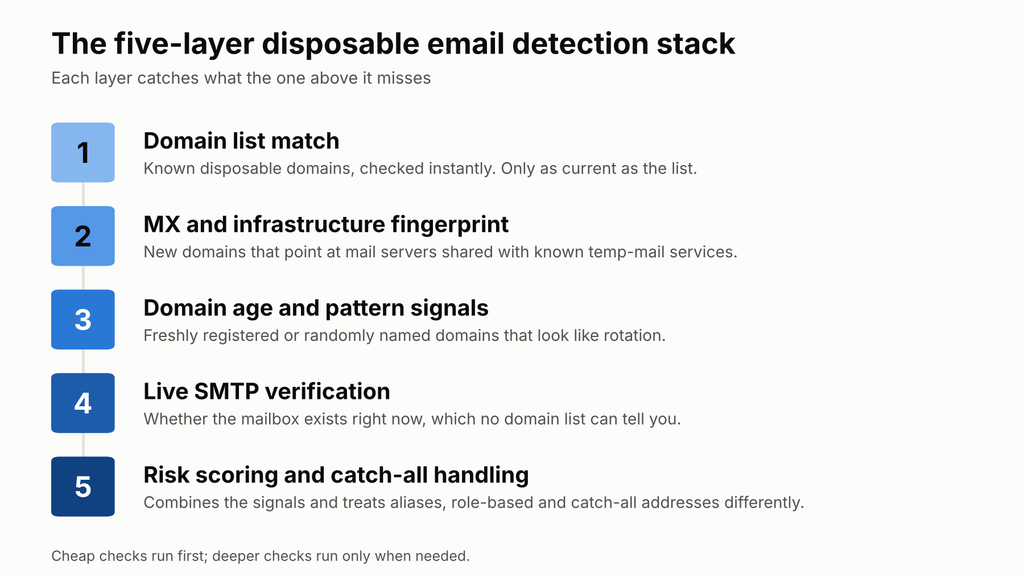
Gamalogic’s temporary email checker combines a continuously updated disposable domain list with MX and DNS lookup, live SMTP verification, domain and IP reputation checks, and catch-all risk scoring, so one request covers the stack.
A list is a reasonable stand-alone defense in a few cases:
It is not enough when a fake address costs real money: free trials, credits, referral rewards, paid acquisition, or any list you will email. Bounces from those addresses damage sender reputation, which is the mechanism explained in why disposable emails hurt lead generation campaigns. To estimate what bad addresses are costing you, use Gamalogic’s email validation ROI calculator.
For most products, yes, but the right response depends on what you sell. A practical breakdown:
Whatever you choose, think in three outcomes instead of two: allow, challenge, or block. Send ambiguous cases such as aliases to a challenge step, and reserve hard blocks for high-confidence matches.
Decision flow for new signups: block if the address is on a blocklist, block if the real-time check finds a disposable address or missing mailbox, challenge aliases, catch-all, role-based or high-risk addresses, otherwise allow Think in three outcomes, not two: allow, challenge or block.
You do not have to take any list or any checker on faith. This test shows how your own setup performs.
dig MX on each missed domain. Misses that share mail servers with flagged domains show exactly what an infrastructure check would have caught.A disposable email domain list is a file of domains known to belong to temporary or throwaway email services such as Mailinator or Guerrilla Mail. Applications compare the domain of each new signup against it and reject or flag matches. It is a lookup of known domains only, so it cannot catch new ones or confirm a mailbox exists.
Usually not. A blocklist misses domains nobody has listed yet, providers that rotate domains, addresses that never existed at real domains, and users who switch to mainstream mailboxes once blocked. It is a useful first layer, but it works best alongside MX checks, live SMTP verification and risk scoring.
There is no single agreed number. Published figures range from 38,000+ in one .NET package to 110,880+ in a community GitHub list and more than 180,000 in Hunter’s database. The sources count differently (providers versus domains) and apply different inclusion rules, so the figures are not directly comparable.
Public GitHub repositories and provider directories are the usual sources. Prefer one with a clear license, recent updates, version history and a way to request corrections. Treat any list as candidate data: review new entries before enforcing them, and keep an allowlist for false positives.
Often enough that rotation does not outrun you. Temporary email services change domains, and old domains expire or change owners, so a static file degrades quickly. Automate the refresh, compare each new version against the last one, and review additions before they go live.
For most products, yes, with a policy that fits the context. Block them for B2B SaaS and newsletters, block or add friction for consumer free tiers, and use a soft warning for developer tools. Treat a match as a risk signal and route ambiguous cases, such as privacy aliases, to a challenge step.
A disposable email checker, also called a temporary email checker, usually only compares the domain against a list of temporary providers. An email verifier goes further and confirms the specific mailbox exists and can receive mail. Gamalogic’s free disposable email checker runs both kinds of checks together.
A blocklist tells you what is already known. A real-time check tells you whether the address in front of you is real.
Paste any address into Gamalogic’s free disposable email checker to see whether it is disposable, temporary, catch-all, role-based or invalid. Your first 500 credits are free for 7 days, no credit card required. To block fake signups automatically, add the same checks to your forms with the email validation API.


Learn how cart recovery email validation improves abandoned cart recovery, ecommerce email deliverability, bounce reduction, and customer retention. Discover how clean email lists help ecommerce brands recover more lost sales and optimize recovery campaigns.


 No credit card required
Post your Comment.