 Sign In














 Email Marketing
 ABM
ABM  List Building
  Lead Generation
  Growth Hacker
  Digital Marketing
  Data Enrichment
  Software as a Service
  Data as a Service
  Waterfall Enrichment
  Startup
  Revenue Performance
  Job Change Tracking
  Customer Data Platform
  CRM
CRM 


 Knowledge Base
  Video Tutorials
  Help Center
  Tarpitting Scoring
  ROI Calculator
  About us
  Contact us
  Testimonials
  Automation
How to Validate Your Mailchimp Email List Before Sending a Campaign

07 Jul 2026
Sreerag
12 Minutes
Read

 Blog
FAQ
Case Studies
Knowledge Base
Video Tutorials
Help Center
SEG Validation
Tarpitting Scoring
ROI Calculator
About us
Contact us
Testimonials
Blog
FAQ
Case Studies
Knowledge Base
Video Tutorials
Help Center
SEG Validation
Tarpitting Scoring
ROI Calculator
About us
Contact us
Testimonials
To validate your mailchimp email marketing tool list for better campaign results, Connect your Mailchimp audience to a Accurate Email validation tool like Gamalogic, run a check across the full list, and remove addresses flagged invalid, disposable, or high-risk catch-all before you send.
Do this before major email marketing campaigns and continuously at signup to keep bounce rates low and protect your sender reputation.
Mailchimp actively monitors your bounce rate, and a spike from sending to a dirty list can get a campaign or an account throttled or flagged. Validating your list before you hit send isn’t an optional extra step; it’s the difference between a campaign that lands and one that quietly damages every send that follows it.
A single campaign to an unverified list doesn’t just risk that one send. Bounce rate and spam-complaint rate feed directly into how inbox providers score your domain and IP reputation and that score follows every subsequent campaign, not just the one that triggered it.
A list that’s gone stale for even a few months can carry a meaningful share of dead or disposable addresses, especially for lists built from web forms, contests, or older imports without double opt-in.
say you have a 50,000-contact Mailchimp audience that hasn’t been cleaned in over a year. If even 4–5% of those addresses have gone dead a normal decay rate for lists that age without active hygiene that’s 2,000, 2,500 hard bounces on a single send.
Mailchimp’s own systems will register that as a reputation event, and your next campaign to good subscribers can suffer lower inbox placement as a result. Validating first turns that risk into a known, fixable number instead of a surprise after you’ve already sent.
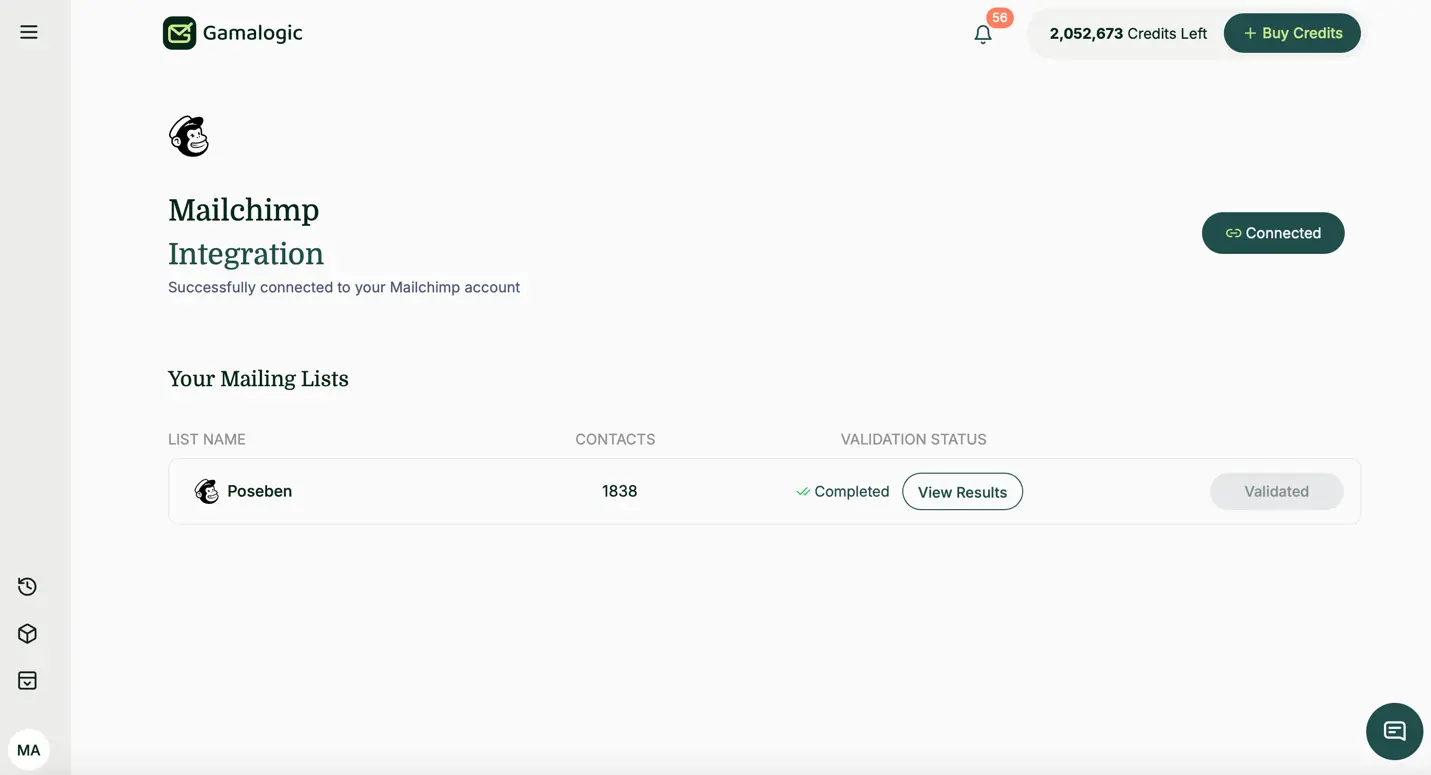
Gamalogic email validator connects directly to Mailchimp via API integration, the same underlying approach that powers validation across other ESPs, so there’s no CSV export or re-import required. Here’s the actual flow:
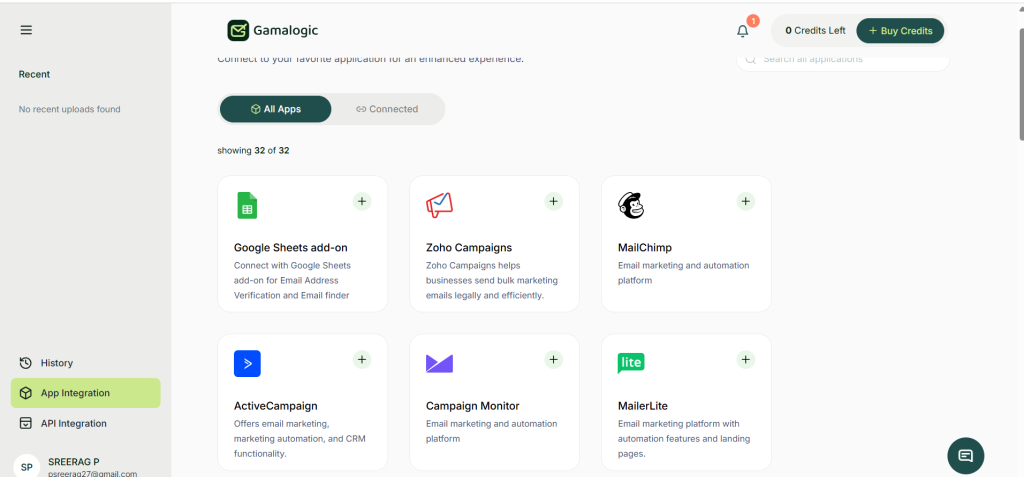
Step 1: Open App Integration and find Mailchimp From your Gamalogic dashboard, go to App Integration in the left sidebar, then find the Mailchimp card in the grid (it sits alongside your other email marketing integrations like Zoho Campaigns, ActiveCampaign, and Campaign Monitor). Click the + on the card.
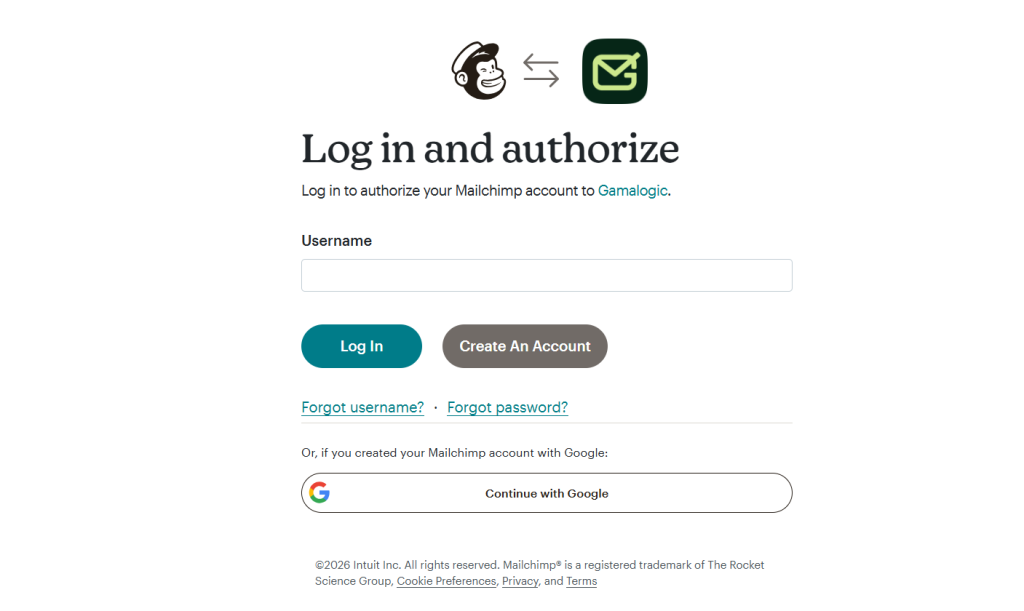
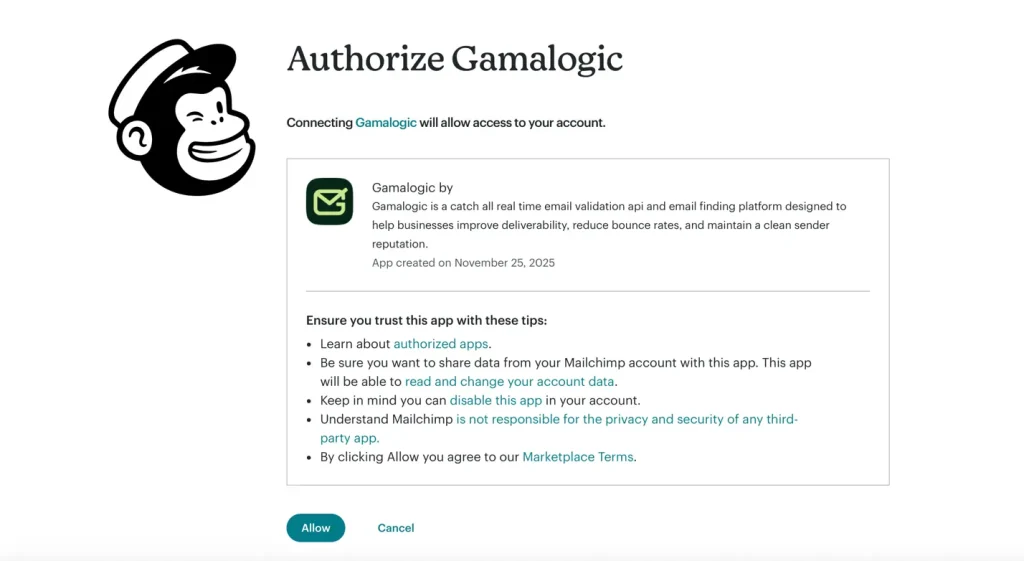
Step 2: Log in and authorize You’ll be sent to Mailchimp’s own login screen, asking you to log in and authorize Gamalogic. Sign in with your Mailchimp username and password (or “Continue with Google” if that’s how your Mailchimp account was created) and approve the connection.
Step 3: Select the audience to validate Once connected, pick the Mailchimp audience (or a specific segment) you want to check. Gamalogic pulls the contact list directly you don’t need to touch a spreadsheet at any point.
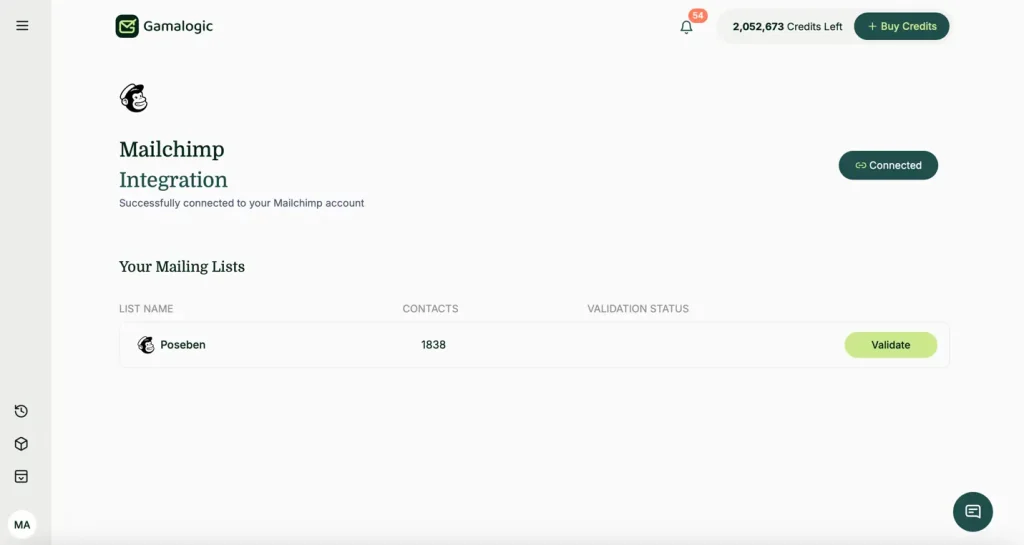
Step 4: Review results and sync back Each address comes back tagged Valid, Invalid, or Risky, with a deliverability score attached. Remove or suppress invalid addresses, decide case-by-case on risky/catch-all ones rather than deleting them outright, and sync the cleaned result back to Mailchimp.
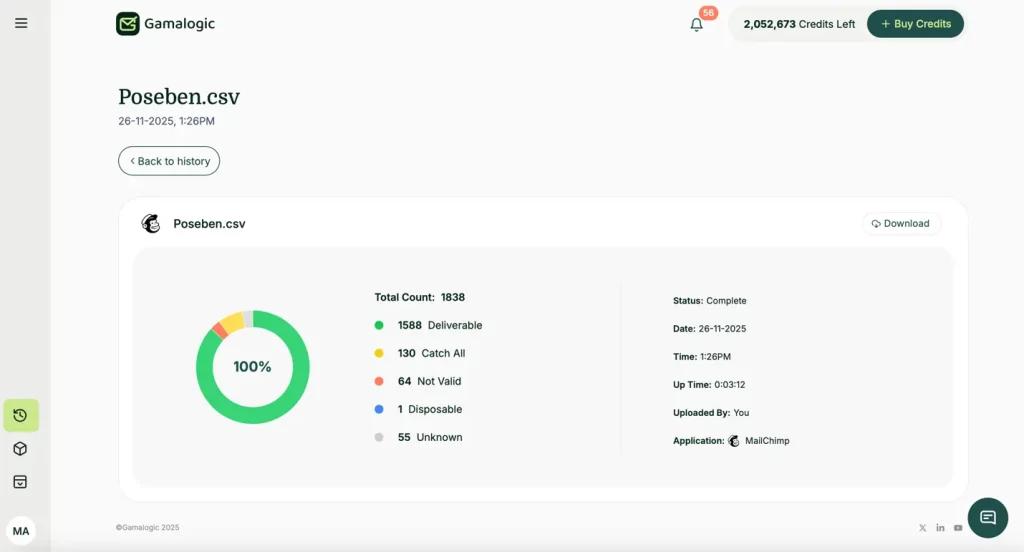
You can also drop a CSV or Excel file straight into Gamalogic’s Bulk Email Validation tool.
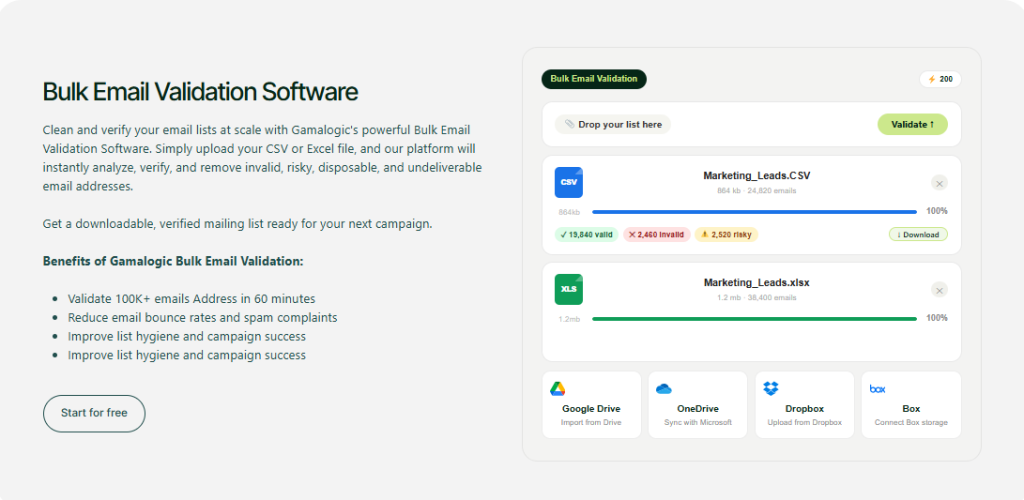
(it handles files pulled from Google Drive, OneDrive, Dropbox, or Box too), or use the Google Sheets add-on to validate a Mailchimp export without leaving your spreadsheet. Same result, different starting point.
see our step-by-step guide to the Bulk Email Validator if you want the full walkthrough or use the Google Sheets add-on to validate a Mailchimp export without leaving your spreadsheet.
Start free — validate your first 500 Mailchimp contacts at no cost →
Most marketers who send regularly use both real-time validation on every new signup form, and a bulk check before higher-stakes sends (product launches, reactivation campaigns, or any send to a segment that hasn’t been emailed recently). For a deeper comparison of when each approach makes sense, see our full breakdown of real-time vs. bulk email validation.
Not all “clean my list” advice checks the same things. A proper validation pass looks at several layers, not just whether an address is formatted correctly:
info@, support@, admin@ — technically valid, rarely engagedA tool that only checks syntax will miss most of this, which is a big part of what separates an accurate email validation tool from a shallow one.
How do I validate my Mailchimp email list?
Connect your Mailchimp audience to a validation tool or export it as a CSV, run a full check across syntax, domain, mailbox, and risk categories, then remove or flag addresses based on the results before sending.
Can Mailchimp verify email addresses on its own?
No. Mailchimp does not include a built-in list-validation tool it monitors bounce and complaint rates after you send, but catching bad addresses beforehand requires a dedicated validation service.
Does Mailchimp remove invalid emails automatically?
Mailchimp will mark addresses as “cleaned” after they hard-bounce, but only after you’ve already sent to them and taken the reputation hit validating beforehand avoids that entirely.
Should I validate emails before importing into Mailchimp?
Yes, validating before import prevents bad addresses from ever counting against your sending reputation, rather than cleaning up after a bounce has already occurred.
What bounce rate is acceptable for a Mailchimp campaign?
Bounce rates under roughly 2% are generally considered healthy; rates climbing toward 5% or higher typically start triggering deliverability throttling from inbox providers.
Does email validation reduce spam complaints, not just bounces?
Indirectly, yes removing disposable and role-based addresses tends to improve overall engagement rates, and higher engagement is one of the signals inbox providers use to reduce spam-folder placement.
What’s a catch-all address, and should I just delete them?
A catch-all domain accepts all mail regardless of whether a specific mailbox exists, so validation can’t always confirm deliverability with full certainty. Rather than deleting these outright, segment them separately and monitor engagement before deciding whether to keep sending to them.
Can I automate validation so I don’t have to clean my list manually every time?
Yes, connecting real-time validation to your signup forms handles new subscribers automatically, and scheduling a recurring bulk check covers the rest of your existing audience without manual exports.Costs scale with volume, so it’s worth checking how pricing works across different validation plans before committing to real-time on every form.
Start free — validate your first 500 Mailchimp contacts at no cost →


If your cold emails suddenly feel invisible, it’s not your copy - it’s the new 2025 deliverability rules. Inbox providers are enforcing tougher filters than ever, and unvalidated lists are getting punished. Gamalogic ensures your list is clean, compliant, and ready for real inbox placement.

Confirmation emails are small touchpoints with big impact. In this blog, we share 10 practical insights to help you transform routine confirmations into trust-building moments that elevate customer experience.



 No credit card required
Post your Comment.