 Sign In














 Email Marketing
 ABM
ABM  List Building
  Lead Generation
  Growth Hacker
  Digital Marketing
  Data Enrichment
  Software as a Service
  Data as a Service
  Waterfall Enrichment
  Startup
  Revenue Performance
  Job Change Tracking
  Customer Data Platform
  CRM
CRM 


 Knowledge Base
  Video Tutorials
  Help Center
  Tarpitting Scoring
  ROI Calculator
  About us
  Contact us
  Testimonials
  Automation
What Is Email Validation? The Complete Guide (And How to Validate an Email)

01 Nov 2025
Sreerag
12 Minutes
Read

 Blog
FAQ
Case Studies
Knowledge Base
Video Tutorials
Help Center
SEG Validation
Tarpitting Scoring
ROI Calculator
About us
Contact us
Testimonials
Blog
FAQ
Case Studies
Knowledge Base
Video Tutorials
Help Center
SEG Validation
Tarpitting Scoring
ROI Calculator
About us
Contact us
Testimonials
Email validation is the process of confirming an email address is correctly formatted, hosted on a real domain, and able to receive mail done before you send, not after. It typically runs four checks: syntax, domain/MX record, SMTP mailbox verification, and risk classification (disposable, role-based, catch-all).
Validate in real time at every form and signup, and re-run bulk validation on existing lists every 60–90 days, since addresses decay continuously. Gamalogic’s Email Validation runs all four checks through one API or bulk upload, with 500 free credits to start.
This guide covers:
Email validation is the process of checking whether an email address is accurate, properly formatted, hosted on an active domain, and safe to send to. In plain terms: it answers the question “is this a real, working email address before I ever try to use it?”
A few facts worth stating directly, since they’re the building blocks everything else in this guide depends on:
This guide covers what email validation is, how it differs from verification, why it matters, how it actually works step by step, who needs it beyond marketing teams, and how to choose a tool.
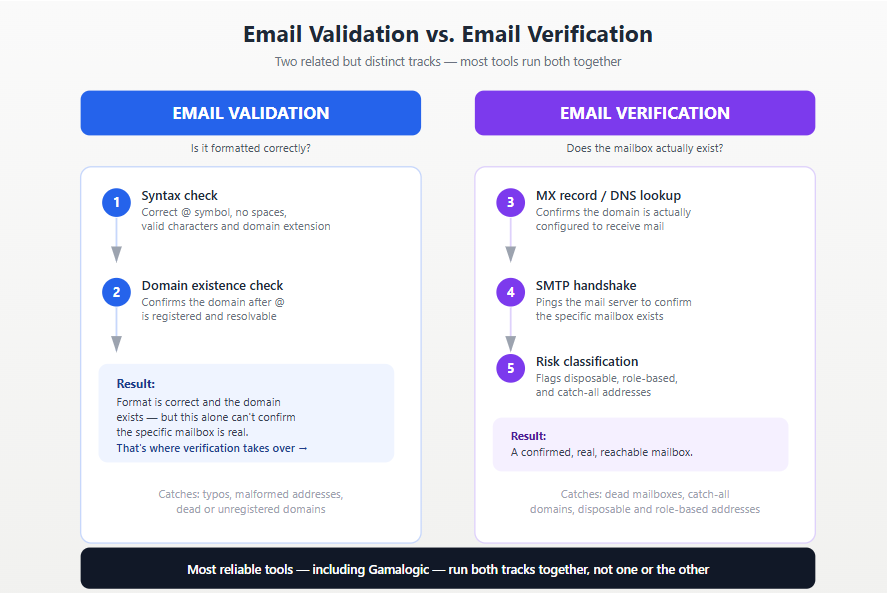
These two terms get used interchangeably, but they’re not quite the same thing, and the distinction matters for how you build your data-quality process.
(gamalogic bulk email verification summary report)
| Email Validation | Email Verification | |
|---|---|---|
| What it checks | Format and syntax is the address structured correctly? | Existence does this specific mailbox actually exist and accept mail? |
| Method | Regex/format rules, domain existence | DNS lookup, SMTP handshake, mailbox simulation |
| Accuracy level | Lower catches typos, not dead mailboxes | Higher confirms real, reachable inboxes |
| When it runs | Instantly, at the point of entry | Can run instantly or in bulk, against existing data |
| What it misses | A syntactically perfect address that doesn’t actually exist | Nothing on its own it’s the deeper check |
In practice, a good validation tool (including Gamalogic email validator) runs both layers together: format/syntax rules to catch obvious errors instantly, and full verification (DNS, SMTP, mailbox check) to confirm the address is genuinely deliverable. Treating them as one combined process, rather than picking one or the other, is what actually protects deliverability.
The case for validation isn’t theoretical, it shows up directly in deliverability data:
Beyond deliverability, validation:
For a deeper breakdown of exactly how these factors compound for marketing teams specifically, see Why Is Email Validation So Important for Email Marketing Experts?
Validation isn’t one check it’s a layered process. Here’s what happens, in order, when an address is validated:
@ symbol is present, there’s a valid domain extension, and no illegal characters or spaces appear. A failed syntax check means the address is invalid, full stop.@ actually exists and is configured with MX (mail exchanger) records, i.e., that it’s actually set up to receive mail at all.info@, support@, sales@), catch-all domains that accept mail for any address, and known spam traps. Catch-all domains in particular deserve a closer look, since they’re the one pattern a basic SMTP check alone can’t reliably resolve see Catch-All Email Validation Explained: A Complete Guide for how that specific check works.You can catch some issues by eye, though this only goes so far:
@, extra spaces, doubled dots, or obviously misspelled domains (gmial.com instead of gmail.com).@ into a browser; if there’s no live site or clear business presence, that’s a warning sign.info@, admin@, or addresses from known temporary-email services are technically valid but carry real engagement risk.Manual checking is fine for a handful of addresses. It doesn’t scale, and it can’t perform an actual SMTP handshake — which is why every list beyond a small size needs a validation tool rather than eyeballing. If you just want to spot-check a single address right now, see How to Check if an Email Address Is Valid for Free for a faster path than doing it by eye.
It’s easy to file this under “a marketing tool,” but bad email data ripples through an entire company, not just campaign performance:
In short: any team whose systems depend on someone actually receiving an email has a direct stake in validation, not just the person who owns the campaign calendar.
Validation should happen continuously, at multiple touchpoints, not as a single one-time task:
When:
Where:
For a deeper comparison of these two approaches, see Real-Time vs. Batch Email Validation: When to Use Each.
A capable validation tool should cover, at minimum:
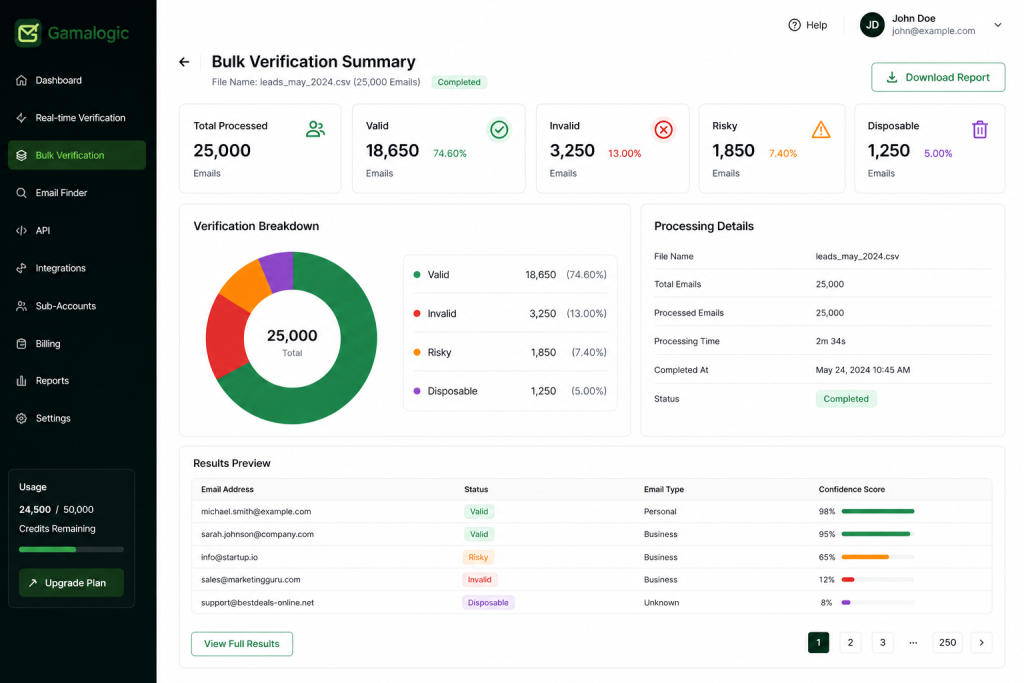
(A sample Gamalogic bulk-validation report, real output, client data redacted.)
| Tool | Real-time API | Bulk validation | Catch-all detection | Notable strength |
|---|---|---|---|---|
| Gamalogic | Yes | Yes | Yes | Combines validation, bulk cleaning, and API integration in one platform with 500 free credits to start, provides 99.6% accuracy,SEG validation |
| ZeroBounce | Yes | Yes | Yes | Enterprise-grade analytics, spam trap detection, deliverability reporting suite |
| NeverBounce | Yes | Yes | Yes | Strong accuracy at scale for large ESP-integrated sends |
Ready to see how many of your addresses are actually deliverable? Try Gamalogic’s Free Email Validation API, 500 free credits, no credit card required.
What is email validation?
The process of checking that an email address is correctly formatted, hosted on a real domain, and able to receive mail done before you send, so bad addresses never reach your list in the first place.
What is the difference between email validation and email verification?
Validation typically refers to format and syntax rules; verification goes further, confirming through DNS and SMTP checks that the specific mailbox actually exists. Most modern tools, including Gamalogic, run both together.
How does email validation actually work?
Four checks run in sequence: syntax/format, domain and MX record existence, an SMTP handshake to confirm the mailbox exists, and risk classification for disposable, role-based, or catch-all addresses.
How often should I validate my email list?
Validate new contacts in real time as they’re collected, and re-run bulk validation on your full list every 60–90 days — lists decay by roughly 22–28% a year, so a list validated once at import will already be meaningfully stale within months.
Do I need email validation if I only send to opt-in subscribers?
Yes, opt-in doesn’t prevent decay. People change jobs, abandon inboxes, and mistype addresses on signup forms regardless of consent status; validation catches all of these independent of how the address was collected.
Can catch-all domains be validated with a standard check?
Not reliably. A catch-all domain accepts mail for any address, so a basic SMTP check will show every address there as “valid” even when most aren’t real. Resolving catch-all domains requires a validator built to detect and flag this pattern specifically.


Discover how to measure and improve email validation accuracy. This guide compares benchmarks, metrics, and top providers — helping marketers achieve <2% bounce rates and stronger deliverability.
Learn how to validate large email lists instantly using the Gamalogic Bulk Email Validator. Step-by-step guide for CSV, Excel, or TXT uploads, plus tips, results, and API integration.


 No credit card required
Post your Comment.