Two teams bought an email validator last quarter, and both picked the wrong one.
The first runs a free-trial signup. They uploaded their list to a bulk cleaner, got a tidy report, and kept collecting fake signups every morning, because nothing checked addresses as they arrived. The second is a sales team that wired a real-time check into their form, then launched outreach to a scraped list nobody had cleaned in bulk. Their bounce rate told them what the form couldn’t.
Neither tool was bad. Each team chose a vendor before they chose a format: where the address enters, how many arrive, and who has to set the check up. Get that order right and most of the vendor comparison gets easy. This guide walks through it.
Quick answer: The right email validator depends less on the vendor and more on where the address enters your system. A handful of checks by hand: a free checker. A list you already own: bulk validation. Junk at a signup form and no developer time: a JS widget. Validation inside a product, at volume, or with custom logic: a real-time API. Strict data-residency rules or very high volume: a self-hosted or hybrid setup. Whatever you pick, one limit never changes: no validator can be certain about a catch-all domain, so look for a risk score instead of a flat “valid.”
What this guide covers
The five kinds of email validator, and the job each one actually does
A decision tree and volume thresholds for picking a format in a few minutes
A use-case matrix for signup forms, cold outreach, CRMs, developers and regulated data
What to do with every result a validator can return, from valid to catch-all to SMTP tarpitting
A weighted scorecard and a one-afternoon test for comparing any vendor
The limits no tool can promise past, and the mistakes that lead to the wrong choice
It’s written for marketers, sales and RevOps teams, and developers who need reliable email validation tool and don’t want to buy twice.
Five types of email validator
A tool that is perfect for cleaning a spreadsheet is the wrong tool for a checkout form, and the reverse is just as true. These are the formats you’re really choosing between:
Format
When it runs
Who sets it up
Good fit
Breaks down when
Free checker
You paste an address or a small file
Anyone, no setup
A handful of checks, or testing a tool’s accuracy
Volume grows, or you need checks inside a form
Bulk validator (upload or Google Sheets add-on)
On a list you already have
Marketer or ops
Cleaning a list before a send
Addresses keep arriving after the clean
JS widget
The moment someone types into a form
Anyone who can paste a script tag
Marketing sites, WordPress and Webflow forms
Server-side checks or custom product logic
Real-time API
Inline, from your own code
A developer
Product signups, checkout, custom rules
No developer time, or very low volume
Self-hosted or hybrid
In your own infrastructure
An engineering team
Data-residency rules, very high volume
Anything below that scale, where engineering time outweighs savings
All five run some mix of the same layers: syntax, DNS and MX lookup, an SMTP check, disposable and role-based detection, and catch-all scoring. What separates them is how many layers each one completes, which is also the practical gap between validation and verification.
One boundary is worth drawing. A validator tells you whether an address you already hold will deliver. It doesn’t find the address. If you’re starting from a name and a company, that’s a discovery problem, and validation is the step that follows.
Choose by checkpoint, not by vendor
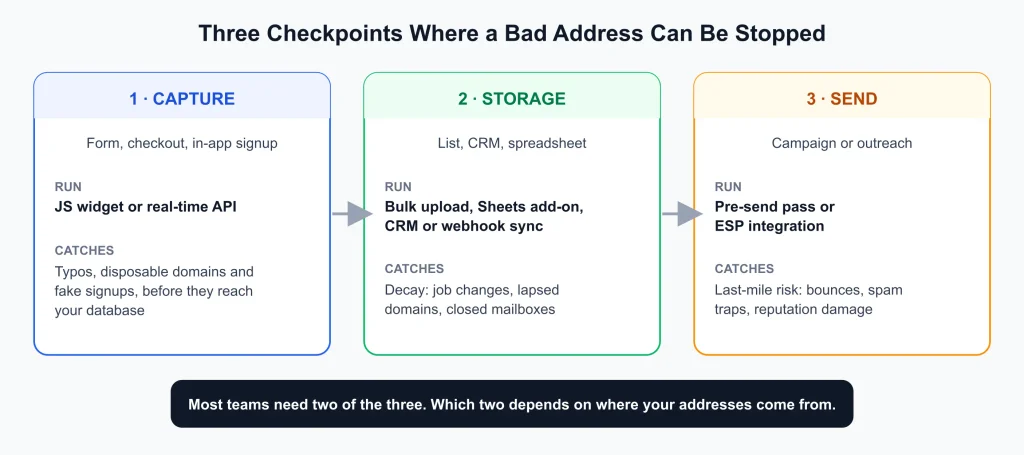
Diagram of three checkpoints where a bad email address can be stopped: capture (JS widget or real-time API), storage (bulk upload, Google Sheets add-on, CRM or webhook sync) and send (pre-send pass or ESP integration)
[IMAGE 2: PLACE HERE, directly under this H2, before the first paragraph] File: pillar-image-2-three-checkpoints.svg Alt text: “” Caption: Each checkpoint catches a different kind of bad address.
Email data passes through three points where a bad address can still be stopped: when it is captured, while it sits in a list or CRM, and right before you send.
Capture catches typos, disposable domains and fake signups before they reach your database. Storage catches decay, because people change jobs, domains lapse and mailboxes close. The pre-send pass catches whatever got through both, at the last moment it can still protect your sender reputation.
Most teams need two of the three. A product with a public signup form needs capture and a pre-send pass. A sales team working from purchased or scraped lists has no capture point at all, so storage and pre-send do the work.
The decision tree
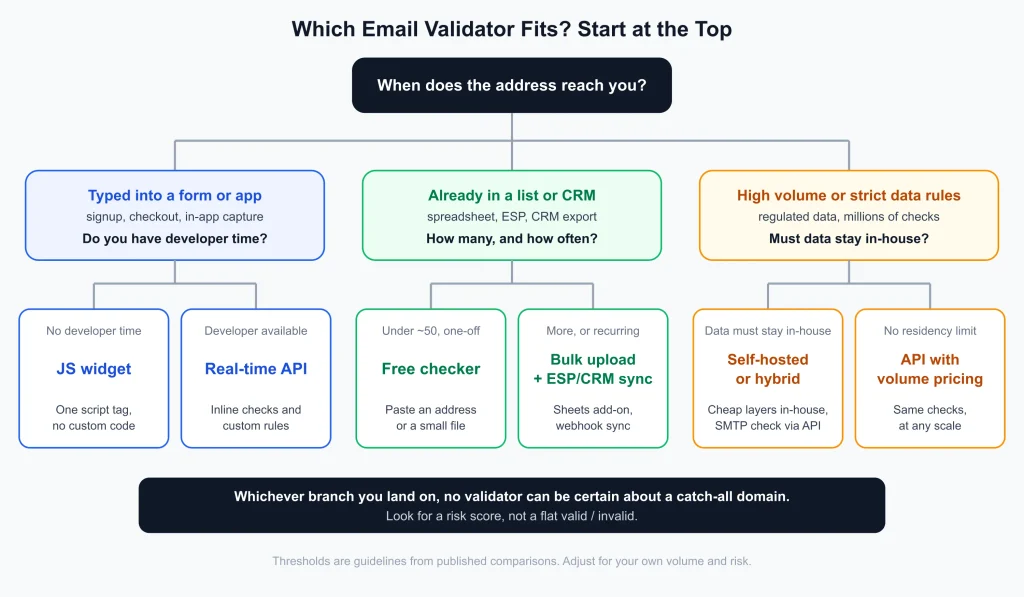
Decision tree for choosing an email validator: forms and apps lead to a JS widget or real-time API; existing lists lead to a free checker or bulk upload with ESP and CRM sync; high volume or strict data rules lead to self-hosted or hybrid, or an API with volume pricing
1. When does the address reach you? If someone types it into a form, you need a check that runs in the moment: a widget, or a real-time email validation API. If it’s already in a list, you need a bulk pass. If both are true, run both, and make sure they use the same detection logic so a “risky” result at signup means the same thing as a “risky” result during cleanup.
2. How many checks a month?
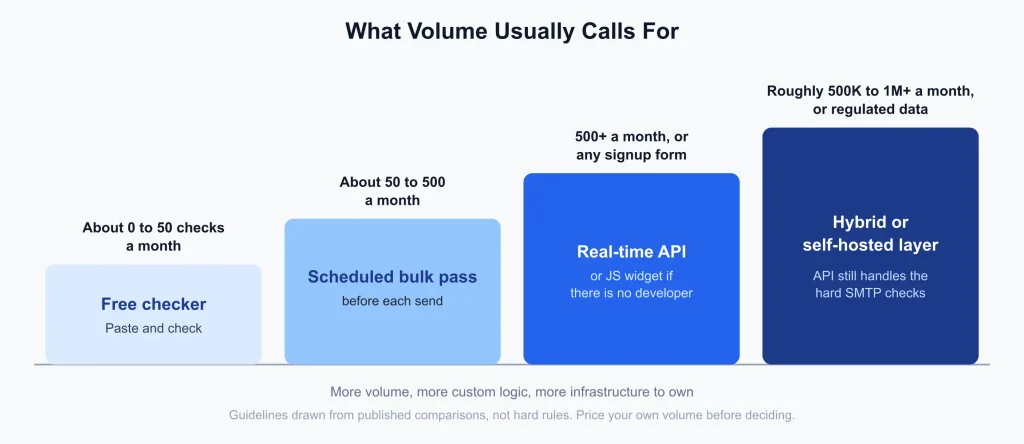
Staircase chart of validator choice by monthly volume: free checker up to about 50, scheduled bulk pass for 50 to 500, real-time API above 500 or at any signup form, and a hybrid or self-hosted layer from roughly 500K to 1M a month or for regulated data
Under about 50 a month, any free checker covers it. Between 50 and 500, a scheduled bulk pass before each send is the practical middle step. Above 500, or at any signup form, a real-time API (or the widget, if you have no developer) is the sensible default. Self-hosting some layers starts to pay for itself at very roughly 500,000 to a million checks a month, because below that the engineering time costs more than the per-check fees.
3. Who will set it up? With no developer, the JS widget, bulk upload, Sheets add-on and ESP integrations all work without custom code. With a developer, the API opens up server-side validation and custom rules. If the honest answer is “a developer, but not this quarter,” the widget is a legitimate bridge rather than a compromise.
4. What does a wrong answer cost? There are two kinds of error: letting a bad address through (bounces, reputation damage, skewed metrics) and blocking a good one (a lost customer). A cold outreach list can afford to be strict because nobody is waiting on it. A checkout form can’t, because a false rejection costs an order. That’s why high-intent forms usually block bad addresses, top-of-funnel forms warn, and some teams log silently at first.
5. Where does the data have to live? For most teams the answer is “nowhere in particular,” and an API is simpler. If regulations such as HIPAA, GDPR or CCPA, or your contracts, limit sending addresses to a third party, you’re choosing between self-hosted validation and a vendor that will sign a data-processing agreement.
Use-case matrix
Use case
Recommended setup
Why
Watch for
SaaS free-trial signup
Real-time API, or the widget if there’s no developer time
Fake and disposable signups skew activation numbers and burn onboarding emails
Block disposable domains; warn rather than block on “risky” so real trial users aren’t lost
Ecommerce checkout and accounts
Real-time API or widget at checkout, plus a periodic bulk clean
A mistyped address means a lost order confirmation and a dead retention list
Typo suggestions beat rejection; high-intent forms can justify blocking
Newsletter and lead-magnet forms
Widget in warn mode, plus a bulk clean before big sends
Low-friction forms shouldn’t lose hesitant real subscribers to a false positive
Re-validate dormant segments before any re-engagement campaign
B2B cold outreach and lead generation
Bulk validation with catch-all scoring, run right before the send
B2B lists decay as people change jobs, and many corporate domains sit behind gateways
Segment catch-all addresses instead of deleting them
Scraped or purchased lists
Bulk validation first, then a pre-send pass
You have no capture point, so quality has to be checked after the fact
Ask where the data came from before you trust any “valid” count
CRM cleanup
Bulk pass, then CRM integration or webhook sync
Contact data goes stale inside the CRM, and sync keeps it from decaying again
Decide what happens to a failed record (flag or delete) before automating
Marketing agencies
Bulk validation plus ESP integrations, one list per client
You inherit each client’s list quality, and sender reputation is part of the deliverable
Report catch-all and role-based addresses as separate buckets
Developers building email into a product
Real-time API; hybrid at very high volume
Validation latency sits directly in your user’s signup path
Test p95 latency and rate-limit behavior before you commit
Data providers and list resellers
API or bulk at scale with catch-all scoring
Accuracy on the hard cases is the product
Ask how catch-all results are labeled, not just how many are “valid”
Regulated data (health, finance, EU)
Self-hosted, or a vendor with a signed data-processing agreement
Addresses leaving your infrastructure may not be allowed
Read retention terms before uploading any list
What to do with each result
Picking the tool is half the decision. The other half is the policy for what happens when it returns something other than “valid.” Most guides stop at “remove the invalid ones.” In practice a validator returns around ten distinct statuses, and each deserves its own rule.
Accept on B2B contact forms, warn on personal accounts
Usually exclude from outreach
Spam trap or honeypot
An address used to catch senders with poor list hygiene
Rarely detectable at entry
Remove if flagged; no tool catches all of them
These are starting policies, not rules. The “what does a wrong answer cost” question from the decision tree still decides where you set the dial.
How the choice plays out in practice
Signup forms and checkout
Both a widget and an API run the same checks inline, and the difference is who builds it. A no-code validation widget on Webflow, WordPress or Framer takes one script tag. An API makes sense once you need validation on the server before writing to a database, or custom rules inside a product.
If you go the API route, test before you trust any vendor’s number. An average hides the slow tail, so measure p95 latency and rate-limit behavior under your own traffic, because a signup spike is exactly when limits bite. As a guideline for signup forms, a p50 under about 200 ms and a p95 under about 800 ms is a reasonable bar.
Lists you already own, and cold outreach
This is a job for bulk email validation, and the hard part is catch-all domains, where good contacts get thrown out with the noise. A good validator returns a score for those addresses so you can segment them and send to them differently, instead of lumping them into a generic “risky” bucket.
Data providers feel this most. In RampedUp.io’s case study, catch-all handling was the core requirement, with a reported 20% improvement in deliverability.
Developer-led and high-volume setups
The question is rarely “API or self-hosted” in the abstract. It’s what you can afford to own. Syntax and DNS checks are easy to run yourself, and open-source verifiers such as Reacher (check-if-email-exists) cover them well. SMTP handshakes, catch-all handling and reputation data are where most self-hosted projects fall short, and a misconfigured retry loop can get your sending IP flagged. The breakdown of self-hosted versus API email verification puts the cost crossover at roughly 500,000 to a million checks a month once engineering time is priced in, and recommends a hybrid design when volume and compliance both push that way: cheap layers in-house, the hard SMTP checks through an API.
Validation inside your ESP or CRM
Built-in list-cleaning tools in email platforms catch part of the problem and miss the rest. Closing the gap usually means validating where the data already lives, through an integration with your sending platform and another with your CRM. For large batches that don’t need an instant answer, asynchronous delivery through webhooks avoids most rate-limit pressure.
Score vendors by use case
Not every criterion matters equally for every job. A signup form lives or dies on latency. A cold list lives or dies on coverage and bounce rate. Use this as a weighting guide when you compare tools.
Criterion
Signup form
Cold outreach list
CRM hygiene
Developer product
Regulated data
Latency (p95)
High
Low
Low
High
Low
Rate limits and burst allowance
High
Low
Low
High
Low
Coverage (share of list with a definite verdict)
Medium
High
High
Medium
Medium
Bounce rate on the “valid” pool
Medium
High
High
Medium
Medium
Catch-all and gateway handling
Medium
High
Medium
Medium
Low
Result granularity (statuses beyond valid/invalid)
High
High
Medium
High
Medium
Integrations (ESP, CRM, Sheets, webhooks)
Medium
Medium
High
Low
Low
API quality (docs, error codes, SDKs)
Medium
Low
Low
High
Medium
Data handling (retention, DPA, residency)
Medium
Medium
High
Medium
High
Price at your volume
Medium
Medium
Medium
High
Low
These weights are editorial judgment, not a standard. Change them to match your own risk.
What stays true whichever you choose
No validator can be certain about a catch-all domain
A catch-all server answers “accepted” for every address, real or invented. The one signal an SMTP check relies on stops varying, so it stops carrying information. That’s a limit of the protocol, not of any one product, and why no validator can be certain about catch-all domains walks through it step by step. A good validator detects the catch-all, then replaces the missing signal with a risk score built from outside evidence. Treat a “valid” on a catch-all domain as a probability, and be wary of any tool that claims certainty.
Coverage and risk trade off, so read both numbers
A low bounce rate means little on its own. A tool can post a very low bounce rate by returning a verdict on only part of your list, and another can approve more addresses at a much higher bounce rate. In our own test of five free email checkers on the same 1,000-address list, the tool that approved the most addresses bounced more than six times as often as the lowest-bounce tools with comparable coverage. That is an in-house test on one list, so treat it as an illustration of the trade-off, not a verdict. How we define and measure accuracy ourselves is published in the accuracy methodology.
A valid address still has to reach the inbox
Validation protects you from bad recipients. It doesn’t authenticate you as a sender. SPF, DKIM and DMARC handle that, and a perfectly clean list sent from an unauthenticated domain can still land in spam.
Lists decay, so validation isn’t one-off
Contacts change jobs and mailboxes close, so a list that was clean in January isn’t clean in September. Re-validate before every large send and before re-engaging any dormant segment.
A one-afternoon test for any validator
Don’t choose from a pricing page. Run this on any vendor:
Pick one list of 1,000 addresses you know something about, ideally with a past send history, so you have real bounce data to compare against.
Run the same list through two tools with no edits, and record how many addresses each one returns a definite verdict on, not just how many it calls valid.
Send to each tool’s “valid” pool (or a seed of it) and compare real hard-bounce rates, then read them next to the coverage numbers.
Look at how catch-all addresses are labeled. A flat “unknown” with no score means the tool stopped at detection.
If the tool sits in a signup path, measure p50, p95 and rate-limit responses over several hours, and read the data-processing terms before you upload anything real.
While you test, watch for these claims:
If a vendor says
Ask
“99%+ accurate” with no coverage figure
What share of my list got a definite verdict, and what was the bounce rate on those?
“Detects every catch-all” or “100% certain”
How are catch-all results labeled, and is there a score?
“Real-time,” with no latency numbers
What are p50 and p95 under concurrent load?
Different accuracy for real-time and bulk
Does “valid” mean the same thing in both paths?
A free tier with no stated cap behavior
What happens at the cap: a clear stop, or a silent cutoff?
No data-handling terms
Is there a data-processing agreement, and what is the retention policy for uploaded lists?
Mistakes that lead to the wrong tool
Choosing by headline accuracy. A single percentage hides whether the tool gave a definite answer on your whole list or only the easy part.
Using bulk validation for a signup problem. Cleaning a list monthly doesn’t stop junk entering it daily. If addresses arrive through a form, you need a capture checkpoint.
Staying on the widget after you’ve outgrown it. Once you need server-side validation or product logic, the API is the next step, not a harder version of the same task.
Deleting every catch-all address. On B2B lists, catch-all domains are disproportionately the mid-size and enterprise contacts you most want. Segment them instead.
Skipping the data-processing terms. Uploading a customer list is a data-sharing decision, and the retention answer differs by provider.
Validating once and forgetting. Decay is steady, so a one-time clean has a shelf life.
A note on bias
The tools linked in this guide come from Gamalogic, the company behind this blog, so weigh them with the test above like any other vendor. If your rules require validation to run entirely on your own infrastructure, a self-hosted or hybrid design is the honest answer, and for a handful of checks a month a free tool does the job.
FAQ
What’s the best email validator for a signup form? A real-time API or a JS widget, depending on whether you have developer time. Test p95 latency, and decide in advance whether a bad result blocks the form, warns the visitor, or is only logged.
Do I need both real-time and bulk validation? Usually, yes. Real-time stops bad addresses at capture, and bulk cleans what’s already stored. Confirm that both paths use the same detection logic so their results mean the same thing.
Is a free email checker enough? For about 50 checks a month or fewer, yes. Beyond that, recurring quotas and one-time credit grants run out, and none of them are built to validate inside a form.
Should I delete catch-all addresses? Not automatically. Keep them as their own segment, weight the risk score rather than the raw SMTP result, and apply a different sending policy to that group.
What should I do with “risky” or “unknown” results? Retry once, since greylisting and timeouts often clear. If it stays unresolved, segment it instead of deleting it, and send to it at lower volume first.
Is an email finder the same as an email validator? No. A finder discovers addresses you don’t have yet, and a validator checks whether an address you do have will deliver. Many teams use an email finder first and a validator second.
When should I self-host email validation? When data-residency or compliance rules keep addresses off third-party infrastructure, or when volume reaches roughly 500,000 to a million checks a month and you already have the engineering capacity. A hybrid design is a common middle path.
Is a validated list guaranteed to reach the inbox? No. Validation removes bad recipients, but inbox placement also depends on sender authentication, reputation and content.
Conclusion
Choose by where the address enters your system, not by vendor. Capture, storage and send are three separate checkpoints, and most teams need two of them.
Match the format to who sets it up and how much you check, then decide what each result status triggers. A free checker for a handful, bulk for a list you own, a widget when there’s no developer, an API for products and volume, and a hybrid or self-hosted layer only when scale or compliance demands it.
Read the limits as carefully as the features. No validator can be certain about catch-all domains, and accuracy only means something next to coverage.
Sreerag P is a seasoned Email Marketing Specialist with over 10 years of experience in digital communication, deliverability optimization, and campaign performance analytics. At Gamalogic, he shares expert insights on improving inbox reach, data hygiene, and API-driven email validation strategies that empower businesses to build trusted customer connections.
A comprehensive guide on email hygiene best practices to help you maintain a clean, accurate, and engaged email list. Learn why email data quality matters, how to improve deliverability, boost engagement, and protect your sender reputation
Discover how to measure and improve email validation accuracy. This guide compares benchmarks, metrics, and top providers — helping marketers achieve <2% bounce rates and stronger deliverability.
 Sign In














 Email Marketing
 ABM
ABM  List Building
  Lead Generation
  Growth Hacker
  Digital Marketing
  Data Enrichment
  Software as a Service
  Data as a Service
  Waterfall Enrichment
  Startup
  Revenue Performance
  Job Change Tracking
  Customer Data Platform
  CRM
CRM 


 Knowledge Base
  Video Tutorials
  Help Center
  Tarpitting Scoring
  ROI Calculator
  About us
  Contact us
  Testimonials
  Automation

 Blog
Blog





 No credit card required
Post your Comment.